NAVMAN TRACKER 5507/5607 Installation and Operation Manual
21
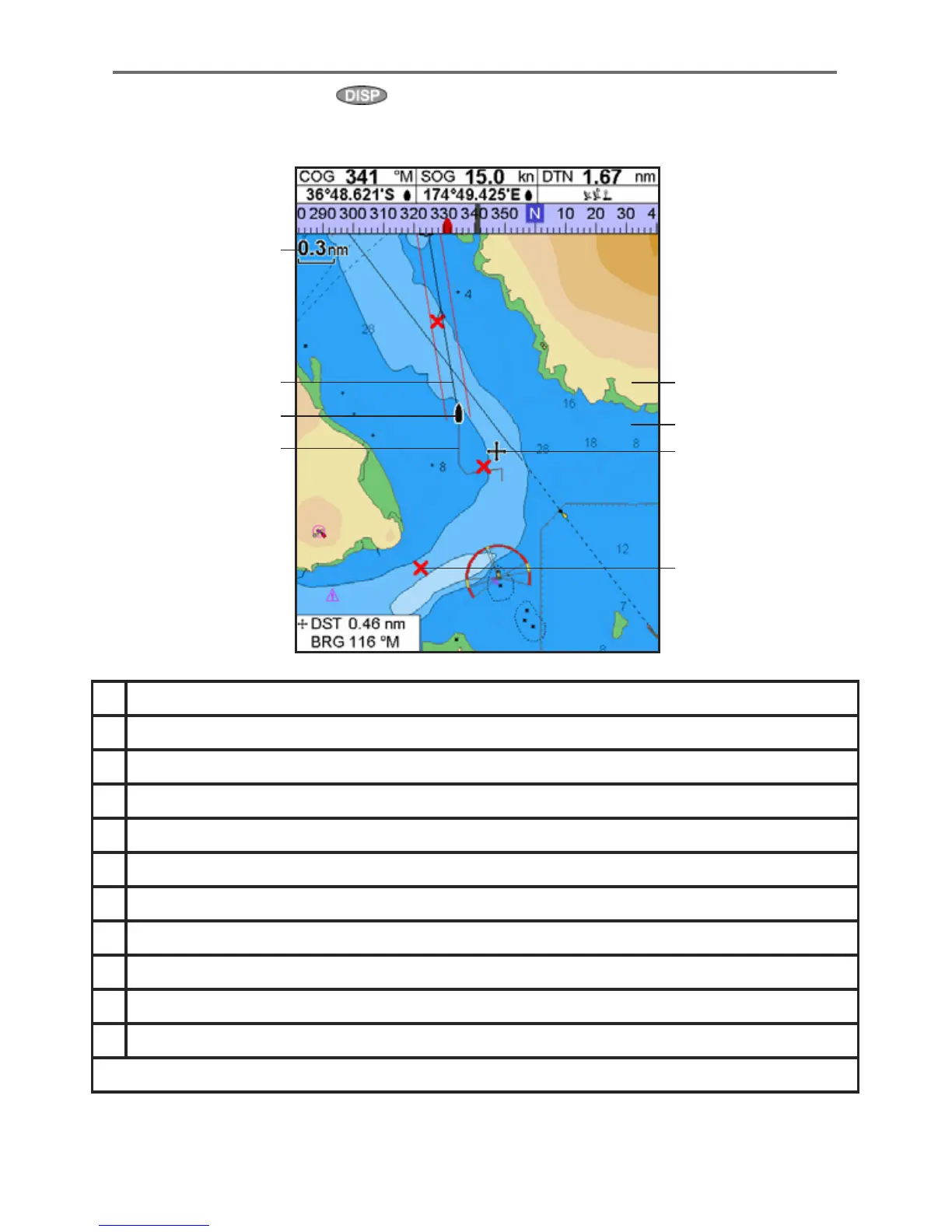
A typical chart window shows:
3-2 Chart window
To go to the Chart window, press then select Chart.
A Data header. To turn the data off or on or to change what data is displayed (see section 2-8-2)
B Compass (see section 2-8-3)
C Chart scale (see section 3-2-3)
D Boat position (see section 3-2-1)
E Boat track (see section 3-5)
F Boat course and CDI lines (see Appendix C, CDI)
G Distance and bearing of cursor from boat
H Land
I Sea
J The cursor (see section 3-2-1)
K A typical waypoint (see section 5)
Note: To change the types of information displayed on the chart (see section 15-2)
A
B
K
C
D
E
F
G
I
J
H











 To Next Page