NAVMAN TRACKER 5507/5607 Installation and Operation Manual
59
15-9 Setup > Units
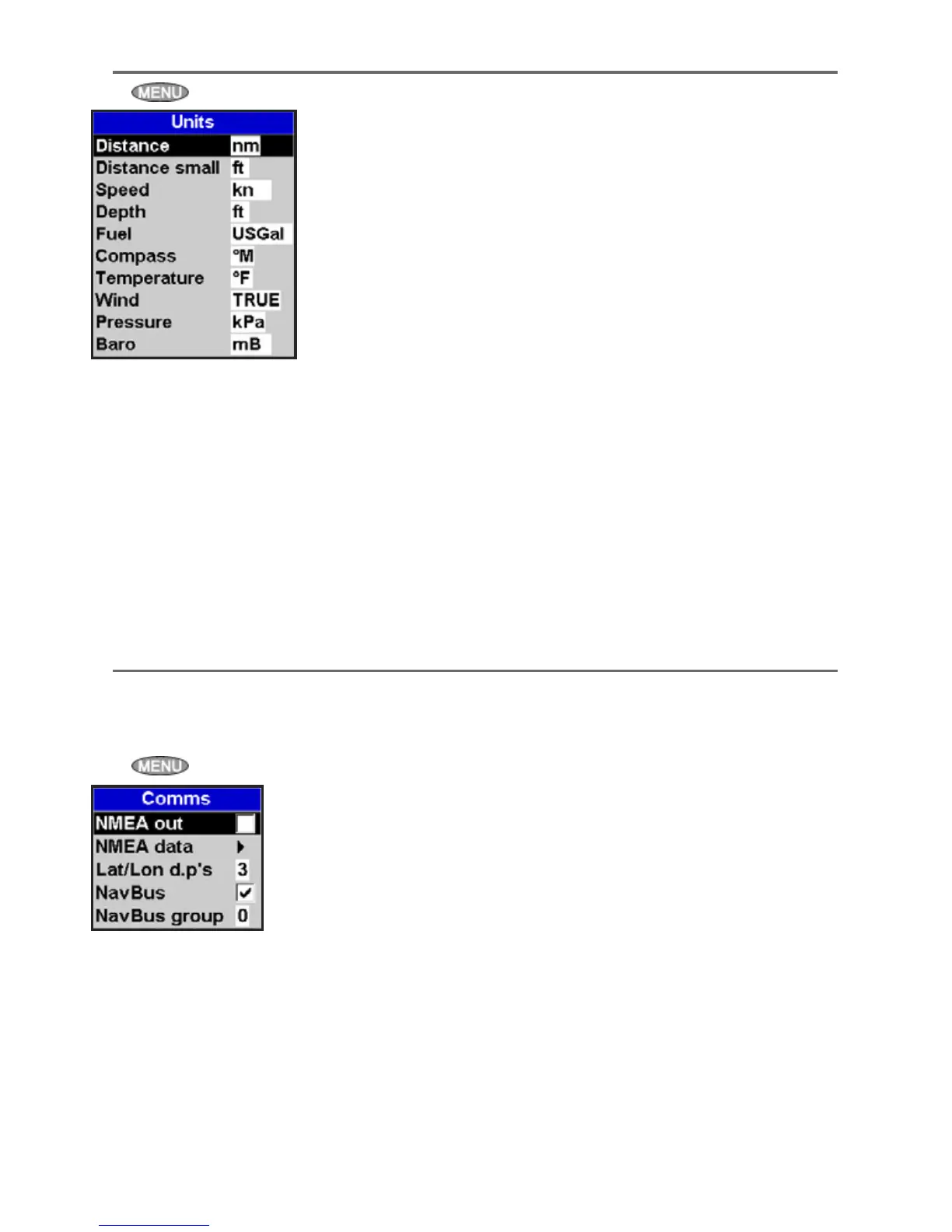
Press twice, then select Units:
The default units are shown above.
Distance
nm (nautical miles), mi (miles) or km (kilometres)
Distance small
ft (feet) or m (metres)
Speed
kn (knots), mph (miles per hour) or kph
(kilometres per hour)
Depth
ft (feet), m (metres) or fa (fathoms)
Fuel
Litres, USGal (US gallons) or ImpGal (Imperial
Gallons)
Compass
°T (True north) or °M (Magnetic north)
Temperature
°F (Fahrenheit) or °C (Celsius)
Wind (optional)
Requires a wind instrument: True or App
(Apparent)
Note: that the units for wind speed are the speed
units.
Pressure
Requires SmartCraft™: kPa or psi
Baro (Barometric pressure)
Requires a NAVMAN VHF receiver connected by
NavBus: InHg or mB.
Use this feature when the 5507/5607 is connected
to other NAVMAN instruments through NavBus or
any compatible NMEA instrument.
Press
twice, then select Comms:
NMEA out
NMEA is generally used with third party
instruments (see section 16-10). Select this to
transmit NMEA sentences, for example to an
autopilot.
NMEA data
Use this to specify which NMEA sentences will be
transmitted (see section 16-11 and Appendix A).
Lat/lon dps
Select the number of decimal points used
for latitude and longitude transmitted in
NMEA sentences.
NavBus
NavBus is the preferred method for connecting
the 5507/5607 to other NAVMAN instruments.
Select this if the instruments are connected using
NavBus.
NavBus Group
Use this when a group of NAVMAN instruments
are connected together using NavBus, to specify
a group of instruments for backlighting, if
required. Then, if the backlight setting on one
instrument in the group is adjusted, the other
instruments change automatically. Otherwise,
select 0. See section 16-9.
15-10 Setup > Comms











 To Next Page