NAVMAN TRACKER 5507/5607 Installation and Operation Manual
53
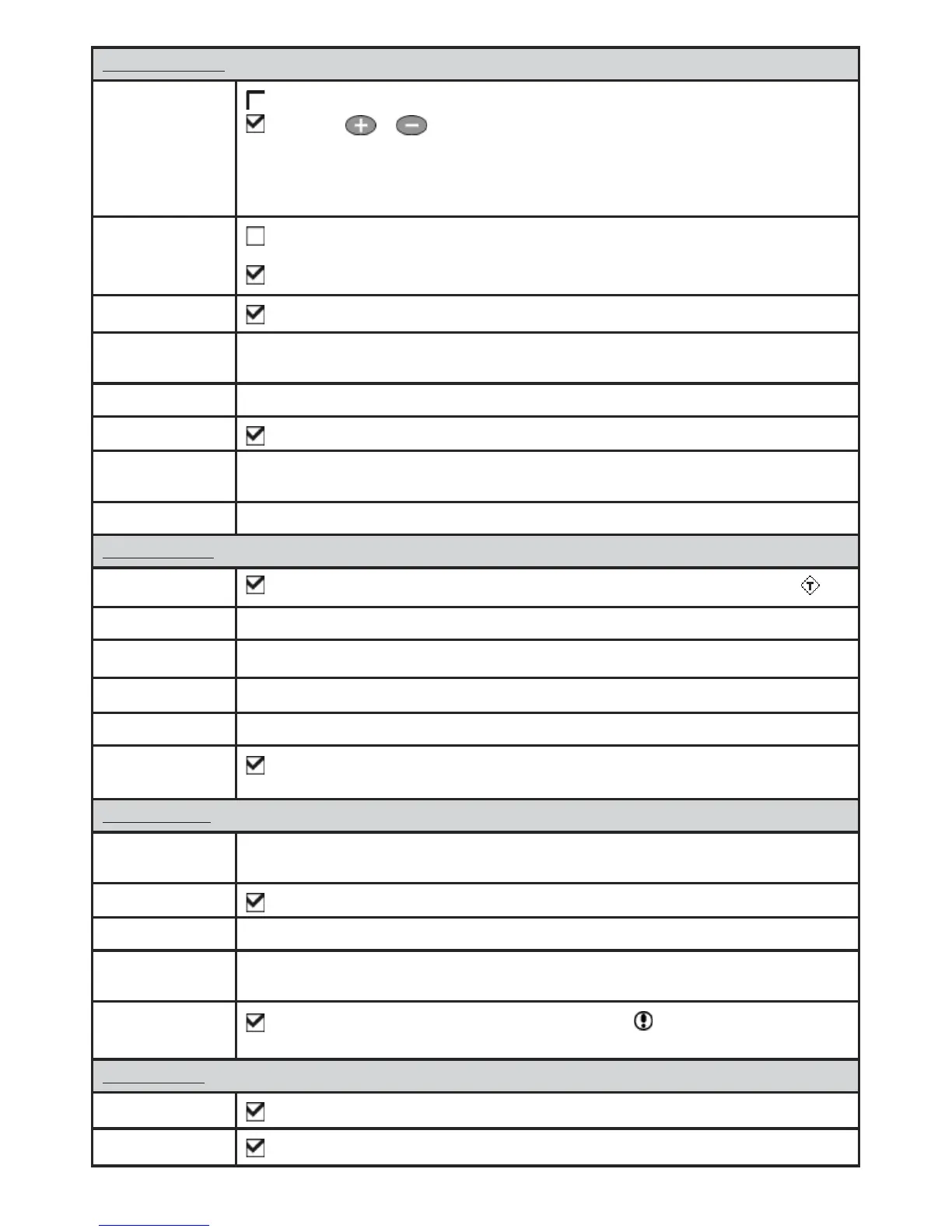
General submenu
Plotter mode
Normal: only scales available on the chart card can be displayed.
If you press or to select a chart scale which is not available, on the chart card, the
chart window will change to this scale but will only display the boat position and track (if enabled).
The rest of the display is white with black crosshatch lines and no chart information is displayed. This
is useful to zoom to a small scale to track small boat movements or if there is no detailed chart for
an area.
Anticlutter
Names and icons shown. Note: this is independent of the change in detail shown at different
zoom levels.
Hides some less important names and icons to make the chart clearer.
Value added data
Non marine chart data shown
Projected course
The 5507/5607 can estimate the course after a given time, based on the current speed and heading
(see section 3-4). The options are 2 minutes, 10 minutes, 30 minutes, 1 hour, 2 hours or Off.
CDI scale See Appendix C. The options are 0.05, 0.1, 0.2, 0.5, 1.0, 2.0, 4.0 and 10.0 distance units.
Lat/lon grid
Displays a latitude and longitude grid.
Boundaries Displays boundaries around areas where more detailed chart coverage is available: Auto
shows the next four detail levels; On
shows all.
Text/icon size Select the size of chart text and icons.
Water submenu
Water features
Displays marine sediment labels (for example, M shows areas of mud) and tide station icons
Bathymetrics Displays underwater depth contours between Bath & sndgs min and max.
Spot soundings Displays depth soundings between Bath & sndgs min and max.
Bath & sndgs min The minimum depth for Bathymetrics and Spot soundings.
Bath & sndgs max The maximum depth for Bathymetrics
and Spot soundings.
Tidal flow
Displays dynamic tide flows: arrows on a chart showing the present tide stream and
orientation (requires a GPS fix and an NT-MAX card)
Other submenu
Waypoints Displays waypoints: Hide all only displays waypoints on any selected route; Selected
displays waypoints with their display option set to Icon or I+N (Icon and Name) (see section 5).
Names
Displays place names.
Lights Displays lighthouses: No sector hides any light sectors; On shows all data.
Nav-aids Displays signals (fog, radar, radio stations) and bouys. Int and US select the icon format;
Smpl
draws simpler icons.
Attention areas
Displays attention area boundaries and information icons ; attention areas are important
areas, such as restricted anchorages or shallow areas.
Land submenu
Land features
Displays land features, for example regions, rivers, roads, railways, airports.
Land elevation
Displays land contours, shaded like depths (requires an NT Max card)











 To Next Page