64
4. LCD Menu
This chapter describes the menus displayed in the LCD screen on the projector’s control panel and their functions. For basic opera-
tions of menus, refer to the projector’s operation manual.
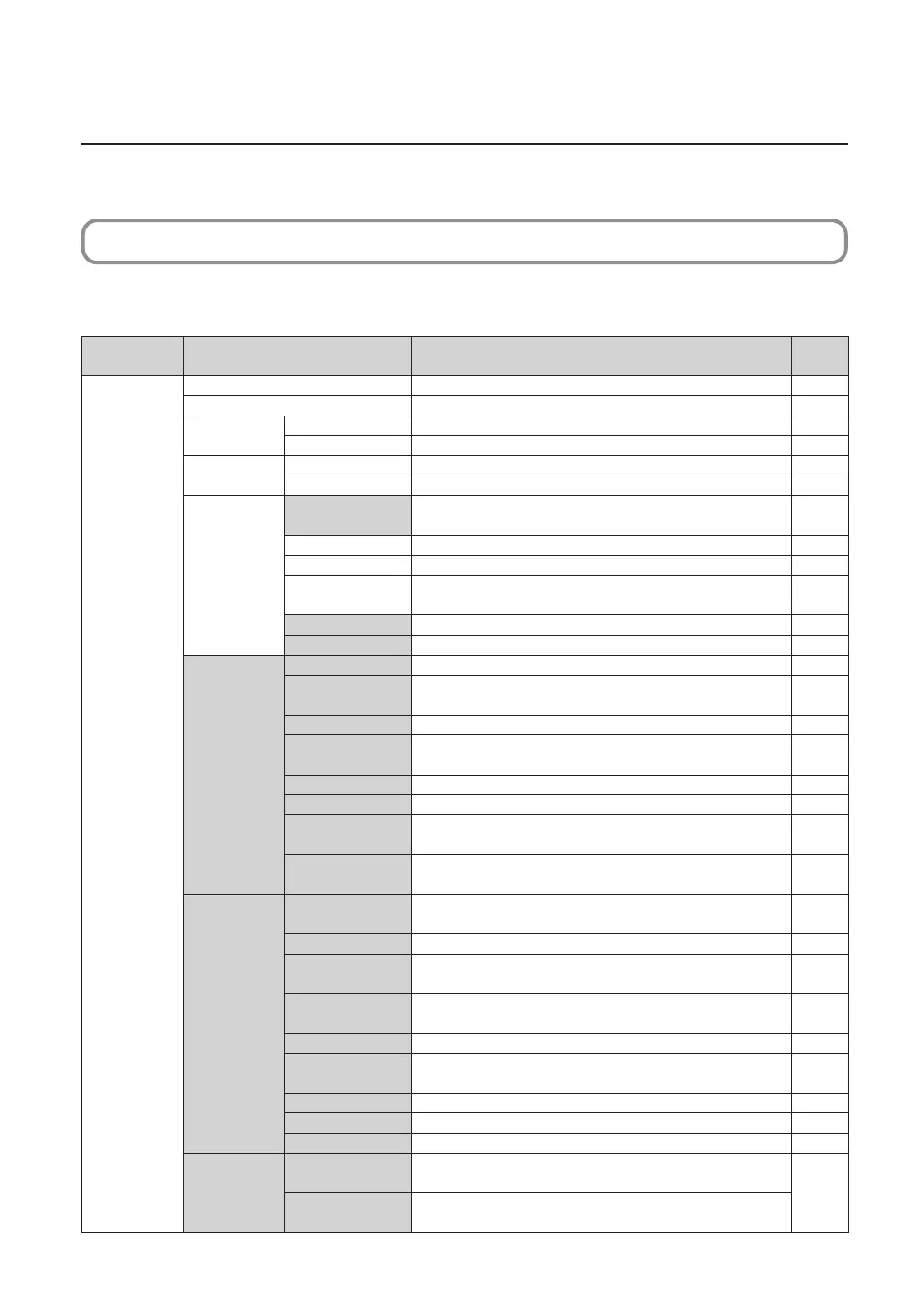
4-1. List of Menu
Menus in parentheses are menus for our service personnel. Normally, these menus cannot be used. If you are logged in to the
projector with Installation privileges, you cannot use [FactoryDefault] - [LAN] (page 69).
Main menu Submenu Description
Reference
page
Title Select “Title Memory Name” Selects the title of the signal to be projected. 66
TEST Pattern Selects the test pattern to be projected. 66
Configuration Lamp Setup Adjust Adjusts lamp brightness. 67
Lamp Mode Selects the lamp to use. 67
Lens Control Lens Position Adjusts the position of the projected screen. 68
Focus Zoom Adjusts the size and focus of the projected screen. 68
Reset (FactoryDefault) Returns the settings to their default values. Selects between preset
buttons and titles only, LAN settings only and all settings.
69
Lamp Usage Initializes the usage time of the lamp. 70
Filter Usage Initializes the usage time of the air filter. 70
Fliter Cleaning Initializes the air filter usage time (for confirming the filter cleaning
time).
70
(Fan Usage) Initializes the usage time of the fan. 71
(Douser Count) Resets the number of times the douser has been used. 71
(Setup) Douser Setup Sets the douser open/close state. 72
Panel Key Lock Locks the buttons on the projector’s control panel so that they
cannot be operated.
72
Auto Key Lock Enables or disables Auto Key Lock. 73
3D Connector Sets the signal input terminal for a 3D image system (3D terminal or
GPI/O terminal).
73
Unlit Mode Sets the projector operation when the lamp does not turn on. 73
Off Timer Sets the time until the projector power is turned off automatically. 74
Message Sets the time to display the message indicating the air filter
replacement cycle.
74
Silent Mode Selects whether to use the status indicator, buzzer, indicators on
the control panel and backlight.
74
(Installation) Option Slot Configures the device installed in slot (only when the projector is in
standby mode).
76
Orientation Sets the projection method and cooling fan operating mode. 76
Lens Type Sets the type of lens (supports or does not support the lens
memory function) attached to the projector.
77
Lens Calibrate
Performs calibration on lens units that support the lens memory
function (only when the projector power is turned on).
78
Lens Center Moves the lens shift position to the center. 78
Baudrate Sets the PC control connector (RS-232) data transmission speed
(bps).
78
Date/Time Sets the date and time on the projector. 79
Fan Speed Mode Sets the cooling fan operating mode. 79
Fan Noise Reduction
Sets the silent mode of the cooling fan. 80
(Memory)
Lamp
The content of the selected lamp memory (lamp mode and lamp
output power value) can be overwritten with the current settings.
81
Lens The content of the selected lens memory can be overwritten with
the current settings.


 To Next Page