83
LCD Menu
4-5. Information
Displays the hours of lamp use, the version information and error codes.
4-5-1. Lamp
Displays information relating to the lamp.
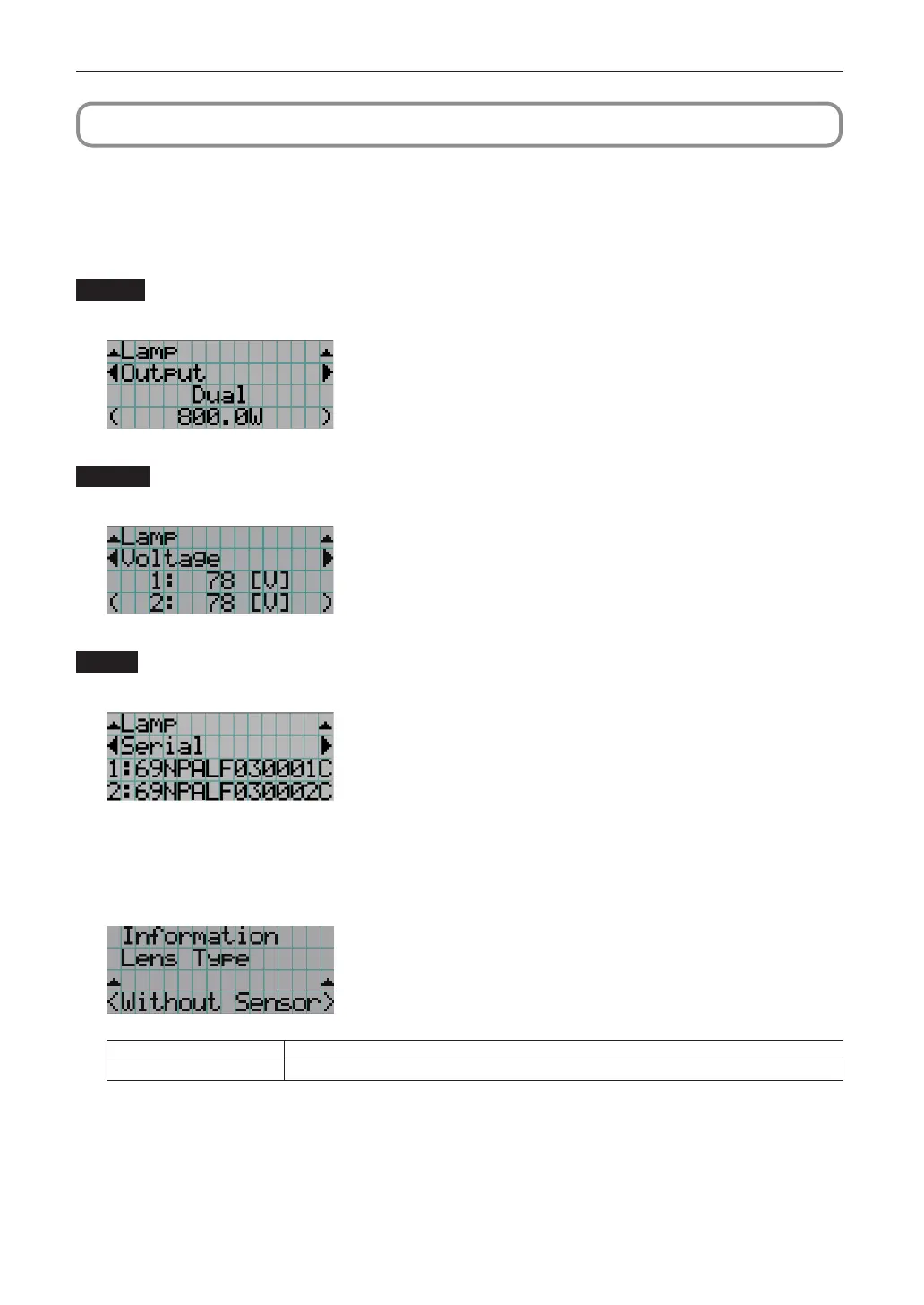
Output
Displays the lamp mode and lamp output power value (W).
← Selects the item to display.
← Displays the lamp mode.
← Displays the current power value (W).
Voltage
Displays the voltage value (V) of the currently used lamp.
← Selects the item to display.
← Displays the voltage value (V) of lamp 1.
← Displays the voltage value (V) of lamp 2.
Serial
Displays the serial number of the currently used lamp.
← Selects the item to display.
← Displays the serial number of lamp 1.
← Displays the serial number of lamp 2.
4-5-2. Lens Type
Displays the current lens type setting. The lens type setting is configured from “Lens Type” in the “Configuration” - “Installation” menu
(page 77).
← Displays the current lens type setting.
Without Sensor Using a lens unit that does not support the lens memory function.
With Sensor Using a lens unit that supports the lens memory function.


 To Next Page