Need help?
Do you have a question about the NERONE MID and is the answer not in the manual?
Explains the scope and target audience of the manual for correct equipment use and safety.
Information on manual delivery, format, and storage guidelines for accessibility.
Defines symbols used to convey important information, warnings, and prohibitions.
Details compliance with design and regulatory frameworks applicable to the equipment.
Outlines warranty terms and required documentation for equipment repairs.
Lists user duties and forbidden actions to ensure safe operation and prevent damage.
Specifies required actions for safe installation and operation of the equipment.
Details forbidden actions and conditions to avoid personal injury or equipment damage.
Describes the identification plate and its key information.
Defines the equipment's purpose and limitations for professional cooking use.
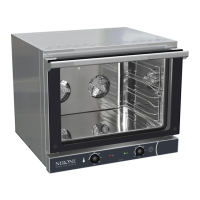
Provides a general overview of the convection oven and its features.
Explains different cooking types and oven functionalities available.
Identifies and illustrates the key parts of the oven.
Instructions for checking the equipment upon delivery and its packaging.
Step-by-step guide for unpacking and initial inspection of the oven.
Guidelines for the proper disposal of packaging materials.
Precautions and procedures for safely moving and handling the oven.
Requirements for the location where the oven should be installed.
Specifies environmental conditions and limitations for the installation site.
Details required clearance around the oven for safety and performance.
Instructions for correctly placing the oven on its support structure.
Guidance on connecting the oven to a suction hood for fume extraction.
Critical information on connecting the oven to the electrical power supply.
Detailed steps and safety requirements for electrical hook-up.
Instructions for connecting the oven to the earthing system.
Overview of the digital control panel layout and buttons.
Description of the digital display features, indicators, and status icons.
Explains button functions and how to interact with the digital interface.
Overview of the mechanical control panel layout, knobs, and lights.
Recommendations and procedures for the initial operation and cleaning of the oven.
Steps for switching the oven on, differentiating digital and mechanical versions.
Instructions for loading food and setting up cooking programs.
Guidance on correctly placing food trays inside the cooking chamber.
Detailed steps for setting cooking temperature and time for digital models.
Guide to creating and saving custom cooking recipes on digital models.
Instructions for selecting and using saved recipes on digital models.
How to adjust water injection settings for digital models.
Steps for using the core probe and Delta T function on digital models.
Explains additional features like humidity control and chamber lighting.
Procedures for correctly turning off the oven for both digital and mechanical versions.
Essential safety precautions to take before and during cleaning operations.
Instructions for routine cleaning of the oven's interior cooking space.
Method for cleaning the oven door glass safely and effectively.
Procedure for a more thorough cleaning after a specified number of operating hours.
Describes periodic checks and preventive maintenance tasks for smooth operation.
Lists initial controls to perform on the oven after receiving it.
Covers repair, service, and replacement of faulty components.
Step-by-step guide for removing the oven door for maintenance access.
Instructions for safely replacing the oven door gasket.
Procedure for removing and replacing the internal glass panel.
Guide for disassembling the oven's internal tray supports.
Steps for safely replacing the oven's internal lamp.
Explains probe-related alarms, error codes, and activation of alarm LED.
Describes how to handle errors related to probe adjustments and oven response.
Lists and explains various error codes (PR1, PR2, PR3) and their meanings.
Procedures for preparing the oven for extended periods of non-use.
Guidelines for the environmentally responsible disposal of appliance components.
 General
| Brand | NERONE |
|---|---|
| Model | MID |
| Category | Convection Oven |
| Language | English |

 To Next Page