NERONE MID
EN
32
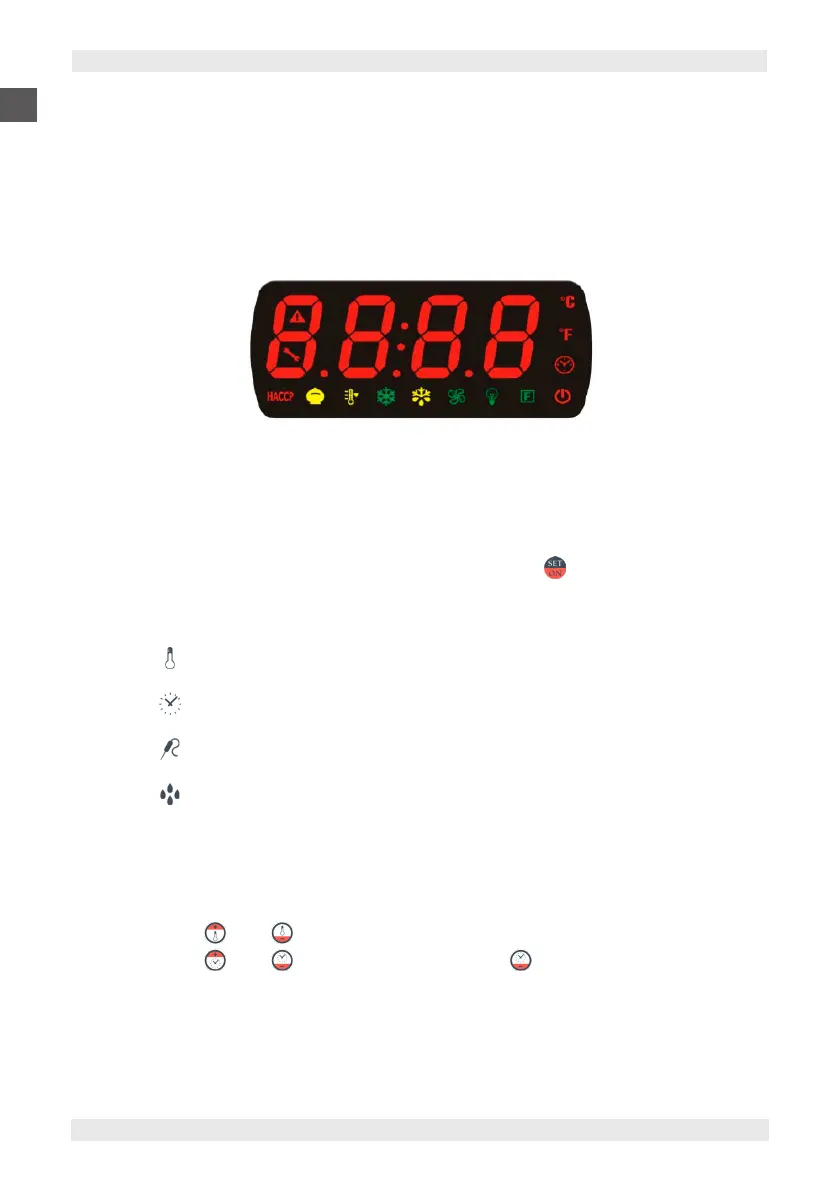
7.1.1. DISPLAY
The “DIGITAL” version control panel is fitted with:
▪ two for four digit,
▪ no. 14 icons to display the output status, used to display the inlets, set-points, the parameters and their values, the alarms,
the functions, the statuses.
The segments of the numbers are red whilst the icons can be of various colours (red, yellow, green, blue).
7.1.2. KEYBOARD FUNCTIONALITY AND USER INTERFACE
Pressing button (1) “MAIN SWITCH”, puts the oven in “Standby”.
The machine activates by pressing button (4) “ON/OFF - SET PARAMETERS” and allows a quick setting of the
cooking functions with consequent cycle start.
there are 5 available parameters:
1
Cooking temperature
2
Cooking time
3
Stop probe temperature (where included)
4
Water flow amount (through the injection cycle percentage) (where included)
5
∆T°
∆T° Temperature differential
Manual parameter settings
Press buttons (3-2) UP
DOWN
to set the cooking temperature that will be shown on the left hand display.
Press buttons (8-9) UP
DOWN
(Infinite time “inF” button (9) DOWN
below zero) to set the cooking time.


 To Next Page