3. Click Submit.
MAC Filter Tab
MAC (Media Access Control) filtering can prevent unauthorized wireless devices from connecting to your
network.
The MAC filter is used to grant (“white list”) or block (“black list”) wireless devices access to the Main and
Guest WiFi networks. Access is based on the MAC address of each wireless device.
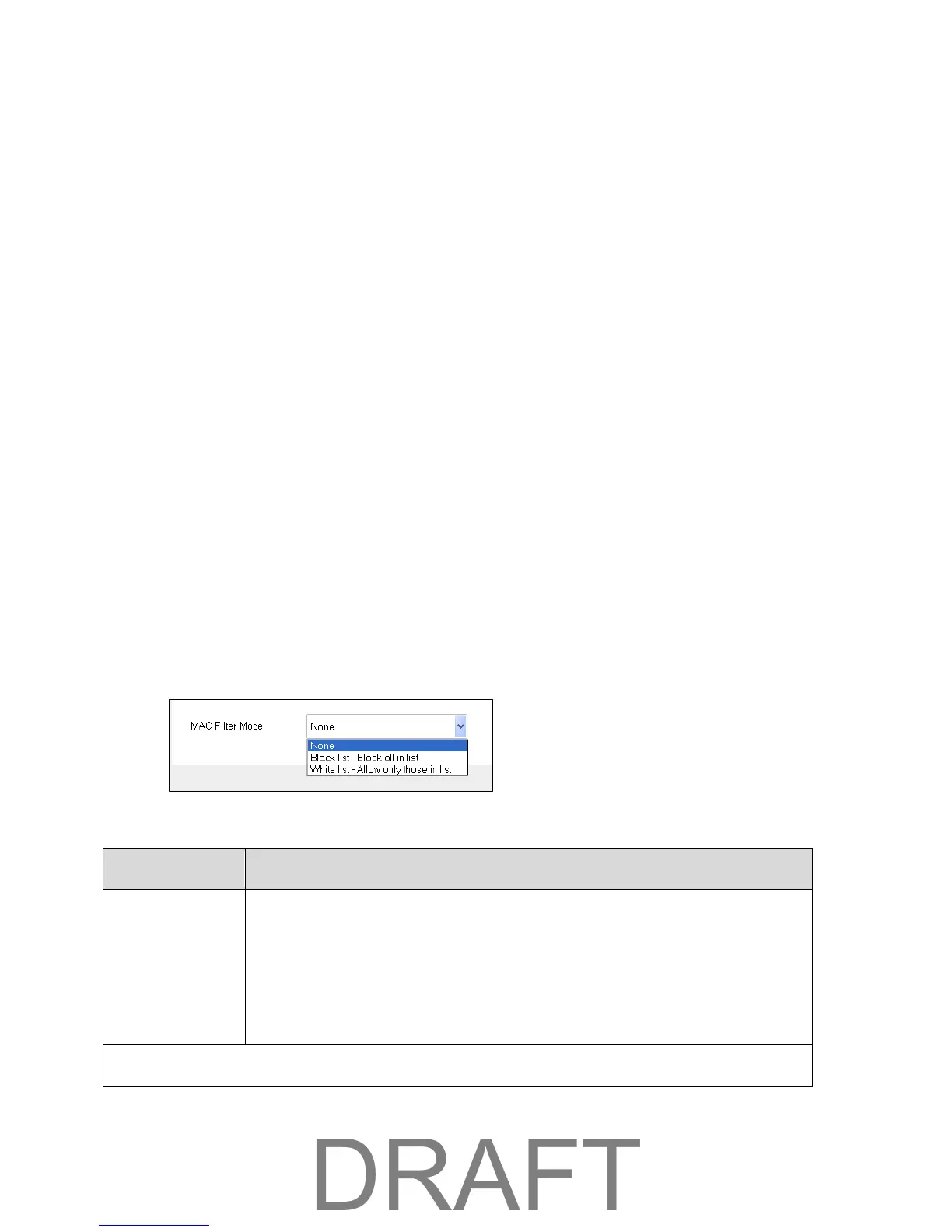
You can choose one of three modes:
● None – All computers are allowed to access the network.
● Black list – All computers are allowed to access the network, unless they’re in this list.
● White list – Only computers that are in this list are allowed to access the network.
Regardless of the mode, a user must provide the correct WiFi password to access the network.
The MAC filter is used to grant (“white list”) or block (“black list”) wireless devices access to the WiFi and
mobile broadband (LTE) networks. Access is based on the MAC address of each wireless device.
MAC filtering increases security of your network. You can give access to your network, based on the MAC
address of the wireless devices. This makes it harder for a hacker to use a MAC address to access your
network.
To view or change the MAC filter:
■ In the Mobile Hotspot Manager, click WiFi > MAC Filter.
The following information is displayed.
MAC Filter Mode
● None – Any device can connect to the WiFi networks.
● Black List – The listed devices will not be able to connect to the WiFi
networks.
● White List – Only the listed devices will be allowed to connect to the
WiFi networks.
Mobile Hotspot Manager (Browser) Interface 36



 To Next Page