Introduction
The following topics describe the basics of using this guide and your new mobile broadband device.
Before You Begin
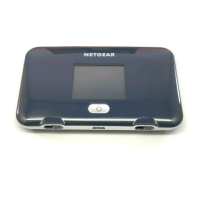
Thank you for purchasing your new NETGEAR Fuse Mobile Hotspot. The following topics explain how
best to use this guide to get the most out of your mobile broadband device.
Before Using Your Device
Read Safety Information thoroughly for proper usage.
Accessible services may be limited by subscription contract conditions.
Guide Usage Notes
Note that most descriptions in this guide are based on your device's default settings at the time of
purchase.
Screenshots and Key Labels
Screenshots and Key labels are provided for reference only. Actual windows, menus, etc. may differ in
appearance.
Other Notations
In the user guide, the NETGEAR Fuse Mobile Hotspot may be referred to either as "mobile broadband
device," "hotspot," "device," or "WiFi router."
Operating Environment (Compatible OSs)
The table below outlines the compatible operating environments for your device. Use outside these
environments may affect performance. Additional factors (hardware, connected peripherals, installed
applications, etc.) may also affect performance.
● For computer support, OS version upgrade information, etc., see the corresponding
manufacturer's product support documentation.
● The information for operating environment (compatible OSs) listed below is the current
information for your device sold as of May 2015.
Introduction 1



 To Next Page