Configure System Information
40
Smart Managed Pro Switches MS510TX and MS510TXPP
8. Click the Apply button.
Your settings are saved.
View the DayLight Saving Time Status
You can view the status of daylight saving time (DST), including information about the
daylight saving time settings and whether the time offset for daylight saving time is in effect.
To view the daylight saving time status:
1. Connect your computer to the same network as the switch.
You can use a WiFi or wired connection to connect your computer to the network, or
connect directly to a switch that is off-network using an Ethernet cable.
2. Launch a web browser.
3. In the address field of your web browser, enter the IP address of the switch.
If you do not know the IP address of the switch, see Access the Switch on page 12.
The login window opens.
4. Enter the switch’s password in the Password field.
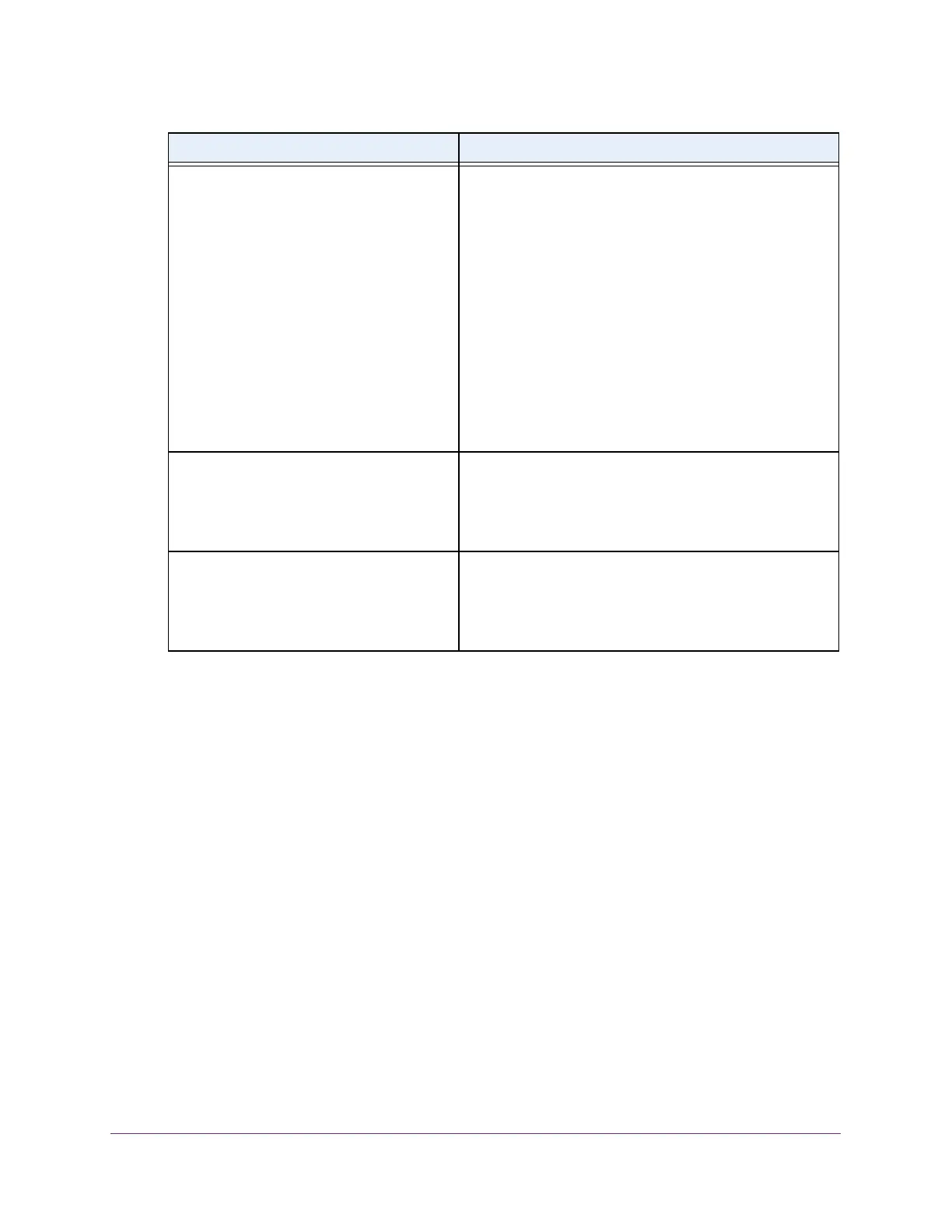
Ends At
Note: These fields do not apply if you select
the Recurring EU radio button or the
Recurring USA radio button.
If you select the Recurring radio button, specify the end
date and time of daylight saving in the following fields:
• Week. Configure the end week.
• Day. Configure the end day.
• Month. Configure the end month.
• Hours. Configure the end hour.
• Minutes. Configure the end minute.
If you select the Non Recurring radio button, specify the
end date and time of daylight saving in the following fields:
• Year. Configure the end year.
• Date. Configure the end date.
• Month. Configure the end month.
• Hours. Configure the end hour.
• Minutes. Configure the end minute.
Offset
Note: These fields do not apply if you select
the Recurring radio button or the Non
Recurring radio button.
If you select the Recurring EU radio button or the
Recurring USA radio button, you must specify the recurring
offset of daylight saving time in minutes. This is the offset in
relation to regular time, that is, when daylight saving time is
not in effect. The default setting (offset) is 60 minutes.
Zone
Note: These fields do not apply if you select
the Recurring radio button or the Non
Recurring radio button.
If you select the Recurring EU radio button or the
Recurring USA radio button, you can specify the acronym
associated with the time zone in which daylight saving is in
effect. This field is not validated against any official list of
time zone acronyms.
Field Description








 To Next Page