Configure System Information
53
Smart Managed Pro Switches MS510TX and MS510TXPP
However, the PDs consume less power than defined by their classes: The PD attached to
Port 1 consumes 7.3W, the PD attached to Port 2 consumes 4.7W, and the PD attached to
Port 3 consumes 8.9W. So even though the switch provides power to two Class 4 devices
and one Class 3 device, the available power budget is 159.1W (180W–7.3–4.7–8.9W).
To determine the delivered power by PoE+ ports:
1. Connect your computer to the same network as the switch.
You can use a WiFi or wired connection to connect your computer to the network, or
connect directly to a switch that is off-network using an Ethernet cable.
2. Launch a web browser.
3. In the address field of your web browser, enter the IP address of the switch.
If you do not know the IP address of the switch, see Access the Switch on page 12.
The login window opens.
4. Enter the switch’s password in the Password field.
The default password is password.
The System Information page displays.
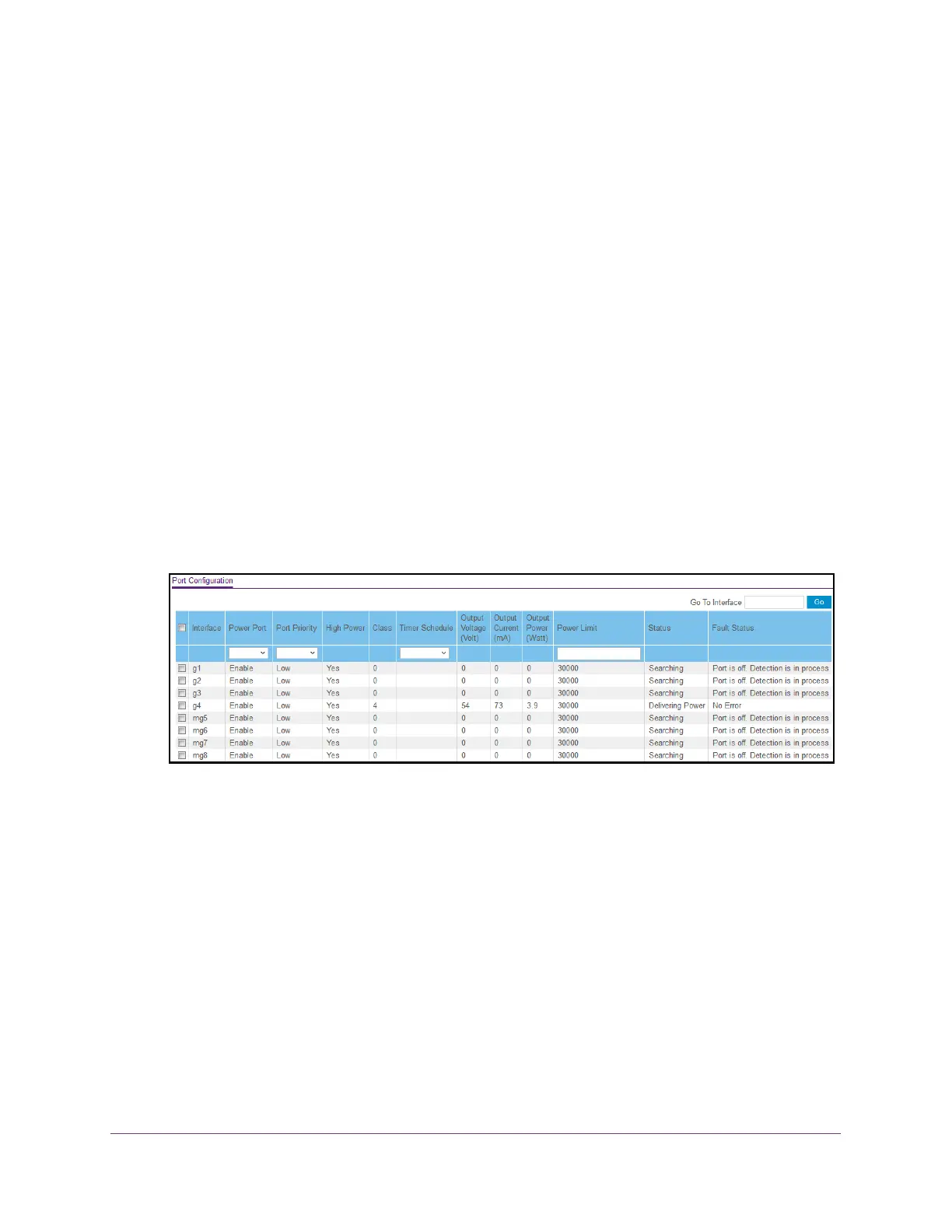
5. Select System > PoE > Advanced > PoE Port Configuration.
The delivered power is stated in the Output Power (Watt) column.
Configure the Global PoE Settings
To configure the global PoE settings:
1. Connect your computer to the same network as the switch.
You can use a WiFi or wired connection to connect your computer to the network, or
connect directly to a switch that is off-network using an Ethernet cable.
2. Launch a web browser.
3. In the address field of your web browser, enter the IP address of the switch.
If you do not know the IP address of the switch, see Access the Switch on page 11.
The login window opens.







 To Next Page