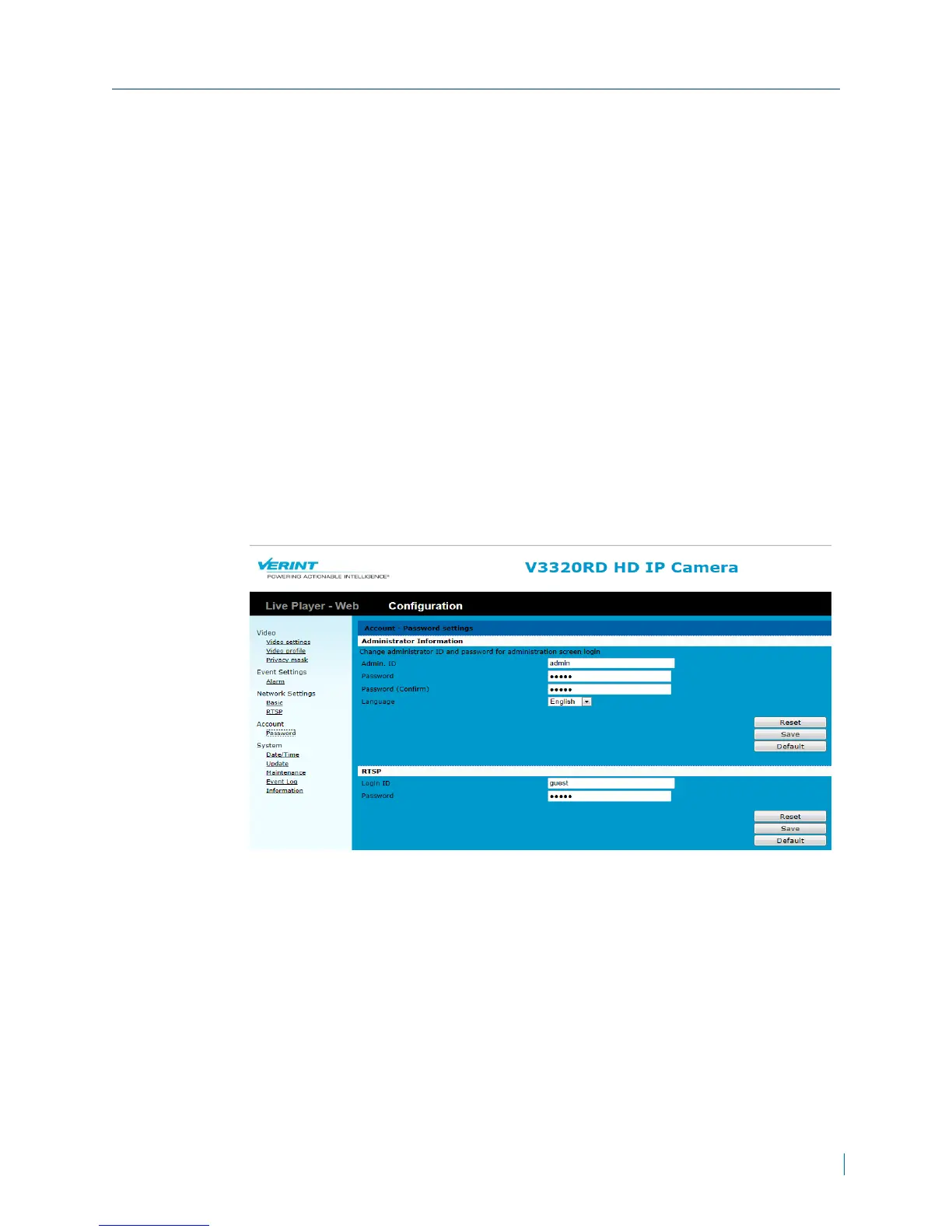
Configuring the User Accounts
The Nextiva IP cameras have two types of user privileges: Administrator and
guest. Users with Administrator privileges are allowed access to the
Configuration page. Users with guest privileges do not have access to the
Configuration page and are limited to five users to view live video.
The default administrator username and password for the Nextiva IP cameras
is admin. To prevent unauthorized access, it is highly recommended to change
the default password to restrict access to the IP cameras and to create multiple
users accounts with a defined set of privileges.
► To configure user acounts
1. In a web browser, type the IP address of the Nextiva IP camera in the
Address bar, and then press ENTER.
2. Type the username and password.
3. Click Configuration >Account >Password.
4. From the Administrator Information section, do the following:
a. In the Admin ID box, type a new administrator user name or keep the
default value of admin.
b. In the Password box, type a new password for the administrator.
c. In the Password (confirm box), retype the new password.
5. From the RTSP section, do the following:
a. In the Login ID box, type a new user name or keep the default value of
guest for RTSPaccess.
b. In the Password box, type a new password for the RTSP.
Chapter 3: Configuration
© 2013 Verint Video Systems Inc. 38



 To Next Page