Safety
information
Product
information
Mechanical
installation
Electrical
installation
Getting
started
Running the
motor
Drive
parameters
Communications Diagnostics Technical data
UL Listing
Information
Commander S100 User Guide 39
5.2 Connect
Connect is a PC tool available from www.controltechniques.com/support. The software allows the user to create a project consisting of multiple drives
from different product ranges, commission and tune the drives using a CT USB Comms cable (CT Part No. 4500-0096) to connect the PC to the
drives 485 port.
When using a PC to communicate with the drive at the default baud rate of 115200 bps, the Latency Timer for the PC comms port should be set to
1 ms using the device manager on the PC. See section 4.9 Communication connections.
5.3 Understanding the display
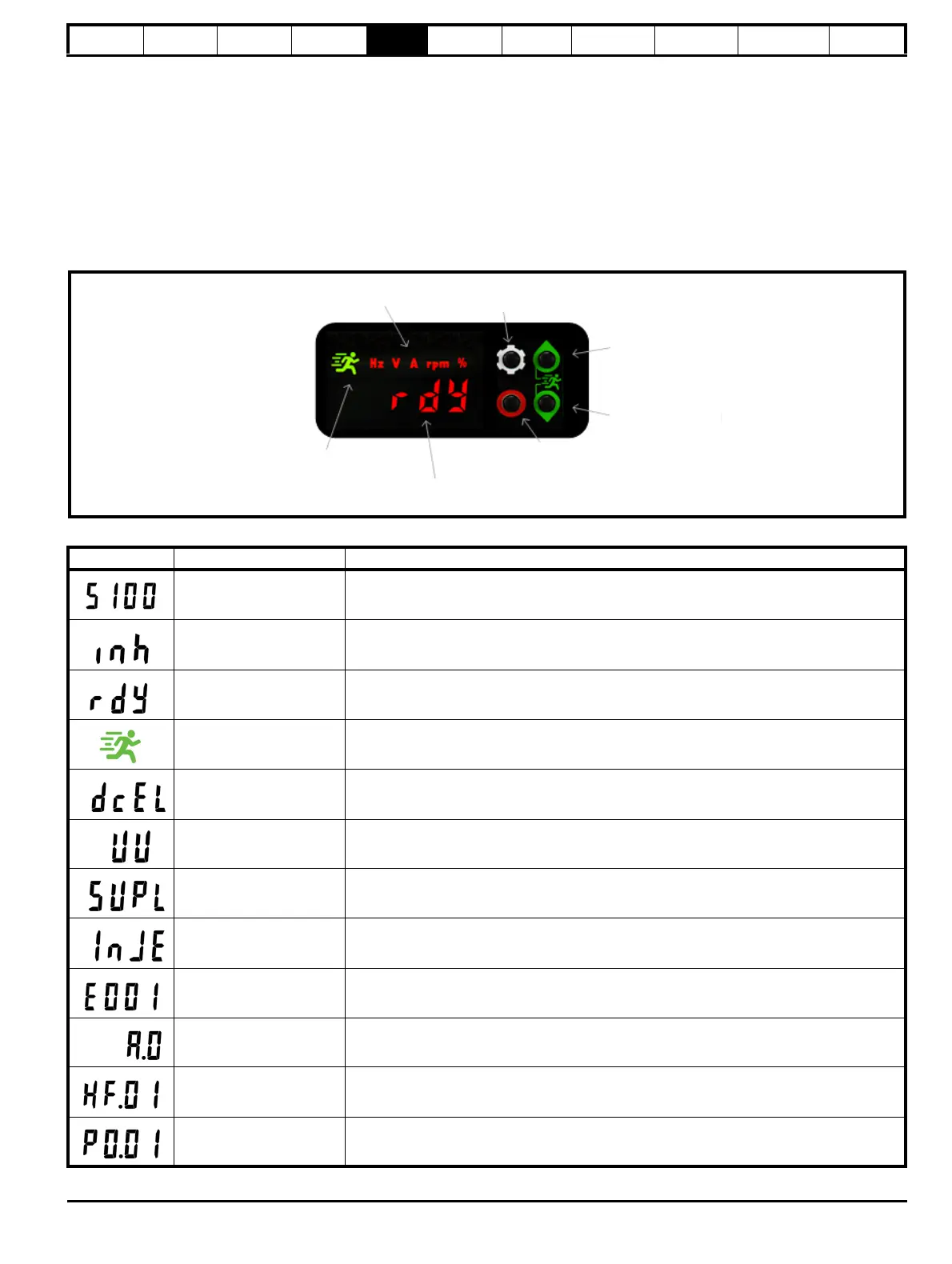
The Commander S100 display is used to show drive status, parameter numbers, parameter values and to indicate units of the currently displayed
parameter or to indicate that the drive is running. See Figure 5-3 for more information.
Figure 5-3 Display
Table 5-2 Status indicators
Units
Settings button
Up Button
Down Button
STOP/RESET
Button
Display
Running Indicator
LED
Drive Display Text Detail
S100 The drive is initialising
Inhibit The drive is not enabled
Ready The drive is enabled but has no active run signal
Running The drive is enabled and has an active run signal
Decelerating to stop The drive is decelerating to a stop
Under Voltage The drive is in the under-voltage state
Supply Loss Supply loss has been detected
Injecting D.C. The drive is injecting D.C. current into the motor
Error
The drive is in an error state, check the error code shown on the display in section 9.2 Errors for
the cause and solutions
Alarm
The drive is in an alarm state, check the code shown on the display in section 9.1 Alarms for the
cause
Hard Fault Hardware Fault - Contact the supplier of the drive
Parameter Parameter location PY.XX, where Y = menu and XX = parameter












 To Next Page