9
Parts of the Camera
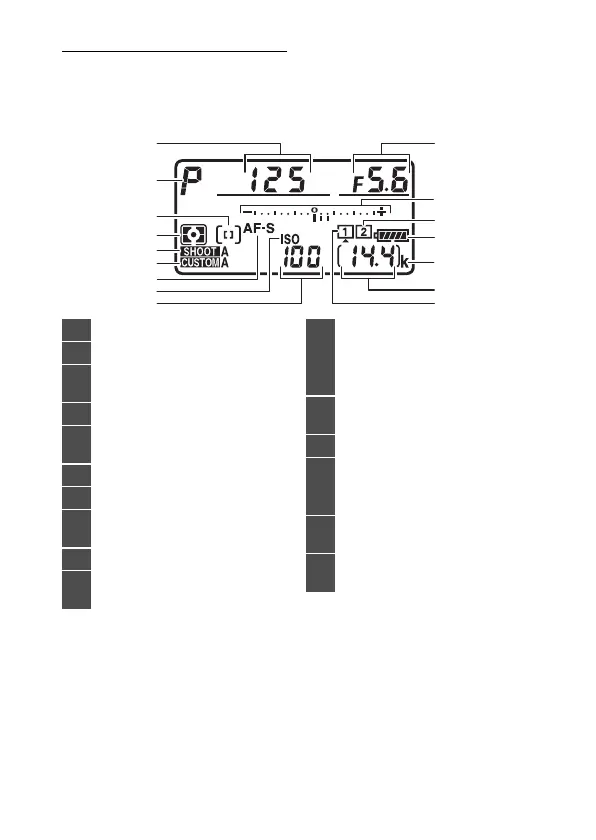
The Top Control Panel
The following indicators appear in the top control panel at
default settings. For a full list of the indicators that may be
displayed, see “Camera Displays” (
0
1033) in “Technical Notes”.
1
Shutter speed (
0
185, 188)
2
Exposure mode (
0
108, 182)
3
AF-area mode indicator
(
0
101, 163)
4
Metering (
0
111, 178)
5
Photo shooting menu bank
(
0
752)
6
Custom settings bank (
0
802)
7
Autofocus mode (
0
98, 149)
8
ISO sensitivity indicator
(
0
114, 213)
9
ISO sensitivity (
0
114, 213)
10
Aperture (f-number;
0
186,
188)
11
Exposure indicator
Exposure (
0
190)
Exposure compensation
(
0
117, 199)
12
Memory card icon (Slot 2;
0
41, 48)
13
Battery indicator (
0
47)
14
“k” (appears when memory
remains for over 1000
exposures;
0
48)
15
Number of exposures
remaining (
0
48, 1120)
16
Memory card icon (Slot 1;
0
41, 48)



 To Next Page