- A 0 ・ -
logo_Q0650_forGraphic
071004_Gdesign_ito
VBA21001-R.3753.A
J18010
#5735
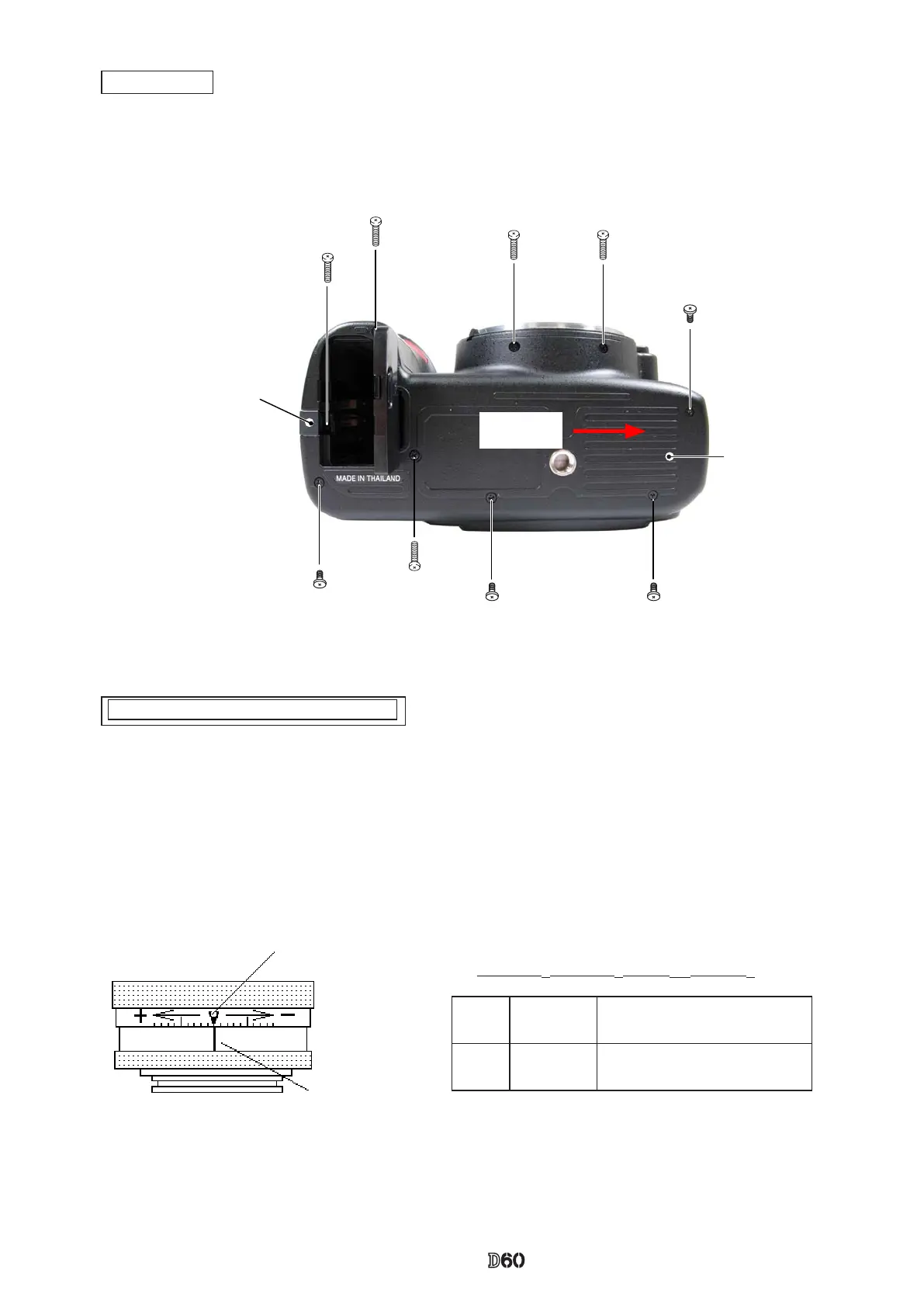
Bottom cover
#5674×2
#5735
#5674
#5674
#5735×2
#5674
Power cord lid
Direction for
positioning
・
Mount the bottom cover.
・
Fix it with four screws (#5735) and ve screws (#5674).
Bottom cover
・
Replace the nder screen with the innity focus adjustment screen (J15410), and use the reference lens (J18010)
and read the value. In case it is out of standard, increase or decrease washers (#297A, #297B) for adjustments.
Caution: For the replacement, put [J15410] with the silver spacers upward, which are attached on both sides.
Standard:
±0.06mm
1 scale
=
0.01mm
)
∞ Innity focus inspection & adjustment
Reference line
"0" position
#297A 1K602-153 Innity-focus adjusting washer
(T=0.1)
0.10mm
#297B 1K602-154 Innity-focus adjusting washer
(T=0.2)
0.20mm



 To Next Page