- A ・ -
logo_Q0650_forGraphic
071004_Gdesign_ito
VBA21001-R.3753.A
Loft PCB / TOGO PCB
・
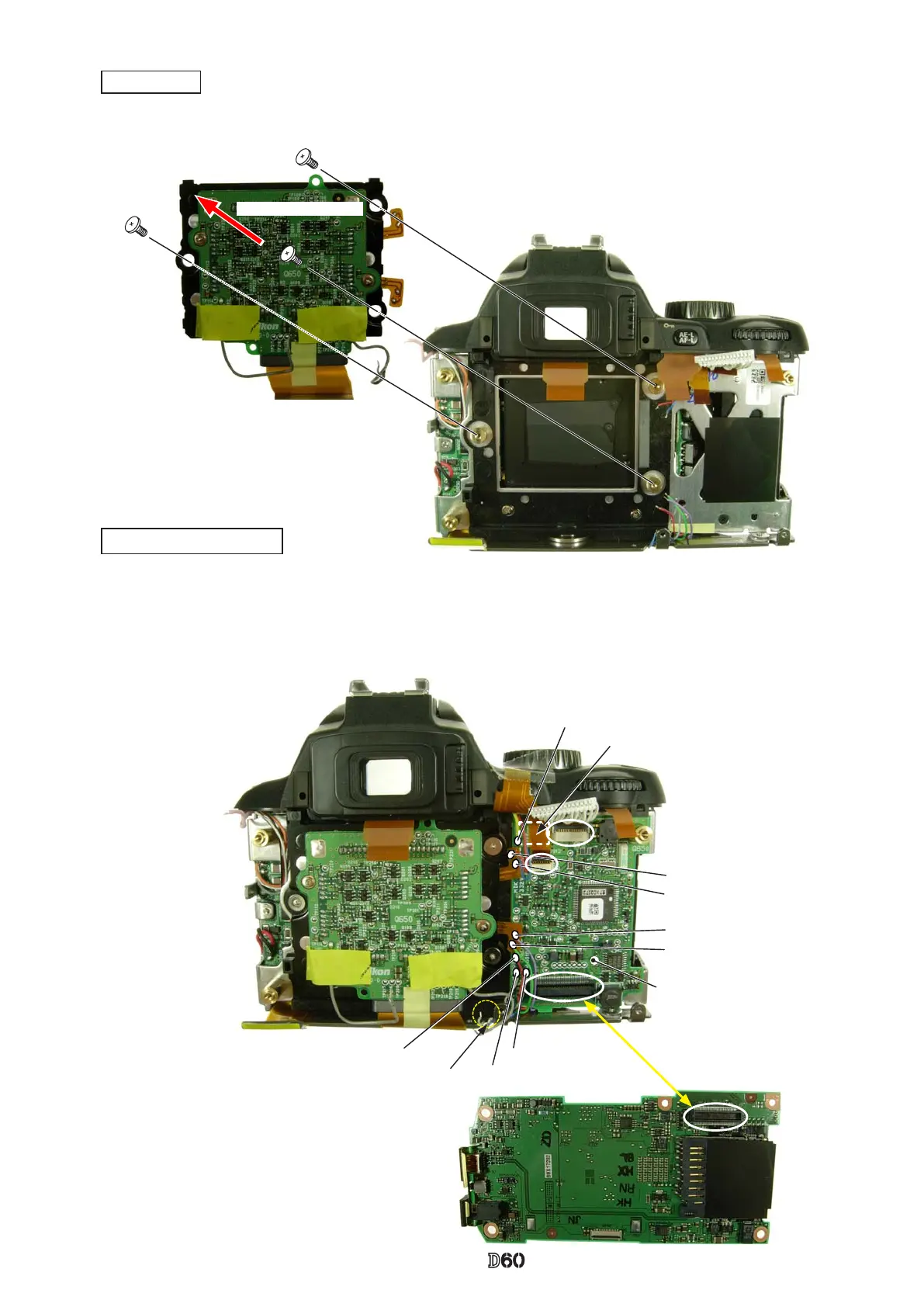
Mount the CCD unit (#B3051) by following the direction for positioning, and x it with three screws (#631).
CCD unit
Caution:
Some bodies have already washer(s) attached on
the mounting surface of CCD unit.
Direction for positioning
#B3051
#631×3
Yellow:DC/DC
Blue:DC/DC
Red:DC/DC
Purple:DC/DC
Green:DC/DC
・
Attach the loft PCB partially with the adhesive double-coated tape.
・
Solder the eight wires.
・
Connect the two FPCs to each connector.
・
By watching the wires and FPCs, mount the TOGO-PCB (#B2001).
Gray:Buzzer unitRed:Backup battery
Gray:Buzzer unit
Loft PCB
#1031
(
Back
)
Adhesive double-coated tape
(Back) TOGO PCB unit
(#B2001)
Pull the blue wire from here.



 To Next Page