5 50_Afficheur_Multigraphic_um_UK_27
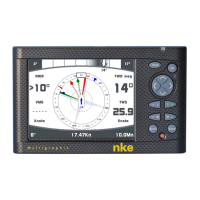
• PAGE
Successive presses will scroll through the pre-set data pages, the pilot page
and the setting page.
Press and hold (at least 3 seconds) to open the Menu page.
• OK
A single press confirms the current selection, or opens specific setup features
on some pages.
Press and hold (at least 3 seconds) to open the settings page for
backlighting, keyboard lock and stand-by mode.
• Cursor pad
Use for the selection of pages and menu options.
• Autopilot control
Use to control the autopilot’s course in 1° or 10° increments to Port or
Starboard.
Press and hold the 10° to tack.
• AUTO
Single press to engage the autopilot.
Press and hold this key to go directly to the Pilot Mode menu.
• STOP
Single press to disengage the autopilot.
• Mob
Press and hold to activate the man Over Board function on the Topline bus.


 To Next Page