68 50_Afficheur_Multigraphic_um_UK_27
2.13 Race timer
The race timer works as a countdown before the start of a race. Two different race
procedures can be set up as « T1 » and « T2 ». The default settings are 5 minutes
for « T1 » and 4 minutes for « T2 ». At the end of the countdown, a short audible
signal is emitted at the 10 last seconds signal and the start time triggers a long
audible signal. These audible signals are repeated by every display.
Once the countdown reaches « 0 », the timer starts for the race time in hours and
minutes.
The timer data is available on the Topline for any display to repeat it.
2.13.1 Using the race timer
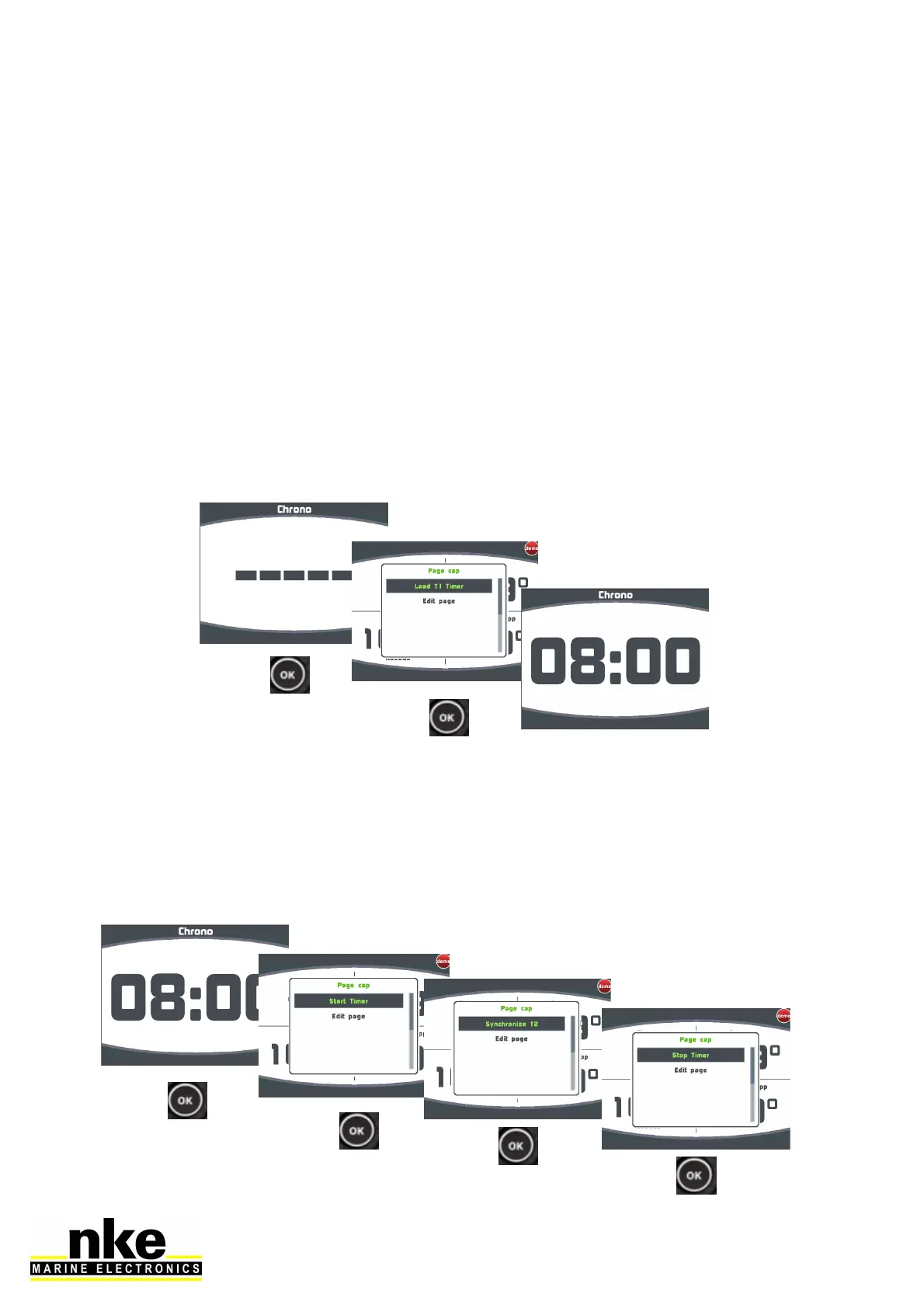
• Setting the race timer
Before starting the timer, it must be prepared by displaying « T1 » on the channel.
• Starting the timer
To start the timer, press on « OK » for display the menu. With another short press on
« OK » you start timer. During the « T1 » timer a short press on « OK » open the
menu for synchronize race timer at « T2 » press « OK » for synchronize . After
« T1 » timer, another short press on « OK » open the menu for stop race timer.


 To Next Page