62 50_Afficheur_Multigraphic_um_UK_27
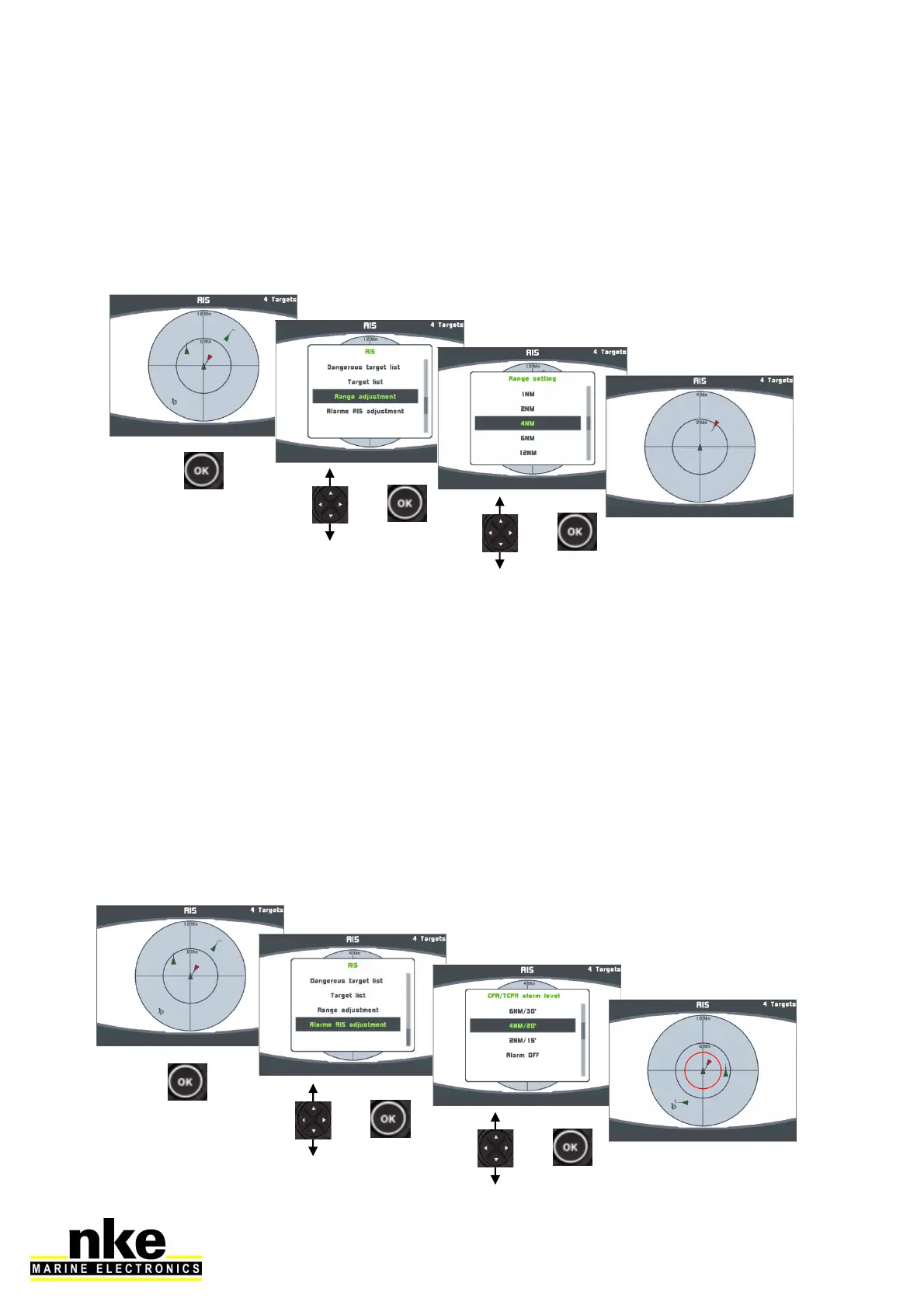
2.11.2 Setting the radar-like scale
A display scale can be set-up for targets in accordance to navigation zones. 6 scales
are available: 1M, 2M, 4M, 6M, 12M and 24M. The default setting of the
Multigraphic is 12M.
2.11.3 Setting A.I.S. alarms
The Multigraphic features an alarm processor which, once connected to an A.I.S.
receiver or transponder, calculates bearing and distance of a target vessel, the CPA
(Closest Point of Approach), the CPA bearing and the TCPA (Time to Closest Point
of Approach).
It generates alarms according to the level activated:
- Alarm if CPA < 6 nautical miles and TCPA < 30 minutes
- Alarm if CPA < 4 nautical miles and TCPA < 20 minutes
- Alarm if CPA < 2 nautical miles and TCPA < 15 minutes
- Alarm if CPA < 1 nautical miles and TCPA < 5 minutes
- Alarm off
The red circle represents the alarm zone.


 To Next Page