EasyManua.ls Logo

Nortel 1230 - User Manual

Nortel 1230
188 pages
Print Icon
To Next Page IconTo Next Page
Loading...
Nortel Communication Server 1000
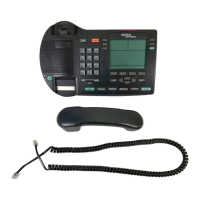
IP Phone 1230
User Guide
Title page

Table of Contents

Other manuals for Nortel 1230

Questions and Answers

  • R
    Renee BurnettAug 28, 2025
    What to do if Nortel IP Phone shows 'Server Unreachable (2)'?
    • J
      James BriggsAug 29, 2025
      The 'Server Unreachable (2)' message on your Nortel IP Phone indicates a network problem. If this issue persists, notify your system administrator for assistance.
  • I
    idownsAug 27, 2025
    What to do if Nortel IP Phone shows 'Server Unreachable (1)'?
    • U
      udukeAug 27, 2025
      The 'Server Unreachable (1)' message on your Nortel IP Phone indicates a network problem. If this issue persists, notify your system administrator for assistance.
  • A
    Amanda ThomasAug 26, 2025
    What does 'Locked from Login' mean on my Nortel IP Phone and how to unlock it?
    • S
      Stephanie WestAug 27, 2025
      The 'Locked from Login' message on your Nortel IP Phone indicates that there were three unsuccessful attempts to enter the correct Station Control Password. To resolve this, you can either wait one hour for the lock to clear automatically. Alternatively, you can contact your system administrator to clear the lock immediately.
  • A
    alexander84Aug 25, 2025
    What to do if my Nortel IP Phone says 'Busy, try again'?
    • T
      Teresa LopezAug 26, 2025
      This message on your Nortel IP Phone can appear for several reasons. It could be that the remote IP Phone you are trying to reach is currently active. In this case, wait until the remote IP Phone is idle and then try again. Alternatively, if you are logged into ACD, log off before initiating Virtual Office from another IP Phone. Finally, ensure that 'Make Set Busy' is active on the ACD IP Phone; if it's not, configure it to be active.
  • L
    Lauren StokesAug 23, 2025
    What to do if my Nortel IP Phone shows 'Invalid ID (1)'?
    • D
      Dennis JohnsonAug 25, 2025
      If your Nortel IP Phone displays 'Invalid ID (1)', it means that the User ID you entered is incorrect. Please ensure you enter the correct User ID. If you are certain that you have entered the correct User ID, it is possible that the User ID is not present in the Gatekeeper database, in this case, please notify your system administrator.

Summary

Using your IP Phone 1230

IP Phone 1230 Controls

Details the physical buttons and their functions on the IP Phone 1230.

Installing your IP Phone 1230

Connecting the LAN Ethernet Cable

Guide for connecting the phone to the local network via Ethernet.

Customizing your IP Phone 1230-advanced features

Password Admin

How to manage the Station Control Password for security features.

Operating your IP Phone 1230

Making a Call

Various methods for initiating telephone calls from the IP Phone.

Answering a Call

Procedures for receiving and responding to incoming calls.

Troubleshooting your IP Phone 1230

Nortel 1230 Specifications

General IconGeneral
Model1230
TypeIP Phone
Ethernet Ports2
Ethernet Speed10/100 Mbps
Headset JackYes
ProtocolsSIP, H.323
Volume ControlYes
Wall MountableYes
AudioSpeakerphone
Power SourcePoE
Supported CodecsG.711, G.729
Network Ports2

Related product manuals