75
Nortel VPN Router Configuration — Basic Features
Chapter 4
Configuring user tunnels
The Nortel VPN Router uses the Internet and tunneling protocols to create secure
connections. The following sections describe configuring the tunnel portion of the
Nortel VPN Router. The configuration process includes setting up the
authentication table and specific tunnel parameters, such as IPsec encryption,
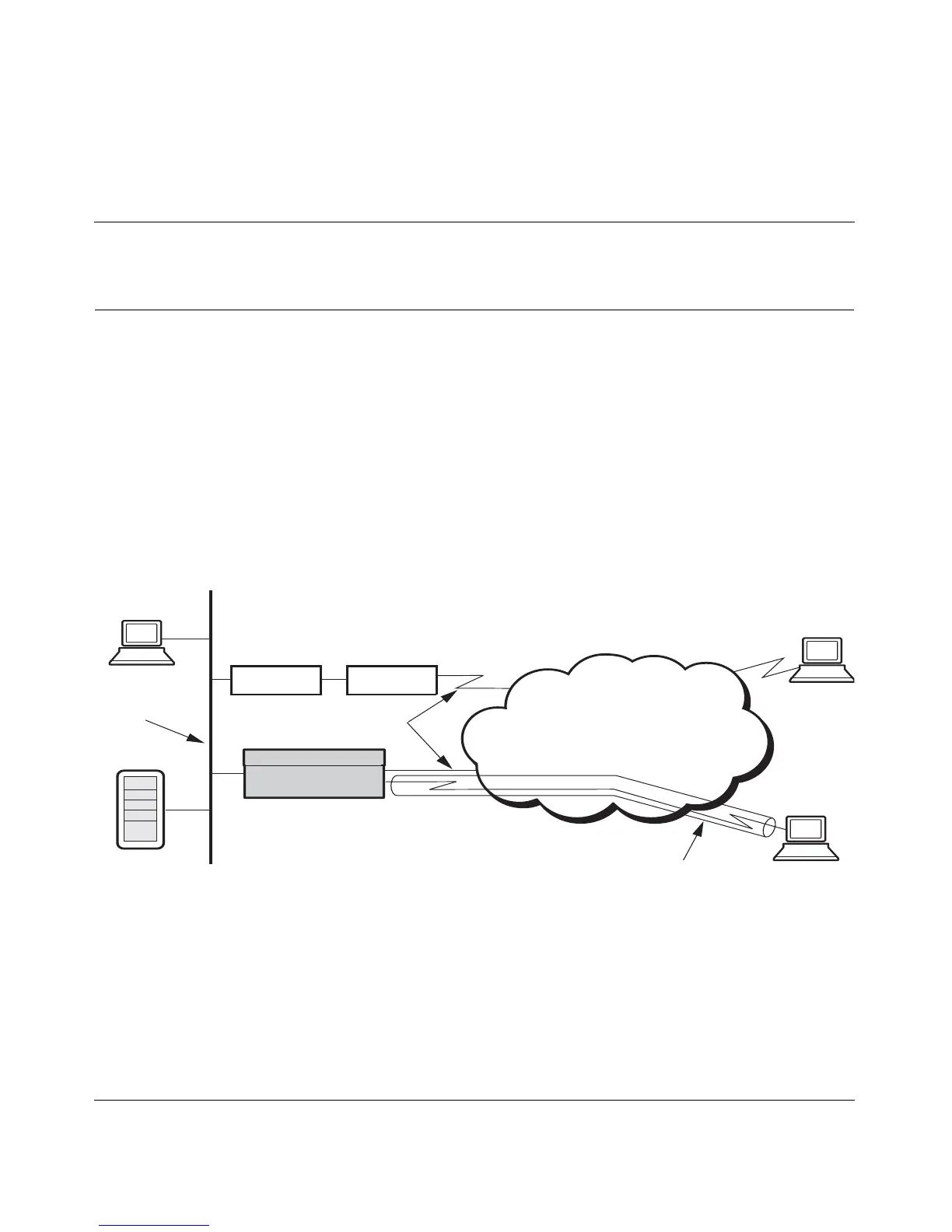
L2TP access concentrators, and L2F network access servers. Figure 9 shows a
typical network illustration with the Nortel VPN Router connected to the PDN
(public data network) and to a remote user through a tunnel.
Figure 9 Tunnel connection configuration
The connection attributes that you configure in the Nortel VPN Router enable the
remote user to create a tunnel into the Nortel VPN Router. However, you are not
configuring the connection from the remote user to the Internet Service Provider
(ISP) at this point. The actual connection to the Nortel VPN Router is a tunnel that
is started from the remote user's PC through its dial-up connection. That
connection is to the Internet (typically using an ISP), through the Internet, and
ends at the Nortel VPN Router on the private, corporate network.
Public WAN
Remote User Tunnel
to Switch
LAN
Firewall Router
PDN
Private LAN
Nortel VPN Router



 To Next Page