3-8
BioProfile FLEX2 ESM Instructions for Use Manual
3.3 Connectivity Requirements
The FLEX2 and ambr® control computer communicate over TCP/IP to allow for the
FLEX2 + ESM to receive sampling instructions from and be managed remotely by the
ambr® computer. This also enables the ambr® software to receive
measured and calculated sample results from the FLEX2 following
an analysis.
The ESM accessory pack includes a connectivity kit to network
the FLEX2 + ESM with the ambr® computer and/or the End User's
local area network. The components are listed below. Aside from
at least one network cable, the remaining items are optional and
may or may not be needed, depending on which conguration is
desired.
ESM Networking Kit:
• Network cable- 20 ft. (6.1 m)
• Network cable- 6 ft. (1.8 m)
• Ethernet switch- 5 port
• C2G Ethernet-to-USB 3.0 adaptor
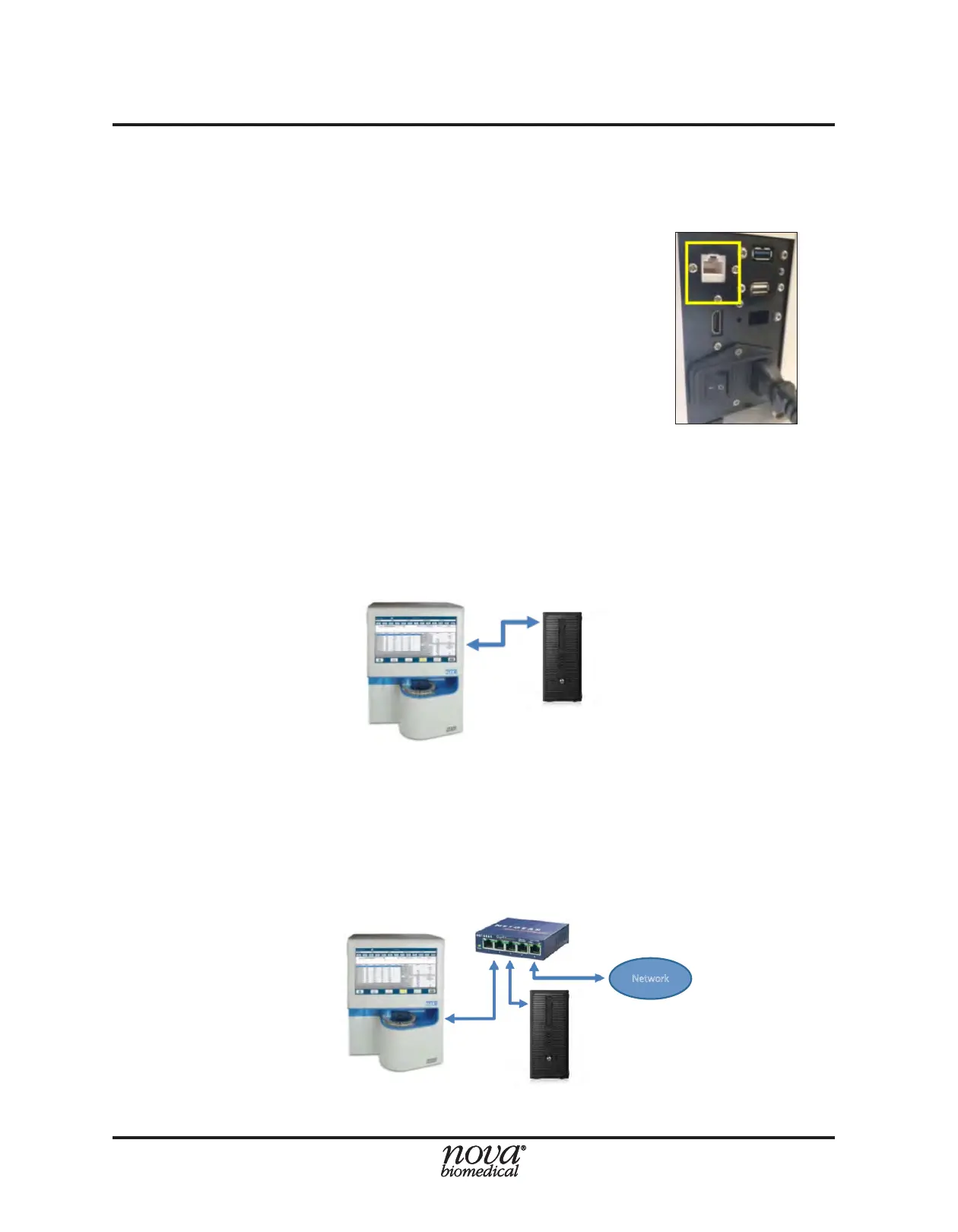
The rst possible arrangement involves a single network cable connecting the FLEX2
directly to the ambr® control PC, using the available NIC on the rear of the FLEX2 (Fig.
3.8). In this case, the FLEX2 is not connected to the corporate or laboratory network.
To arrange the FLEX2 such that it is connected to the ambr® computer and a laboratory/
corporate network, one of the following two arrangements must be implemented, since
there is only one available NIC on the rear of the FLEX2.
One option involves connecting the ambr® control computer and FLEX2 to the corporate
or laboratory network via a network switch. One Ethernet cable goes from the ambr®
control computer to the network switch, a second Ethernet cable connects the FLEX2
to the network switch, and a third connects the switch to the laboratory or corporate
network port.
Figure 3.8 NIC on rear of FLEX2 for
Ethernet cable connection to ambr®
computer or LAN.
Figure 3.9 Option 1: Single network cable connecting FLEX2 to ambr®
ambr® Control Computer
ambr® Control Computer
Ethernet
Switch
Figure 3.10 Option 2: FLEX2 and ambr® connected to lab network via Ethernet switch


 To Next Page