5-1
5 Maintenance
5. Maintenance
5 Maintenance
The following sections provide detailed information and directions to operate and
maintain the BioProle FLEX2 ESM. It is important to perform and/or schedule routine
maintenance as recommended.
WARNING: Cell culture samples are potential sources of infectious agents. Handle
all sample and ow path components with care. Gloves and protective
clothing are recommended.
5.1 ESM Maintenance Screen
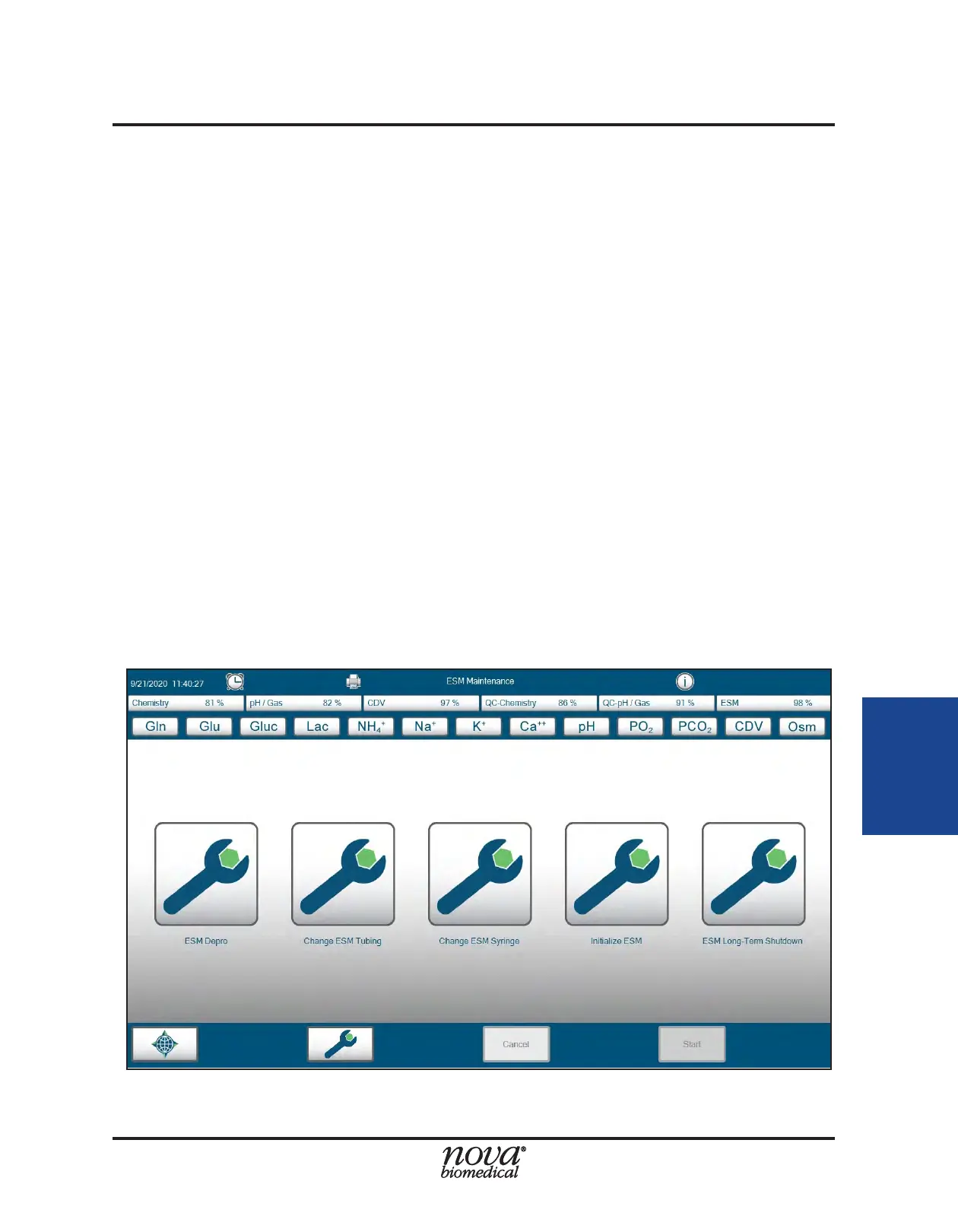
From within the ESM Maintenance menu, an operator with the appropriate privilege level
can perform the following maintenance procedures:
• ESM Depro
• Change ESM Tubing
• Change ESM Syringe
• Initialize ESM
• ESM Long-Term Shutdown
To access the ESM Maintenance menu:
1. From the FLEX2 Left Home Screen, select the Maintenance icon to view the
system maintenance menu.
2. From within the maintenance menu, select ESM in the Command Bar to enter
the ESM maintenance menu (Fig. 5.1).
Figure 5.1 ESM Maintenance Menu


 To Next Page