Installation OEM6 Family Cards Chapter 2
OEM6 Family Installation and Operation User Manual Rev 12 41
To enable EVENT1, issue the following commands:
1. INTERFACEMODE COM3 NONE NONE
2. MARKCONTROL MARK1 ENABLE
3. SAVECONFIG (optional)
OEM628 Receiver
The OEM628 card, COM1 can be configured as either RS-232 (with hardware flow control, if the cable used
supports it) or RS-422 (with no hardware flow control), by setting main connector pin 2 LOW or HIGH
respectively.
To select RS-422, apply 3.3 VDC to pin 2 during start-up. See Figure 78, Top-view, P1500 Main Connector
24-Pin Header on page 154 for pin-out details for COM1 RS-232 and RS-422 configurations.
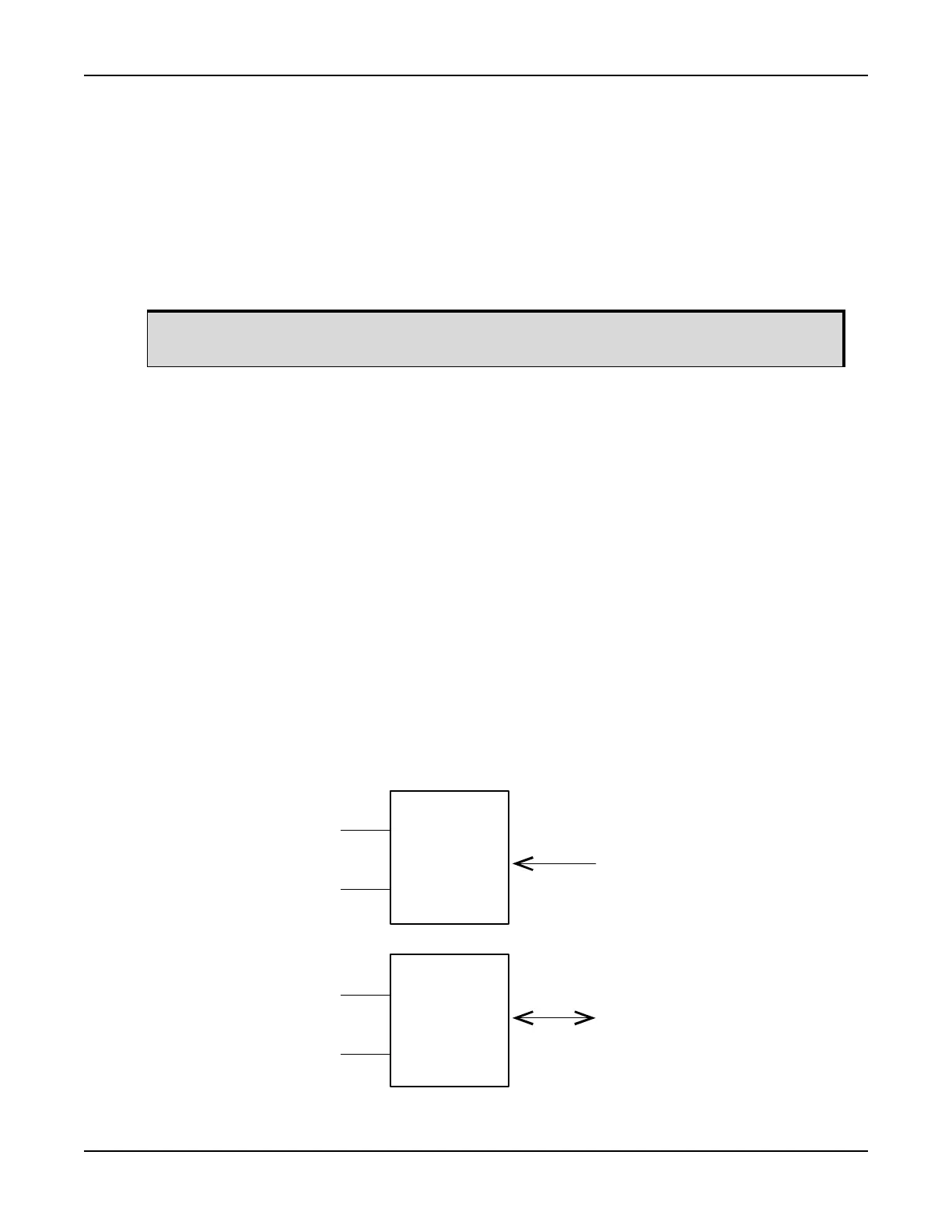
A third serial port, COM3, is also available on pin 7 (RXD) and pin 19 (TXD). By default, COM3 is enabled.
COM3 is multiplexed with both EVENT2 and USER0.
To enable COM3:
1. If a user application is running, make sure it does not initialize GPIO_USER0.
2. Issue the following command: MARKCONTROL MARK2 DISABLE
3. Issue the following command: INTERFACEMODE COM3 NOVATEL NOVATEL ON
Use any interface mode except NONE
Refer to the OEM6 Family Firmware Reference Manual (OM-20000129) for further command information.
To enable MARK2:
Issue the following command:
1. MARKCONTROL MARK2 ENABLE
2. INTERFACEMODE COM3 NONE NONE OFF
Figure 16: OEM628 COM3 Multiplexed with EVENT2 and USERGPIO
By default, RS-232 is selected since the pin-2 input, if open, is pulled LOW by an internal
pull down resistor.
RXD3
EVENT2
P1500 Pin 7
MUX
MUX
P1500 Pin 19
TXD3
USER0


 To Next Page