23
5. FFT judgment criterion value should be based on 1.000m/s
2
and it is changed in
accordance with the equipment situation.
6. Select the envelope ON or OFF in accordance with the measurement condition.
Select envelope “ON” for vibration measurement of bearings and gears etc., and envelope
“OFF” for the measurement of unbalance etc.
After necessary information is input, tap "OK". New measurement point is registered.
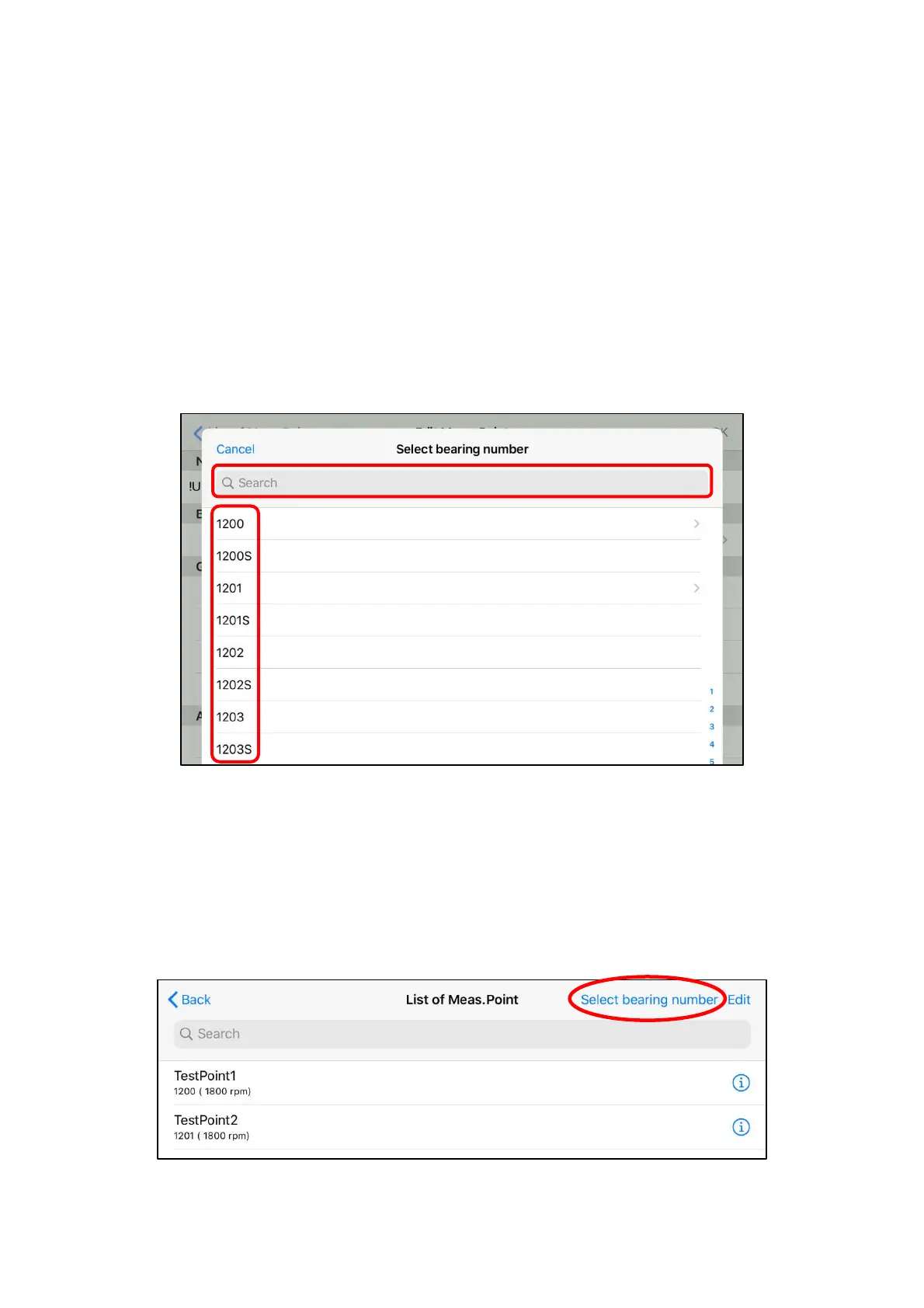
When "Bearing" on edit measurement point screen is tapped, the list is displayed as shown in
Figure 4.13.
By inputting figures/characters into the "Search" window, the search can be narrowed.
Tap the bearing parts number to be measured from displayed bearing parts numbers and select
it.
Figure 4.13 Bearing parts numbers selection screen
(2) Editing of registered measurement point
Information on the measurement point that has already been registered can be edited. The edit
screen is displayed when the measurement point to be edited is selected from the list of
measurement points, then correct it as needed and tap "OK."
Moreover, "Select bearing number" on the upper right of the screen sorts the measurement point
name in the order of bearing parts numbers and displays.
Figure 4.14 List of measurement points


 To Next Page