27
4.4 Measure without measurement point
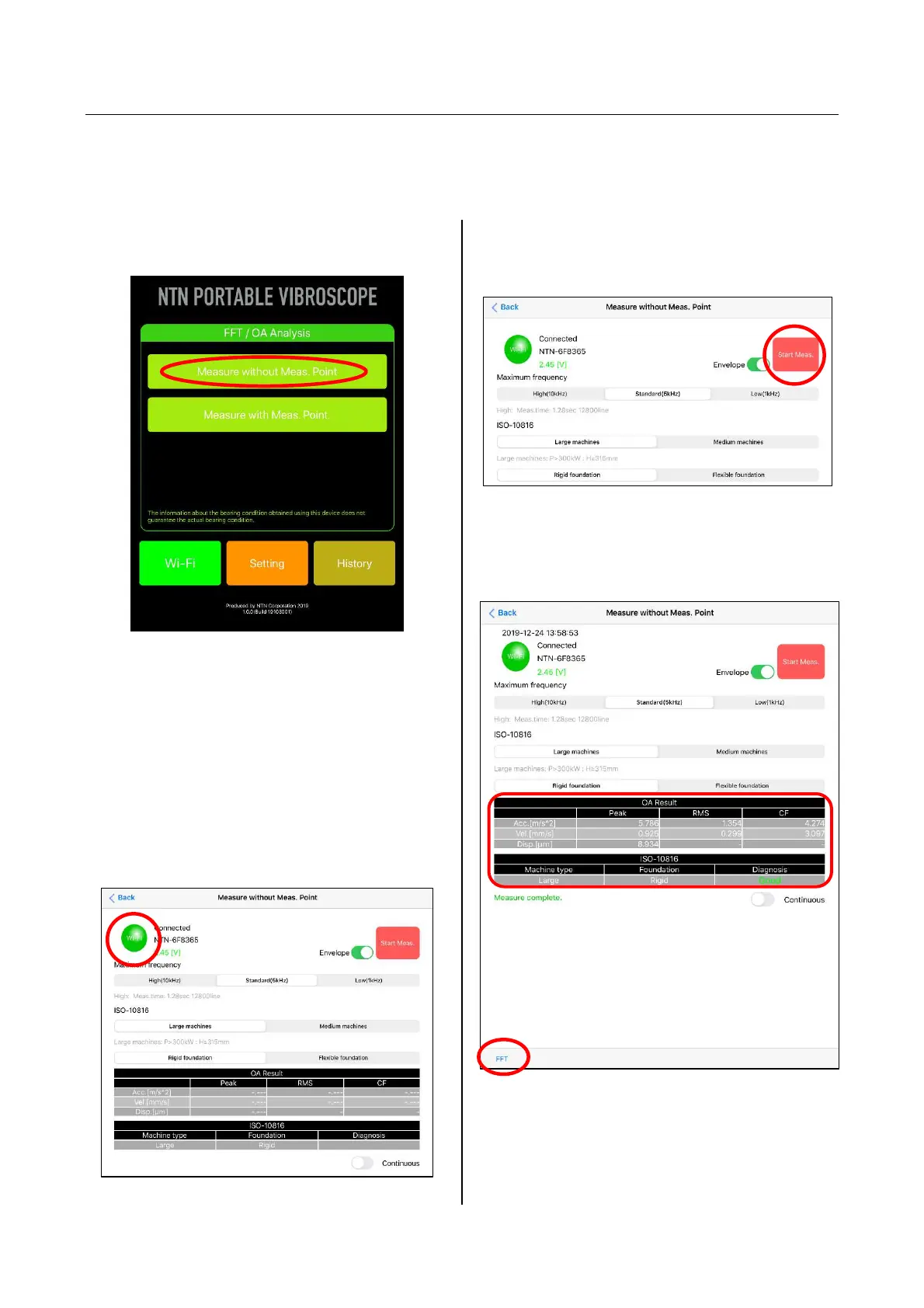
This is a mode that operates as a general vibration measuring instrument. The judgment other than
ISO-10816, history display and measurement data saving cannot be performed, but the vibration
measurement can be performed easily without setting of measurement point information.
(1) Tap "Measure without Meas. Point" from the
home screen of the application.
Figure 4.21 Selection of Measure without
Meas. Point
(2) Confirm that "Wi-Fi" button on the upper left of
the Measure without Meas. Point screen is
green (connected). When the "Wi-Fi" button is
red (not connected), tap the "Wi-Fi" button first
to display Wi-Fi setting screen and establish
the connection.(Refer to "4.2 Wi-Fi connection
setting" for the connection method.)
Figure 4.22 Measure without Meas. Point screen
(3) Select Envelope ON-OFF, maximum
frequency and the ISO-10816 judgment criterion,
and tap the "Start Meas." button at the upper right.
Figure 4.23 Measure without Meas. Point screen
(4) When the measurement is completed, the
judgment result of ISO-10816 is displayed.
Figure 4.24 Result screen of Measure without
Meas. Point


 To Next Page