29
4.5 Measure with measurement point
This is a mode in which the tendency management can be done by setting measurement point
information. Judgment with the set judgment criterion, judgment of ISO-10816, save of measurement
result and history display can be performed.
The judgment results of the FFT measurement and the OA measurement are
reference result of judging measurements based on the judgment criterion
the customer, and does not guarantee the objective state of the bearing to be measured.
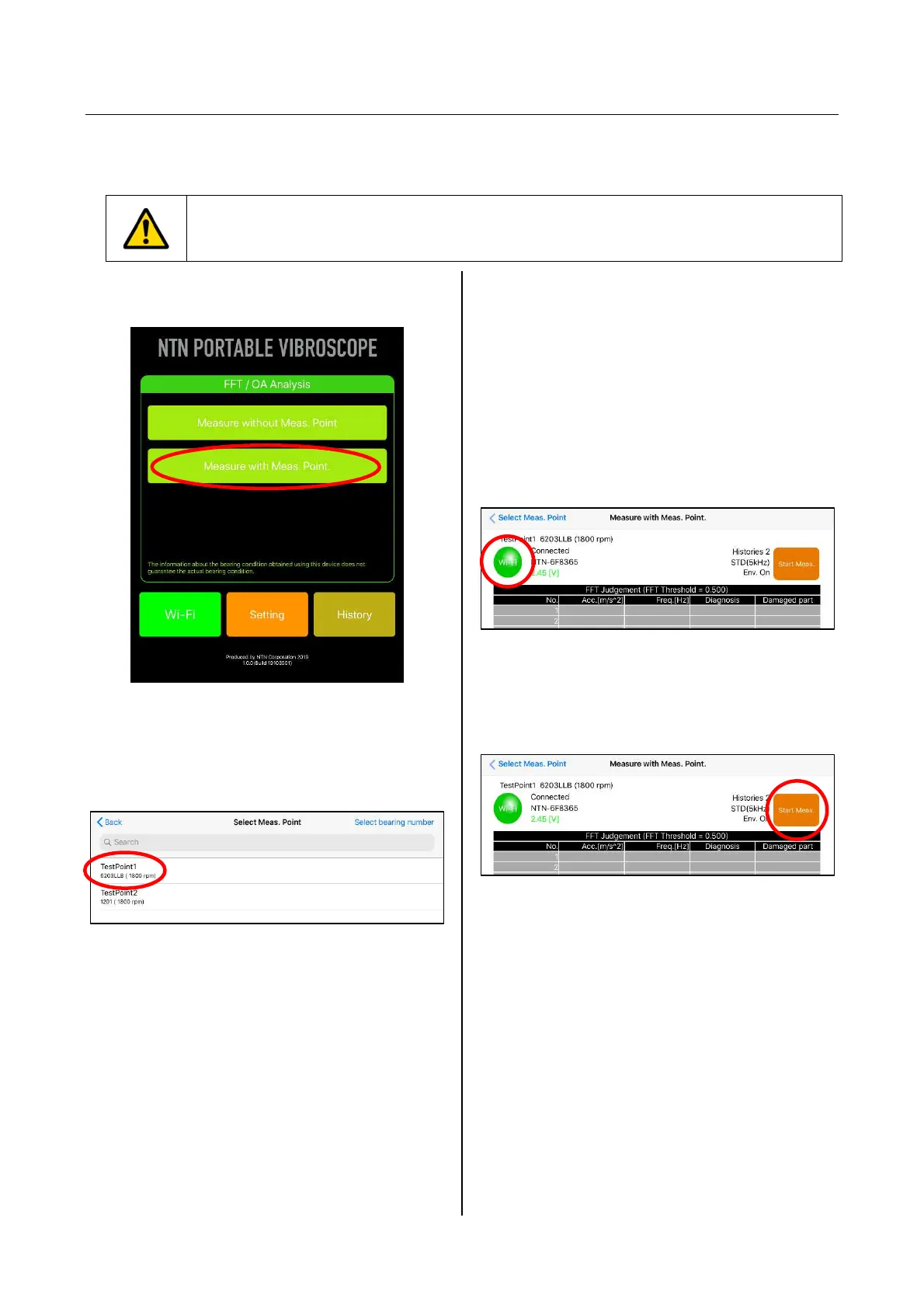
(1) Tap "Measure with Meas. Point" from
the home screen of the application.
Figure 4.28 Selection of Measure with
Meas. Point
(2) The target measurement point name is
selected from the screen of Select Meas. Point.
Figure 4.29 Select measurement point name
(3) The condition is selected and it is confirmed
that the "Wi-Fi" button on the upper left of
Measure with Meas. Point screen is green
(connected). When "Wi-Fi" button is red (not
connected), tap the "Wi-Fi" button first to move
to Wi-Fi setting screen, and after establishing
the connection, the measurement is started.
(Refer to "4.2 Wi-Fi connection setting" for the
connection method.)
Figure 4.30 Measure with Meas. Point screen
(4) Tap the “Start Meas.” button on the upper right
of the screen of Measure with Meas. Point.
Figure 4.31 Measure with Meas. Point screen


 To Next Page