20
4.3 Setting
When the measured data is judged or saved, it is necessary to register the
point information. Moreover, when judging the bearing not registered in the data base,
special bearing or other company’s bearing
etc., it is necessary to register the bearing
parameter beforehand.
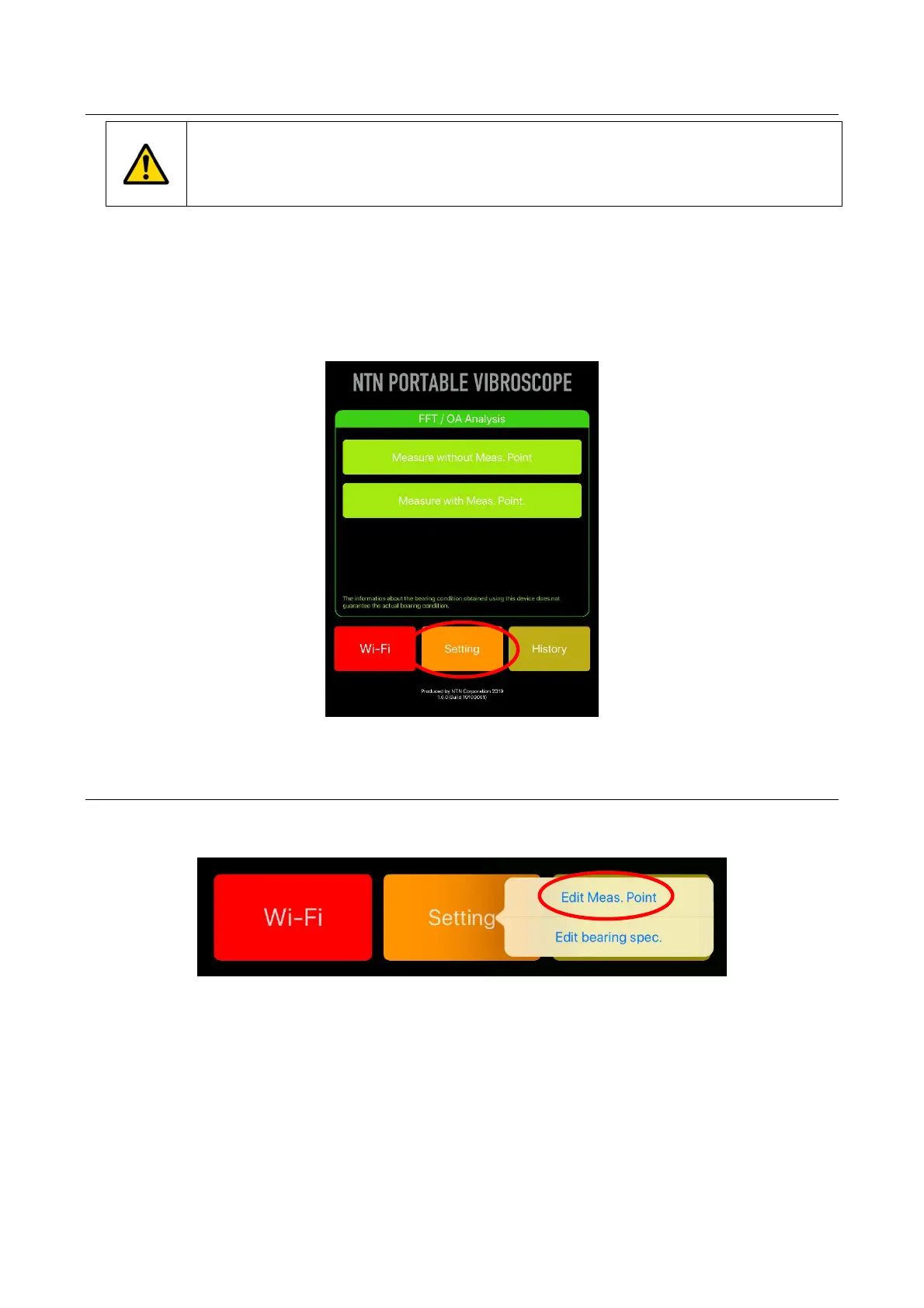
From “setting” botton, measurement point information and bearing information can be registered and
edited newly. When the following "4.5 Measure with measurement point" is performed, the input of
measurement point information and bearing information is indispensable. The bearing parts number to
be measured, rotational speed, judgment criterion value, FFT measurement result, OA measurement
result, judgment result, and history management etc. are all managed by the measurement point name
set in the measurement point information.
Figure 4.7 Setting
4.3.1 Edit measurement point
When tap “setting” button on the home screen, the menus of “Edit Meas. Point” and “Edit bearing
spec.” are displayed, then select “Edit Meas. Point”
Figure 4.8 Edit measurement point


 To Next Page