SAMM User Manual
51
6.4.2 Kongsberg Mesotech MS1000
SAMM interfaces with the MS1000 series sonar by receiving a data and metadata string from
the sonar software directly.
To interface with the MS1000 sonar:
1. Launch the MS1000 sonar
software and connect the sonar
as usual.
2. Launch SAMM.
3. Click the Add data icon.
4. Click Connect to...
5. Select Kongsberg MS1000 from
the supported sensors list and
click Load.
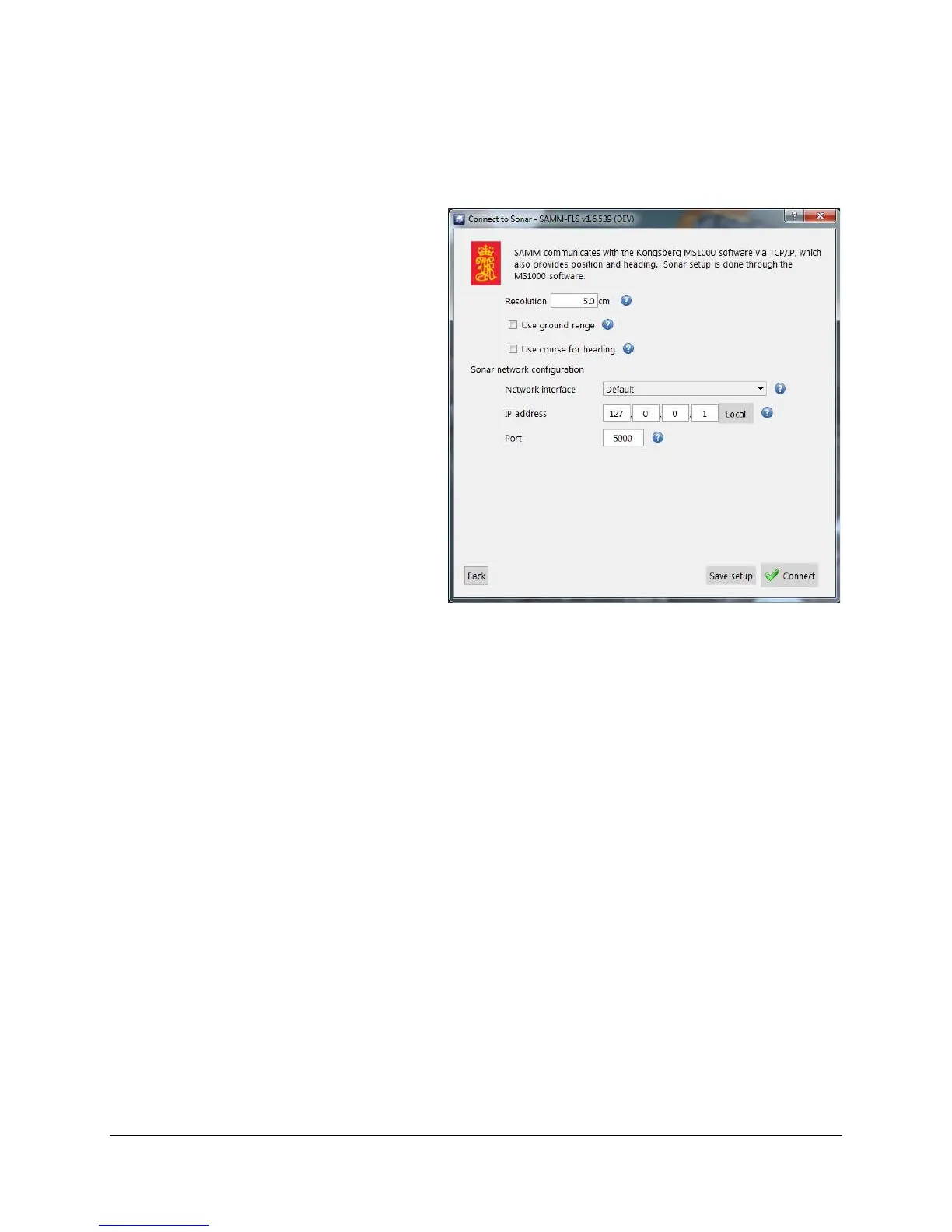
6. In the MS1000 interface window
(Figure 41), set processing
parameters as necessary.
7. If SAMM and the M3 software are
running on the same computer, do
not change the IP address from
127.0.0.1. If the sonar software
is running on a different computer
that is networked to the SAMM
computer, select an appropriate
network from the Network
interface dropdown and enter the
IP address of the computer
running the M3 software in the IP
address field.
Figure 41. MS1000 Interfacing
8. Do not change the port number from 5000 unless you change it in the MS-1000 sonar
software. Then, enter the matching port number in the Port field.
9. Click the Connect button.
10. Monitor the connection status in the Device status popup and in the status bar on the
bottom left. Acquisition begins automatically. SAMM flashes a warning if it is not
recording. Click the Record toggle icon to switch recording on and off.



 To Next Page