41
CD Indicators
CommandCommand
CommandCommand
Command
CharacterCharacter
CharacterCharacter
Character
DescriptionDescription
DescriptionDescription
Description
??
??
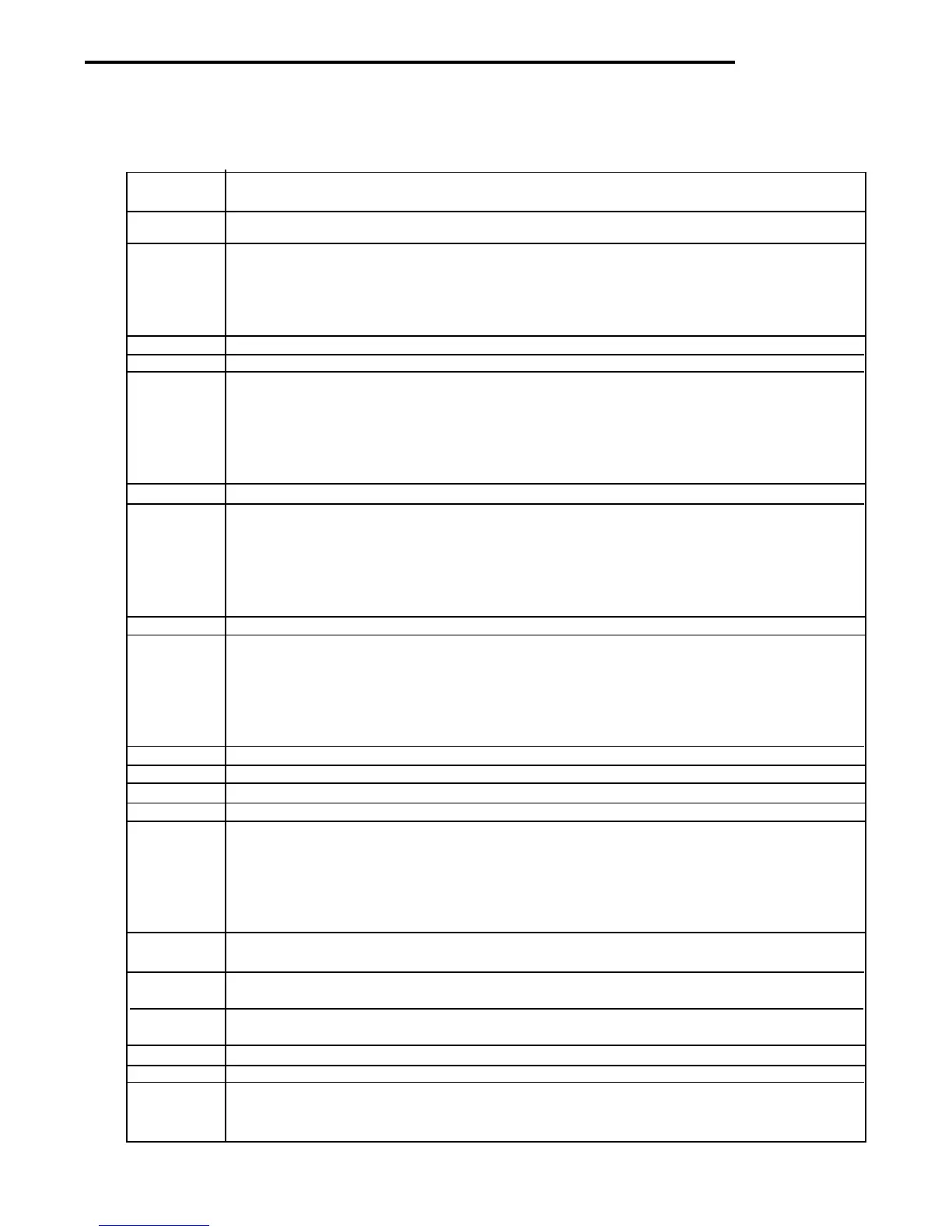
? Print current mode: g, kg, custm, %, #
nnnAnnnA
nnnAnnnA
nnnA Set Auto Print feature to "nnnn".
nnnn=0 Turns feature OFF
nnnn=S Output on stability
nnnn=C Output is continuous
nnnn=1-3600 Sets Auto Print interval
CC
CC
C Begin span calibration.
FF
FF
F Print current function.
xlxl
xlxl
xl Set Averaging Filter to "x", where x = 0 to 3.
If LFT, level 0 to 1.
0=minimum level
1=
2=
3= maximum level
LL
LL
L Begin linearity calibration.
xMxM
xMxM
xM Places terminal in mode "x", where x = 1 to 4.
If unit is not already enabled, command returns ES.
1=grams
2=kilograms
3= pounds
4= custom units
PP
PP
P Print display data.
xSLxSL
xSLxSL
xSL Set stable data only printing TO "X", where x = 0 to 3.
If LFT, x=0 or 1.
0=.5d
1= 1d
2= 2d
3=5d
TT
TT
T Same effect as pressing Tare Key.
NN
NN
N Shows copyright notice.
VV
VV
V Print software version number.
EscVEscV
EscVEscV
EscV Print scale ID
xZxZ
xZxZ
xZ Set Auto Zero to "x", where x=0 to 3.
If LFT, Auto Zero level from 0 to 1.
0=off
1=0.5d
2=1d
3=3d
x%x%
x%x%
x% Set % reference weight. Uses real number "x" as current Percent Reference Weight.
Weight must be entered in Calibration Units.
x#x#
x#x#
x# Set PC reference weight. Uses real number "x" as current Parts reference Weight. Weight
must be entered in Calibration Units.
EscREscR
EscREscR
EscR Resets setup and print menus to factory defaults.
CAUTION: This will reset RS232 configuration.
##
##
# Print current Parts Count Reference Weight in the most recently used Units.
%%
%%
% Print current Percent Reference Weight in the most recently used Units.
xFxF
xFxF
xF Set current function to "x", where x=0 to 4.
If mode is not already enabled, command returns ES.
0=None (normal weigh)
RS232 COMMAND TABLE
4.7 Printing Data (Cont.)
4.7.2 Output Formats (Cont.)



 To Next Page