48
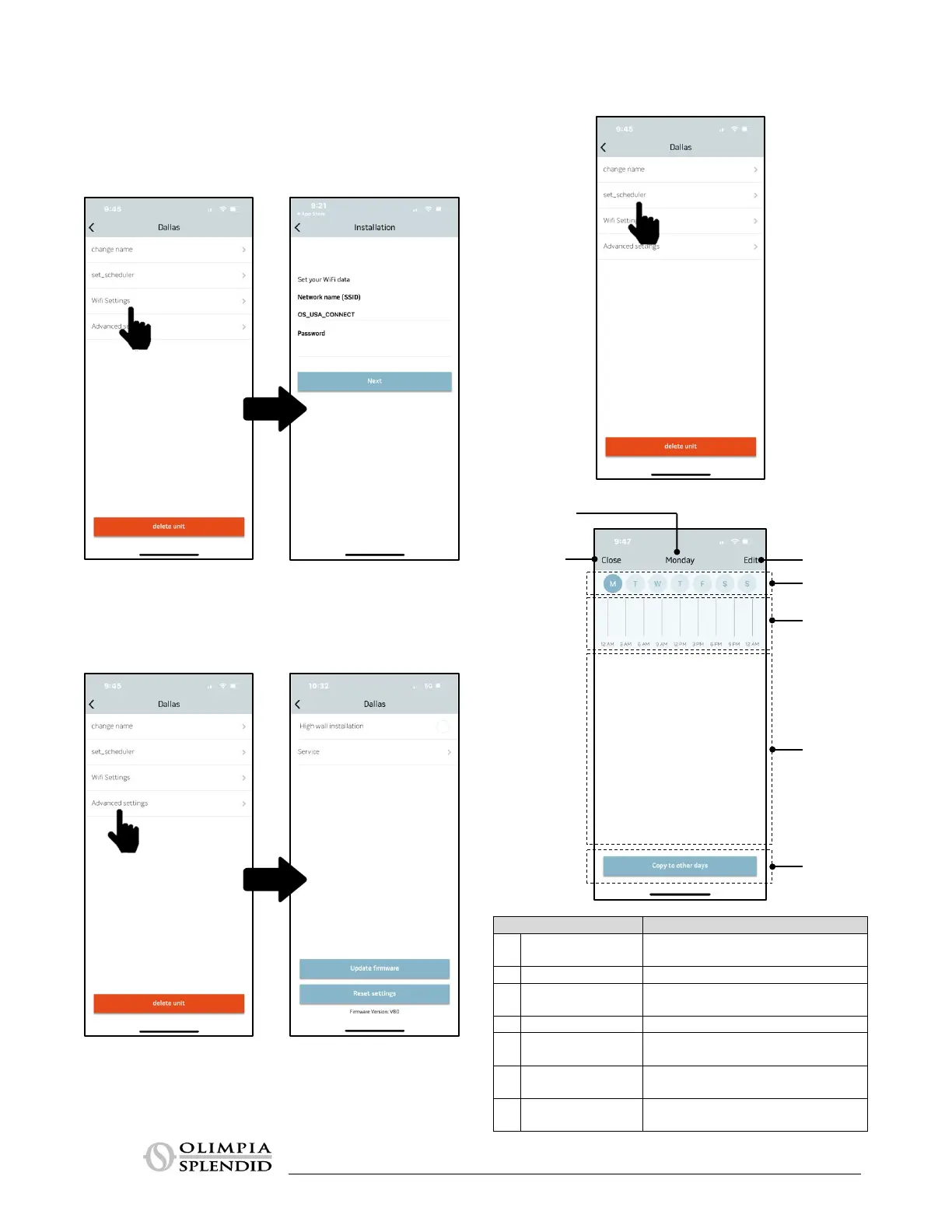
10.2.4.2 Configuring Wi-Fi
If you select CONFIGURE WI-FI, you can:
– verify the Wi-Fi network signal strength for the B1018 kit installed in
the unit.
– set the network name (SSID) and password for the Wi-Fi network to
which the board will connect.
10.2.4.3 Advanced Settings
By selecting ADVANCED SETTINGS, you can:
– set the installed position of the climate control unit.
– access the service page (for Olimpia Splendid access only).
I
f you select TIMER, it is possible to access the Timer programming
screen.
1 Close
Used to confirm settings and return to
the “Manage Climate Control Units
Displays the selected day of the week
3 Edit program
Allows access to the page to modify
programming for the selected day
Used to select another day of the week
5
Graphic view of the hourly program for
the selected date
6
Display the detail of the time range
entered
7 Copy program
Copy the timer settings to another day of
the week



 To Next Page