MAESTRO SMART 47
10.2.4 Climate control unit settings
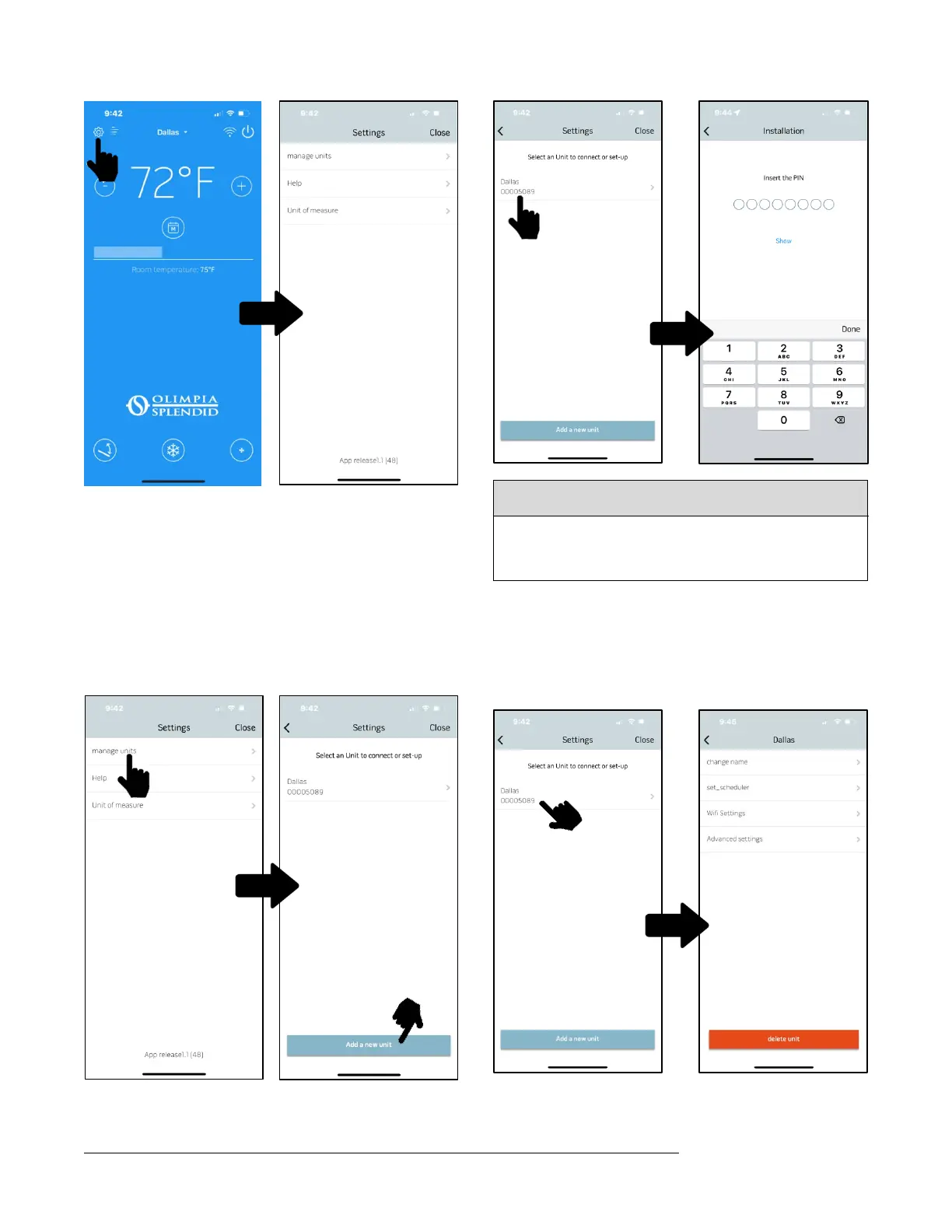
If you press the SETTINGS button, you can access:
– the MANAGE UNITS submenu.
– an online guide covering the functions of the app.
It is possible to access the online guide via a web browser as well at
http://www.olimpiasplendidusa.com
10.2.4.1 Add and manage climate control units
Access the Settings submenu by pressing the MANAGE UNITS. If you
select ADD UNIT, you can add other units that have not yet been
registered in the app.
NOTE: To perform these steps, Bluetooth on the smartphone must be on
and the climate control unit to be registered must be within Bluetooth
communication range.
Your PIN cannot be changed, and it is unique for every B1018 kit, so
you must keep it safe for any new registration of the climate control
unit on the app. We suggest that you use one of the labels provided in
your welcome kit and attach it next to the units data plate.
Once registration is complete, the “control panel” is displayed.
Select the individual unit in order to access the following settings:
– change the unit’s name (the name may have up to 6 characters).
– timer programming.
– Wi-Fi communications configuration.
– advanced configuration.



 To Next Page