ENGLISH
33
SALES TRANSACTION EXAMPLES
REGISTERING A SINGLE ITEM SALE WITH
CHANGE TENDER
Up to eight digits can be used for entering the amount.
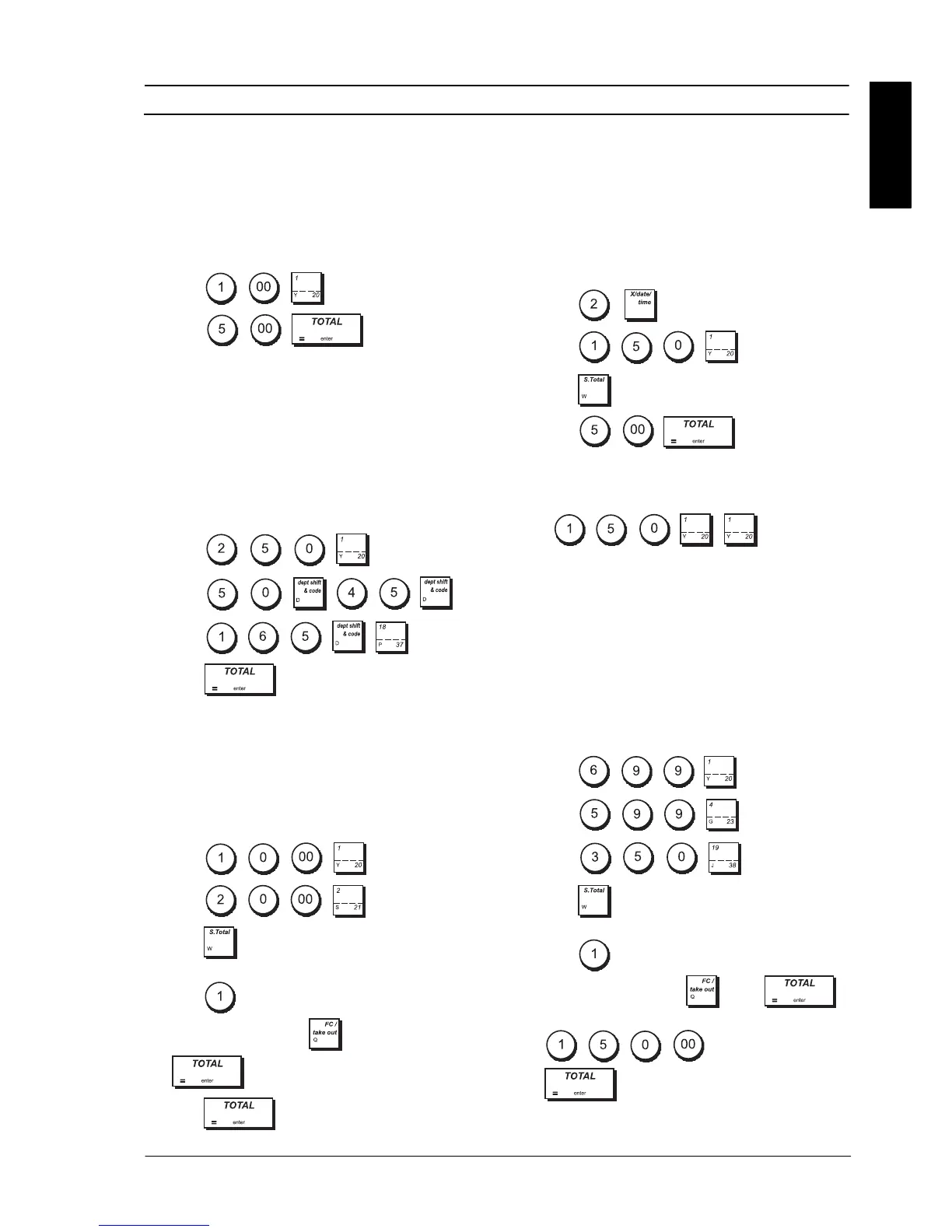
Example: Register a £1.00 item in Department 1.
Compute change for £5.00.
1. Press
.
2. Press .
The transaction is terminated and the change due to the
customer is displayed.
REGISTERING A MULTIPLE ITEM SALE WITH
EXACT CASH TENDER
Example: Register a £2.50 item to Department 1, a
£0.50 item to Department 45 and a £1.65 item to
Department 37, with an exact tender of £4.65.
1. Press
.
2. Press .
3. Press
.
4. Press .
REGISTERING A MULTIPLE ITEM SALE WITH
EXACT CASH TENDER IN FOREIGN
CURRENCY
Example: Register a £10.00 item to Department 1, a
£20.00 item to Department 2, with an exact tender in
the programmed foreign currency number 1.
1. Press
.
2. Press
.
3. Press to display and print the current balance
due in the Local Currency.
4. Press
for the foreign currency programmed
as number 1 and press
-> FC then
.
5. Press .
REGISTERING A SALE OF MULTIPLE ITEMS
AT SAME COST
Up to two digits can be used for the quantity multiplied.
Example: Multiply two items costing £1.50 and
register the sale to Department 1. Compute change for
£5.00.
1. Press .
2. Press
.
3. Press .
4. Press
. The change due
to the customer is displayed.
Steps 1 and 2 in the procedure above could be replaced
with the following to achieve the same result:
Press
.
REGISTERING A MULTIPLE DEPARTMENT
SALE WITH PAYMENT IN FOREIGN
CURRENCY AND CHANGE TENDER IN
LOCAL CURRENCY
Example: Register a £6.99 item to Department 1, a
£5.99 item to Department 4 and a £3.50 item to
Department 19. Compute change for
¤150.00
(Euro = foreign currency number 1).
1. Press .
2. Press .
3. Press .
4. Press to display and print the current balace
due in the Local Currency.
5. Press for the foreign currency programmed
as number 1 and press
-> FC .
6. Type the amount tendered in the foreign currency
and press
.
The change due to the customer is displayed.















 To Next Page