ENGLISH
35
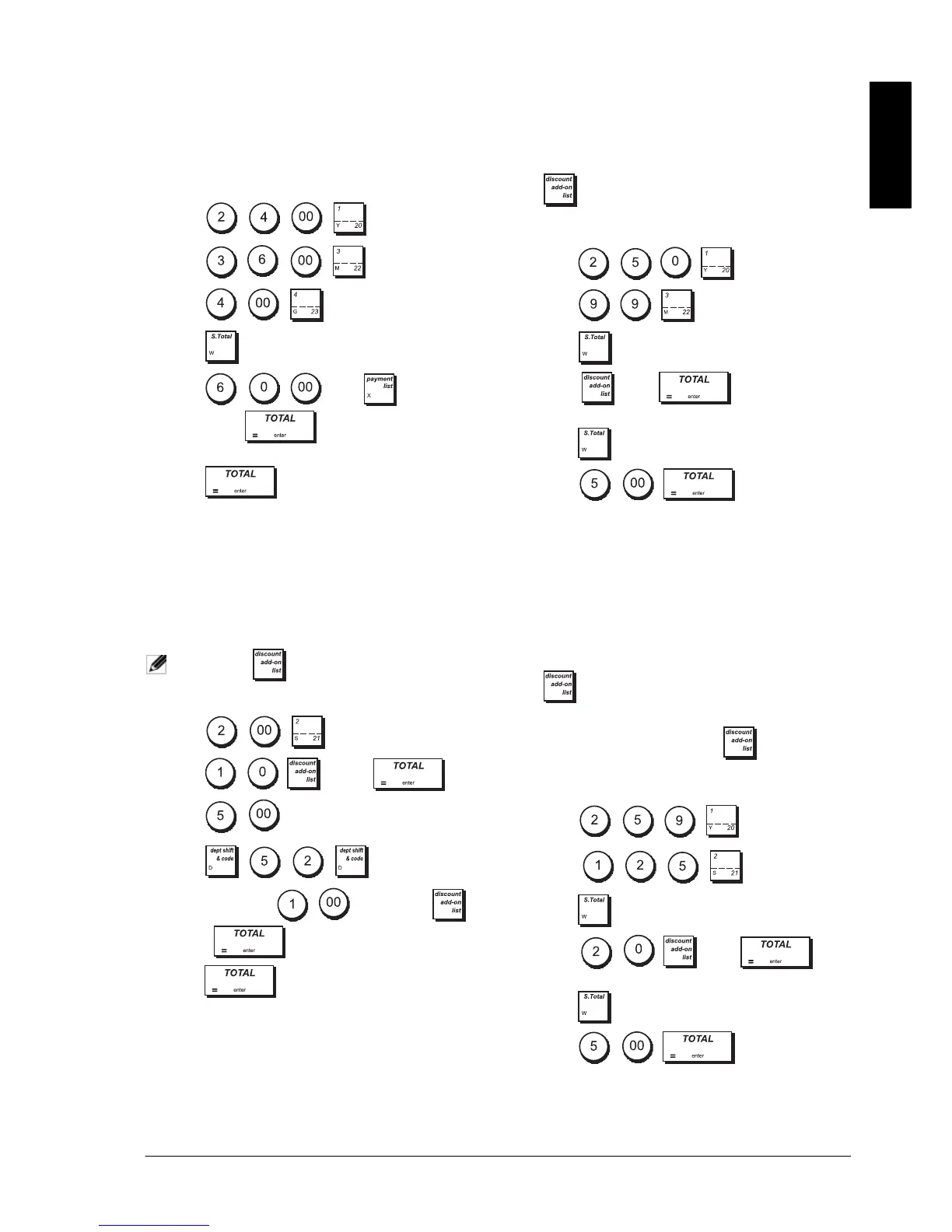
SPLIT CHECK/CASH TENDER
Example: Register a £24.00 item to Department 1, a
£36.00 item to Department 3 and a £4.00 item to
Department 4. Split the tender between £60.00 check
and £4.00 cash.
1. Press
.
2. Press
.
3. Press
.
4. Press .
5. Press
then -> CHECK
followed by . The remaining balance
due to the customer is displayed.
6. Press .
REGISTERING (-) REDUCTION COUPONS
Up to 8 digits can be used to enter the amount for a
transaction.
Example: Register a £0.10 reduction (coupon) on a
£2.00 item to Department 2 and a £1.00 discount on an
item costing £5.00 to Department 52.
NOTE: The -> -/+1 key must have been
programmed to apply a discount.
1. Press
.
2. Press -> -/+1 .
3. Press .
4. Press
.
5. Type the discount
followed by
->
-/+1 .
6. Press .
DISCOUNTING TOTAL SALE USING A
PROGRAMMED DISCOUNT RATE
Example: Register a programmed 10% discount to an
entire sales transaction. Compute the change tender.
The ->
%1 function must have been programmed
to apply a 10% percent discount.
1. Press
.
2. Press
.
3. Press .
4. Press ->
%1 . The amount
discounted is displayed.
5. Press .
6. Press
. The change due
to the customer is displayed.
DISCOUNTING THE TOTAL SALE USING A
RANDOM DISCOUNT RATE
Up to 4 digits can be used to specify the discount
percentage (in the range 0.01 - 99.99%).
Example: Register a 20% discount to a sales
transaction. Compute the change tender.
The ->
%1 function must have been programmed
to apply discounts.
If you specify a percentage before ->
%1, it
overrides the programmed percentage value.
1. Press
.
2. Press
.
3. Press .
4. Press
-> %1 .
The amount discounted is displayed.
5. Press .
6. Press
.
The change due to the customer is displayed.















 To Next Page