ENGLISH
39
HOLDING AND RECALLING A SALES
TRANSACTION
You can temporarily put a sales transaction on hold,
start and conclude a separate transaction in the mean
time, then recall and conclude the held transaction.
This allows the clerk to serve a second customer to avoid
delays if for any reason the customer being currently
served is not ready to finalize the transaction.
Only one transaction can be held at a time.
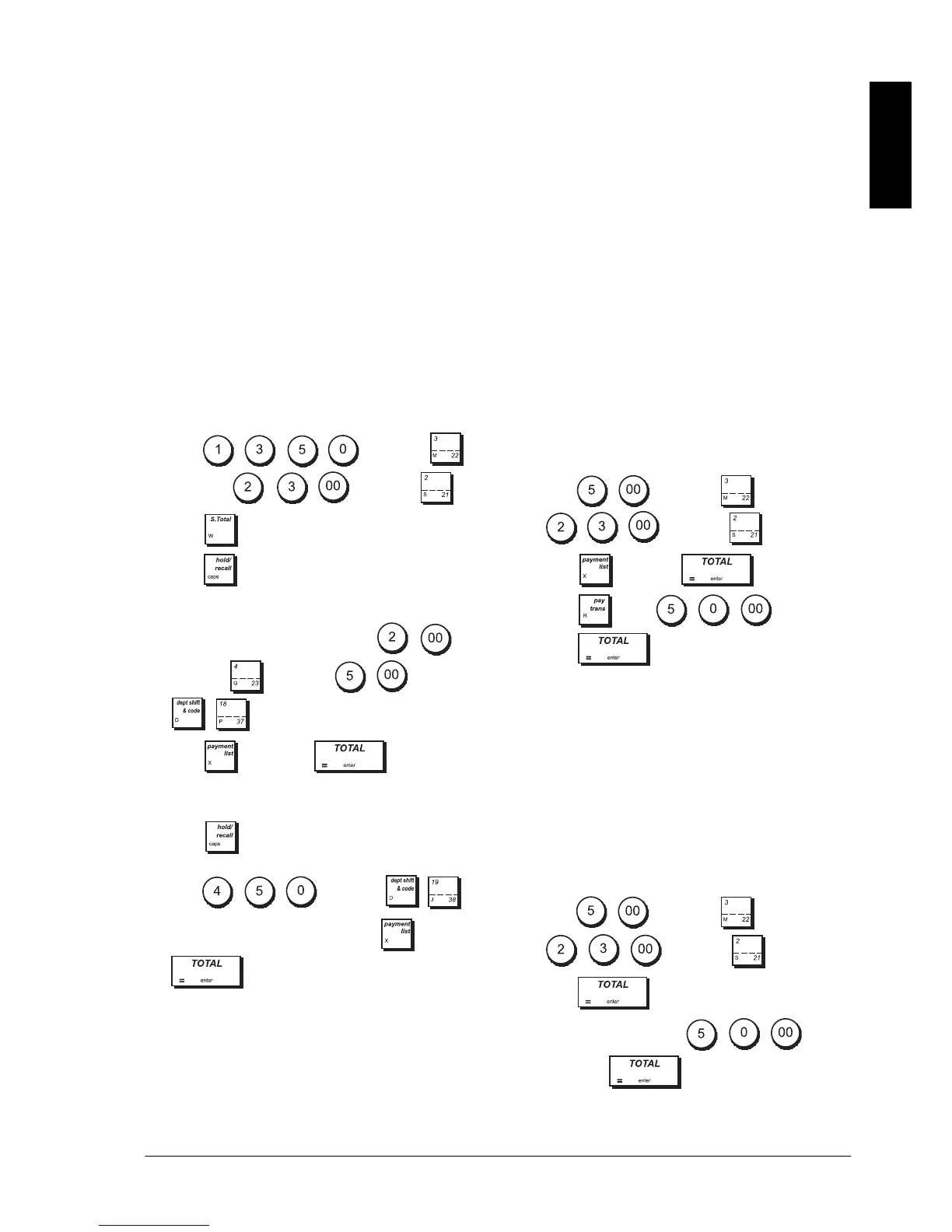
Example: Register a £13.50 sale to Department 3 and
a £23.00 sale to Department 2. Subtotal the transaction
and then put it on Hold. Serve another customer by
registering the sale of a £2.00 item to Department 4, a
£5.00 item to Department 37 and finalizing the sale
with a Credit card 1 tender. Recall the suspended
transaction, register the sale of a £4.50 item to
Department 38 and finalize the transaction with a check
tender.
1. Type and press ,
then type and press .
2. Press .
3. Press . A line is displayed to indicate that the
transaction was put on hold. Tear off the sales
receipt and put it aside.
4. Start the second transaction. Type
and press , then type and press
.
5. Press ->
CREDIT 1 to finalize the
second transaction. A beep sounds to remind you to
conclude the transaction that you previously put on
hold.
6. Press . The transaction that was put on hold
resumes from where you left off.
7. Type
and press .
8. Finalize the transaction by pressing ->
CHECK
.
TRANSFERRING A FINALIZED PAYMENT TO
ANOTHER MEANS OF PAYMENT
Upon conclusion of a sales transaction, you can transfer
the payment just made to another form of payment.
This is particularly useful if the customer decides to pay
with another means after the finalization of the sales
transaction.
Payment transfers also allow you to give the customer
cash back as long as the payment is transferred to a
cash tender and you specify an amount that is greater
than the sales transaction total.
Payment transfer operations can be performed only
once after finalization. No receipt is issued, but the
transfer is recorded in the management reports.
Payment transfers do not apply to tenders with foreign
currencies.
Example: Register a £5.00 sale to Department 3 and a
£23.00 sale to Department 2 as a charge transaction.
Transfer payment to a £50.00 cash tender with cash
back to the customer.
1. Ty pe
and press , then type
and press .
2. Press ->
CHARGE .
3. Press , type and then
press . The cash drawer opens and the
cash back amount due to the customer is displayed.
AFTER-TENDER CHANGE TRANSACTIONS
Allowed only for cash tenders, with this feature the
clerk can finalize a sales transaction as an exact cash
tender and then afterwards register the cash collected
from the customer and give the required change.
Example: Register a £5.00 sale to Department 3 and a
£23.00 sale to Department 2 as an exact cash tender.
Register the collection of £50.00 and compute the
related change.
1. Ty pe
and press , then type
and press .
2. Press .
3. Type the cash collected
and
then press . The cash drawer opens
and the change due to the customer is displayed.















 To Next Page