ENGLISH
37
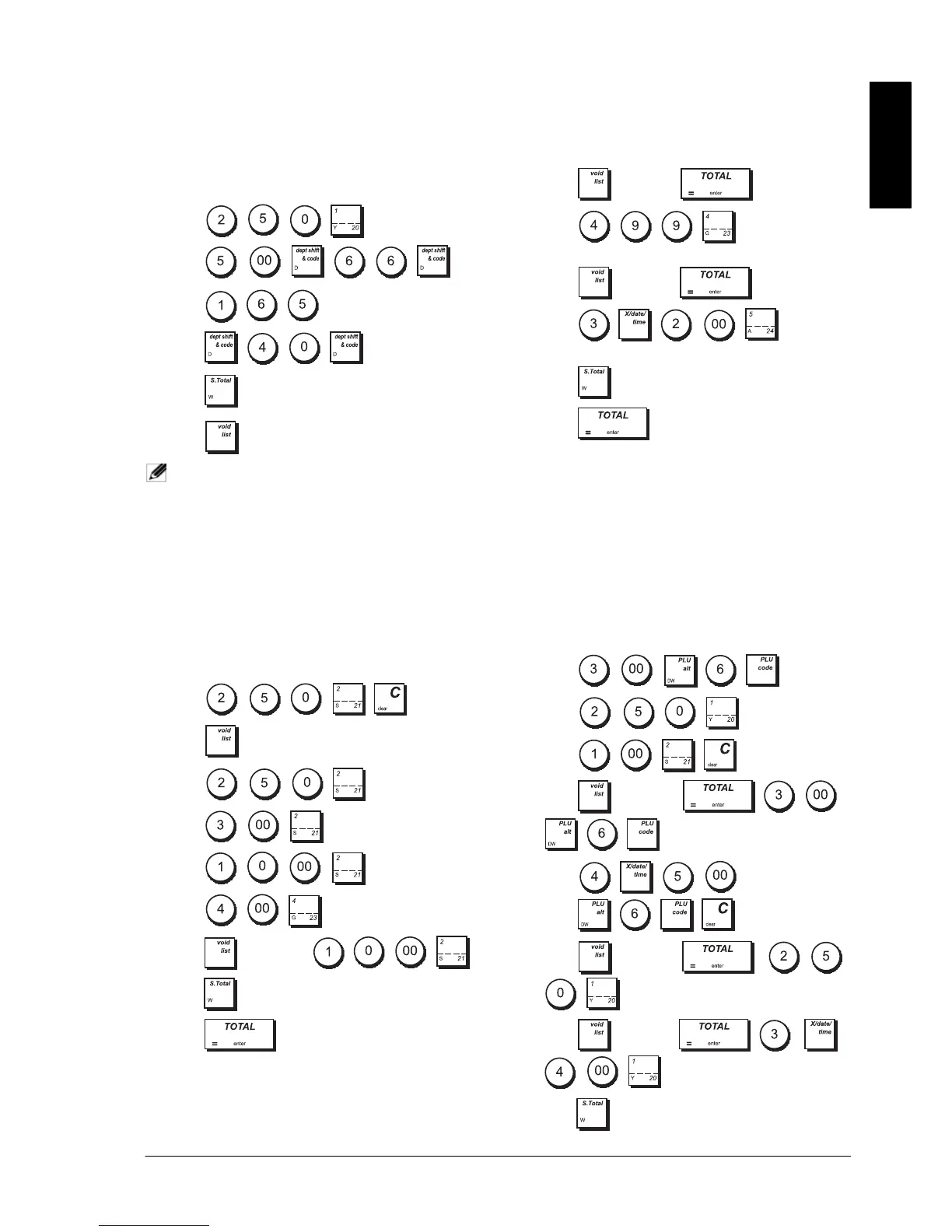
VOIDING A COMPLETE SALES
TRANSACTION
Example: Register a £2.50 item to Department 1, a
£5.00 item to Department 66 and a £1.65 item to
Department 40, then void the entire transaction.
1. Press
.
2. Press
.
3. Press
.
4. Press .
5. Press ->
FULL VOID.
NOTE: A full void cannot be performed when the
number of items registered in the
transaction exceeds 50.
VOIDING THE PREVIOUS ENTRY IN THE
MIDDLE OF A SALE
Example: Void a £2.50 entry erroneously made to
Department 2, then register a £3.00 item to this same
Department. Void an incorrect £10.00 entry. End the
transaction with an exact cash tender.
1. Press
.
2. Press -> EC/ VOID.
3. Press
.
4. Press
.
5. Press .
6. Press .
7. Press ->
EC/ VOID .
8. Press .
9. Press .
REFUNDING MULTIPLE ITEMS
Example: Refund a £4.99 item to Department 4 and
three £2.00 items to Department 5.
1. Press
-> REFUND .
2. Press . The amount to
be refunded is displayed.
3. Press ->
REFUND .
4. Press
.
The amount to be refunded is displayed.
5. Press .
6. Press .
REGISTERING MULTIPLE VOID AND
REFUND TRANSACTIONS
Example: Overwrite preset PLU 6 with £3.00, register
the sa
le of a £2.50 item to Department 1, and of a £1.00
item to Department 2. Void the £3.00 sale to PLU 6 and
then register the sale of four £5.00 items to PLU 6. Void the
sale of the £2.50 item previously made to Department 1
and then refund 3 items costing £4.00 each. Subtotal the
sale and end the transaction with an exact cash tender.
1. Press .
2. Press
.
3. Press
.
4. Press ->
EC/VOID
.
5. Press
.
6. Press ->
EC/VOID
.
7. Press ->
REFUND
.
8. Press .















 To Next Page