Operator console 2-3
Console Diagnostics
Various errors or failures are signaled by the console in the following ways:
- Error LED (LED 2) blinking
- Error LED (LED 2) blinking + other LEDs lit
- Error LED (LED 2) lit steady.
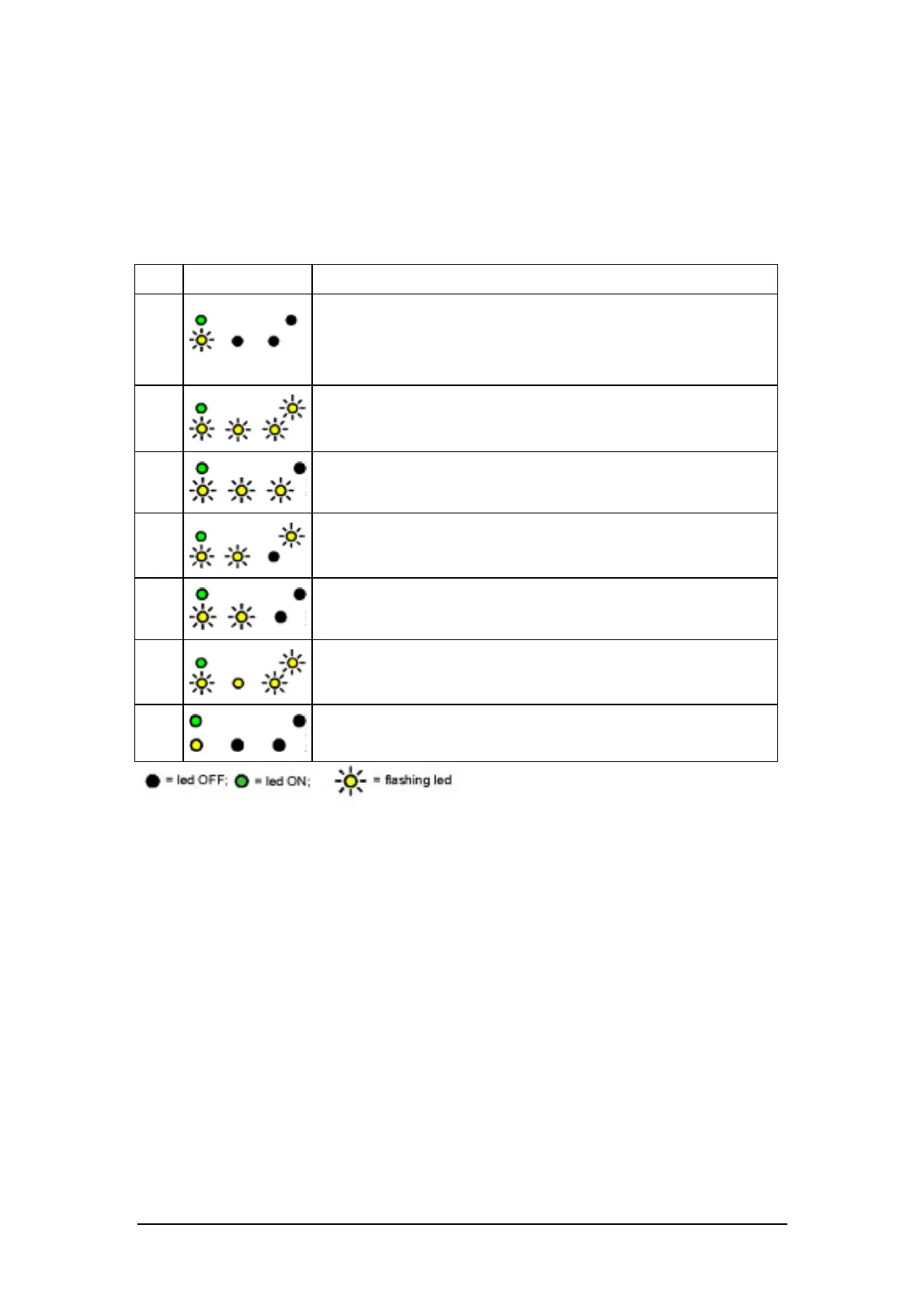
The table below reports all the LED signals given:
LED indication Type of problem
1
a) Paper jam
b) Carriage blocked
c) Cutter blocked
d) Print head overheating
2
Printer covers open
3
SETUP values in Eeprom read incorrectly
4
Photosensor setting parameters in Eeprom read incorrectly
5
Carriage position setting value in Eeprom read incorrectly
6
MICR reader setting value in Eeprom read incorrectly
7
Problem requiring action from the Customer Engineering
Department
Problems 1 and 2 can be eliminated by the operator.
To eliminate problem 3 (regarding the setup):
1. Press one of the two keys: the setup parameter default values are restored.
2. Repeat the setup if you wish to change these values.
Problems 4-7 are eliminated by the Customer Engineering Department.















 To Next Page