Operator console 2-4
Setup and settings
Proceed as follows to perform setup and/or settings:
1. Open the front cover on the printer
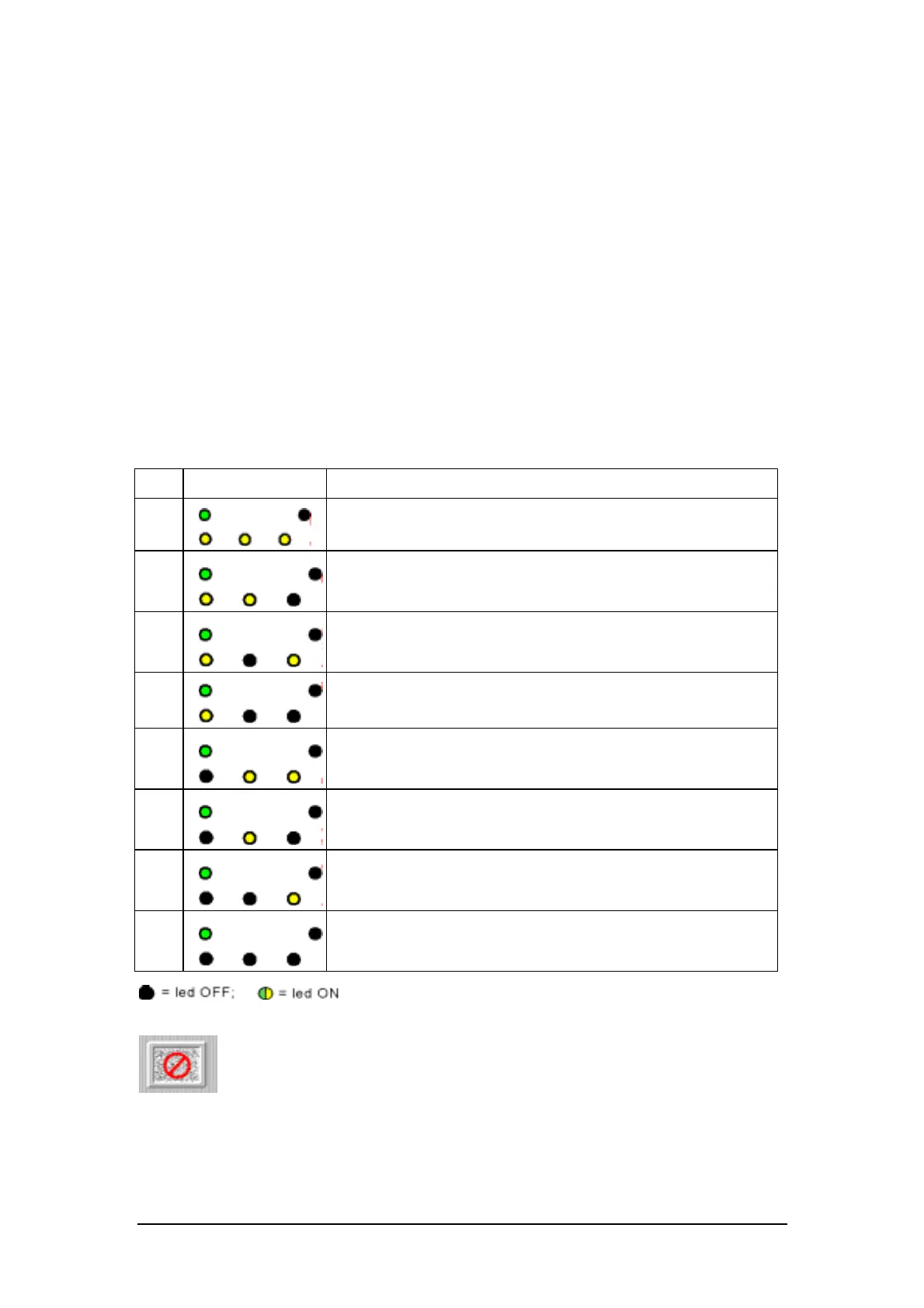
2. Simultaneously press keys 1 and 2 for more than 5 seconds, until a beep is heard:
when the keys are released, LEDs 2 (error), 3 and 4 will be lit.
3. For a second time, simultaneously press keys 1 and 2 for more than 10 seconds, until
another beep is heard.
4. Press key 1 one or more times until the LED sequence corresponding to the operation
desired is obtained (see below the table illustrating correspondence between the LED
sequences and the operations desired).
Press key 2 to return to starting conditions (reset).
5. Close the front cover of the printer: the operation desired is performed or arrangements
made for it.
The table below illustrates the LED sequences corresponding to the various setup/setting
operations:
Ref. LED sequences Setup/setting operation
1
Initial status (setup/settings mode)
2
Operator test
3
Printer setup
4
Settings mode
5
MICR read test
6
Print test on frontal insertion document
7
Hexadecimal printing
8
Print test on paper rolls
Operations from 4 to 8 are reserved for the Customer
Engineering Department and are described in the relative
manual.















 To Next Page