ESG-400
3 Error screen, codes and measures
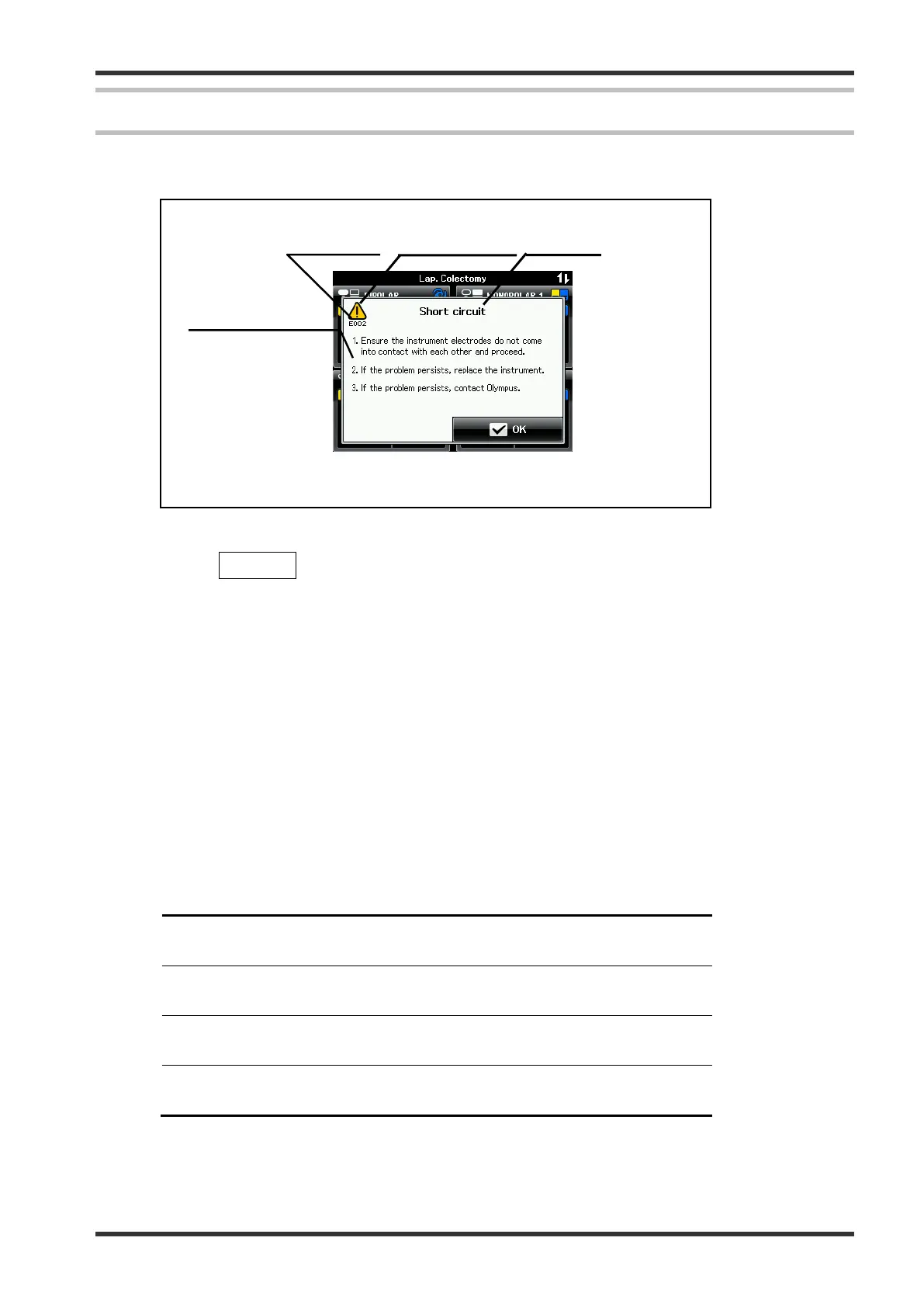
Follow the troubleshooting advices in this chapter, to identify or correct failures. The error window is configured
as shown in figure below.
NOTE
The OK bu
tton is not available in software version lower
than 4.00-A
If an error occurs (see Fig. 4.3.1):
An error window will appear and an alarm signal is audible.
A short message with the error code, error title and a description of the remedial action will be displayed.
The error code consists of an error number shown under the “caution” symbol.
Depending on the error priority, the condition of the audible signal and the “caution” symbol are different
(see Table 4.1).
Proceed with the described remedial action.
The error window disappears after a few seconds, if the error is cleared.
If the error window is still displayed, the error is not cleared. Proceed with the next remedial action if
available.
Error category Error condition priority Indicator (“caution”)
symbol condition
High priority Immediate user response
is required
Flashes in red color
Medium priority Prompt user response
is required
Flashes in yellow color
Low priority Awareness of the user
is required
Constant on in yellow color
Table 4.1: Error priorities and the corresponding indicator symbol condition
(Example: E002 Short circuit)
7.022.211 / ISSUE 5 48 / 110 Chapter 4: Troubleshooting






 To Next Page