28
1
EN
Selecting folders and files
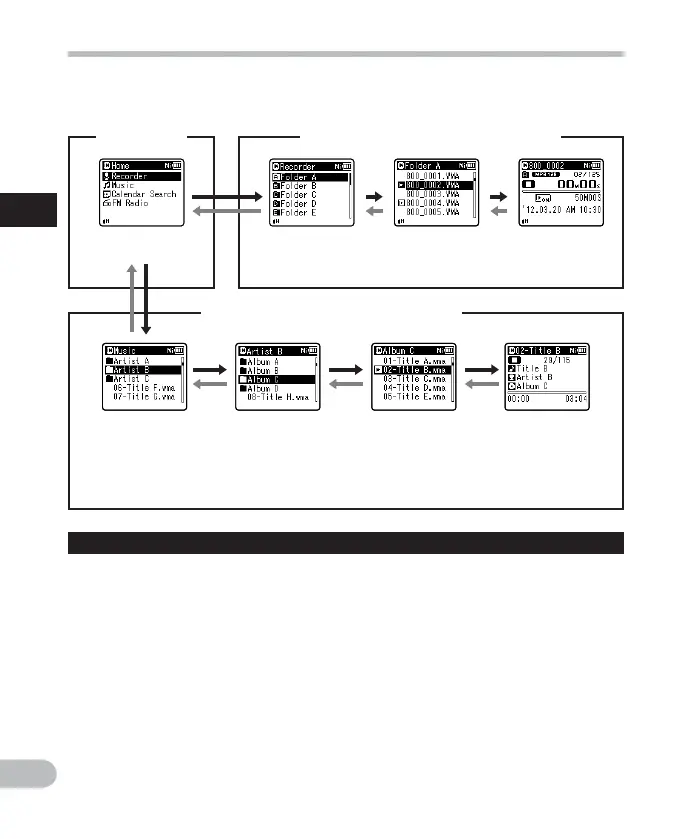
Change folders while the recorder is stopped or during play. For information on the layered
structure of the folders, see the section entitled “
Notes on the folders ” ( ☞ P.26).
Moving through the levels
}
Return
:
LIST
button
Each time you press this button, you
move up one level. The 0 button can
also serve as the LIST button on a list
display.
• If you press and hold the LIST button
while moving in a hierarchy of folders,
you will return to the file display.
{
Proceed
: `
OK
button
Each time you press this button, you
open the folder or file selected in the list
display and proceed down one level.
• The 9 button can also serve as the
` OK button on a list display.
Selecting folders and files
Operation of the folders for voice recordings
Operation of the folders for music playback
[
H o m e
] display
Folder list
display
File list display File display
Folder list
display
(First layer)
Folder list
display
(Second layer)
File list display File display
Example:
WS-813
When [ M u s i c ] folder is selected.
+
or
–
button
Select a folder or file.
[
H o m e
] display:
This display allows the mode of the
recorder to be changed ( ☞ P.25).
List display:
The folders and files stored in the
recorder are displayed.
File display:
Information about the selected file is
displayed. The recorder is in playback
standby mode.



 To Next Page