51
4
EN
FM radio mode operations
FM radio mode operations
Adding a radio station
You can add radio stations from Auto/
Manual reception to the preset stations.
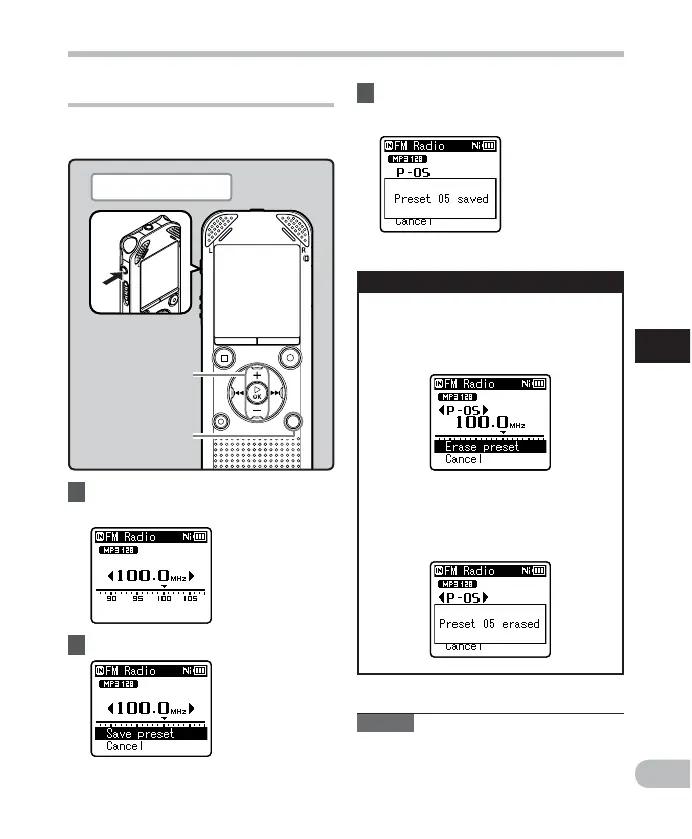
1 Tune to the radio station you
want to preset.
2 Press the
SCENE
/
INDEX
button.
• Select [ C a n c e l ] and press the ` OK
button to return to the previous
display.
Deleting a preset radio station
1 Tune to the preset radio
station you wish to erase.
2 Press the
ERASE
button.
3 Press the `
OK
button.
• Up to 30 radio stations can be preset.
• Select [ C a n c e l ] and press the ` OK
button to return to the previous
display.
3 Press the `
OK
button.
Note
• The preset numbers are automatically
assigned according to the frequency.
+ −
button
`
OK
button
SCENE/INDEX
button
Plug in the earphones



 To Next Page