40
3
EN
Playback
Playback
c
a
b
1 Press the
LIST
button repeatedly
to set the [
H o m e
] display.
2 Press the
+
or
−
button to select
[
Calendar Search
].
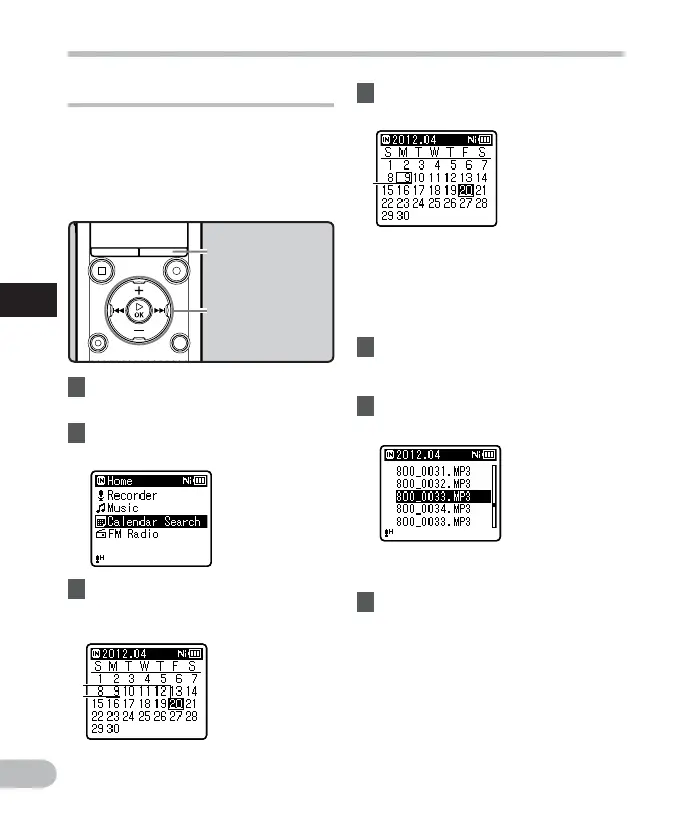
Searching for a file
4 Press the
+
,
−
, 9 or 0
button to select the date.
9 , 0 buttons:
Move to the previous/next day.
+
,
−
buttons:
Move to the previous/next week.
• Press the STOP ( 4 ) button to return
to the [ H o m e ] display.
5 Press the `
OK
button.
• Files recorded on the date selected
are displayed in a list.
6 Press the
+
or
−
button to select
a file.
• Press the 0 button to return to the
previous screen.
7 Press the `
OK
button to start
playback.
3 Press the `
OK
button.
• [ Calendar Search ] will appear on the
display.
+
−
button
9 0 button
`
OK
button
You can search for voice files by the date
they were recorded. As long as you know the
date, you can quickly find a file even if you
have forgotten what folder it is in. It is only
possible to search for files saved in the voice
recordings folder ( & to * ) .
LIST
button
a Current date
b Date when a file
was recorded
c Selected date
• Dates with recorded files are shown
with underbars.



 To Next Page