50
4
EN
b
a
FM radio mode operations
FM radio mode operations
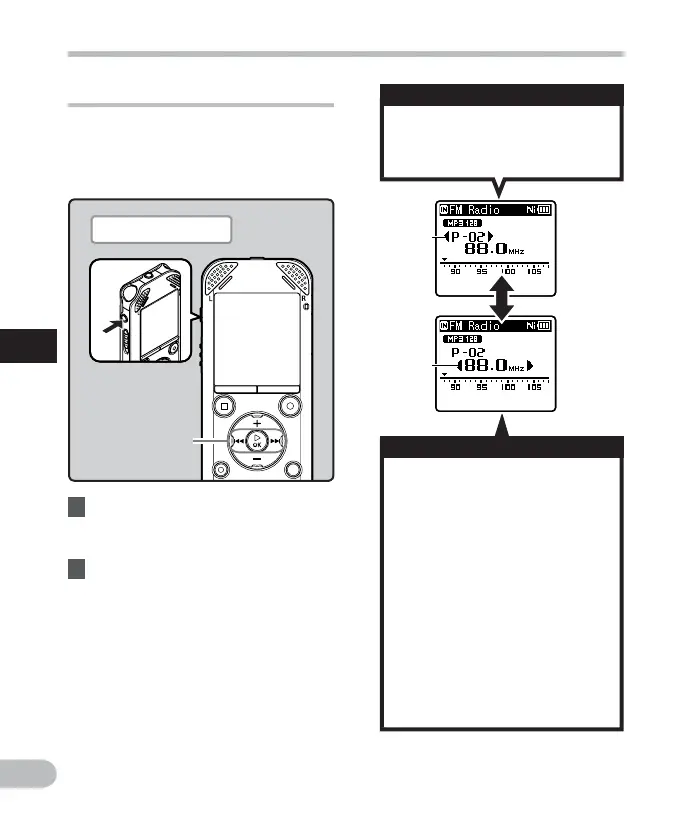
Changing the reception mode
It is possible to fine tune the channels
manually if the station you are looking for
has a weak signal and couldn't be detected
using the Auto Preset function.
1 Perform Steps 1 through 3 from
“FM radio mode operations”
( ☞ P.48).
• Press the 9 or 0 button to
select a preset station.
a Preset number
• Press the 9 or 0 button
to adjust the frequency and
tune to a radio signal (Manual
reception).
• Press and hold the 9 or 0
button to scan through the
receivable radio stations (Auto
reception).
b Tuning frequency
• If you press the ` OK button
while a frequency that you have
not preset is being received,
the recorder will tune in to the
station whose preset number
is closest to the frequency that
was being received.
2 Press the `
OK
button to select a
reception mode.
• If you have preset stations, the
reception mode changes at each
press of the ` OK button.
9 0 button
`
OK
button
Plug in the earphones
Preset call mode
Auto/Manual mode



 To Next Page