52
4
EN
d
e
c
a
b
Recording from the FM radio
• When you record FM radio, the
recording is stored automatically
in the [ FM Radio ] folder in the
[ R e c o r d e r ] folder.
Notes
• When recording from the FM radio, be
sure to connect the earphones to the EAR
jack.
• When FM radio is recorded, the file name
assigned to the recording ( ☞ P.33) is
appended with a date and time.
813_0001_120715_0915.WMA
D a t e : [120715] (2012, July 15)
T i m e : [0915] (9.15 am)
Recording from the FM radio
For WS-813:
When recording from the
FM radio:
Even if the sound of the FM radio is
clear, in certain conditions there may
be cases of electric interference when
the recording starts.
To avoid such a problem, perform a
recording test before recording. Also,
be sure to record in places with good
reception.
1 Tune to the broadcast program
you wish to record ( ☞ P.25, P.48).
2 In menu settings relating to FM
radio, set [
O u t p u t
] to [
E a r p h o n e
]
( ☞ P.67).
• If [ O u t p u t ] is set to [ S p e a k e r ], you
cannot record.
3 Press the
REC
( s ) button to start
recording.
• The LED indicator light turns on and
[ K ] appears on the display.
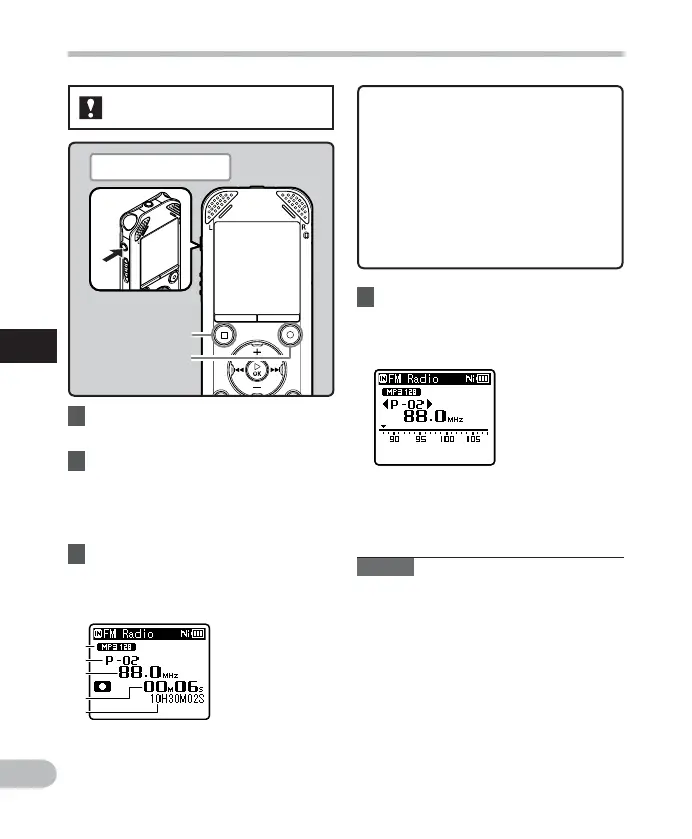
a Recording mode indicator
b Preset number
c Tuning frequency
d Elapsed recording time
e Remaining recording time
4 Press the
STOP
( 4 ) button to stop
recording.
• [ K ] disappears and the reception
display re-appears.
Plug in the earphones
REC
( s ) button
STOP
( 4 ) button



 To Next Page