P6
P4
P1
P2
P3
P5
OPERATOR INTERFACE
Hand-held remote control
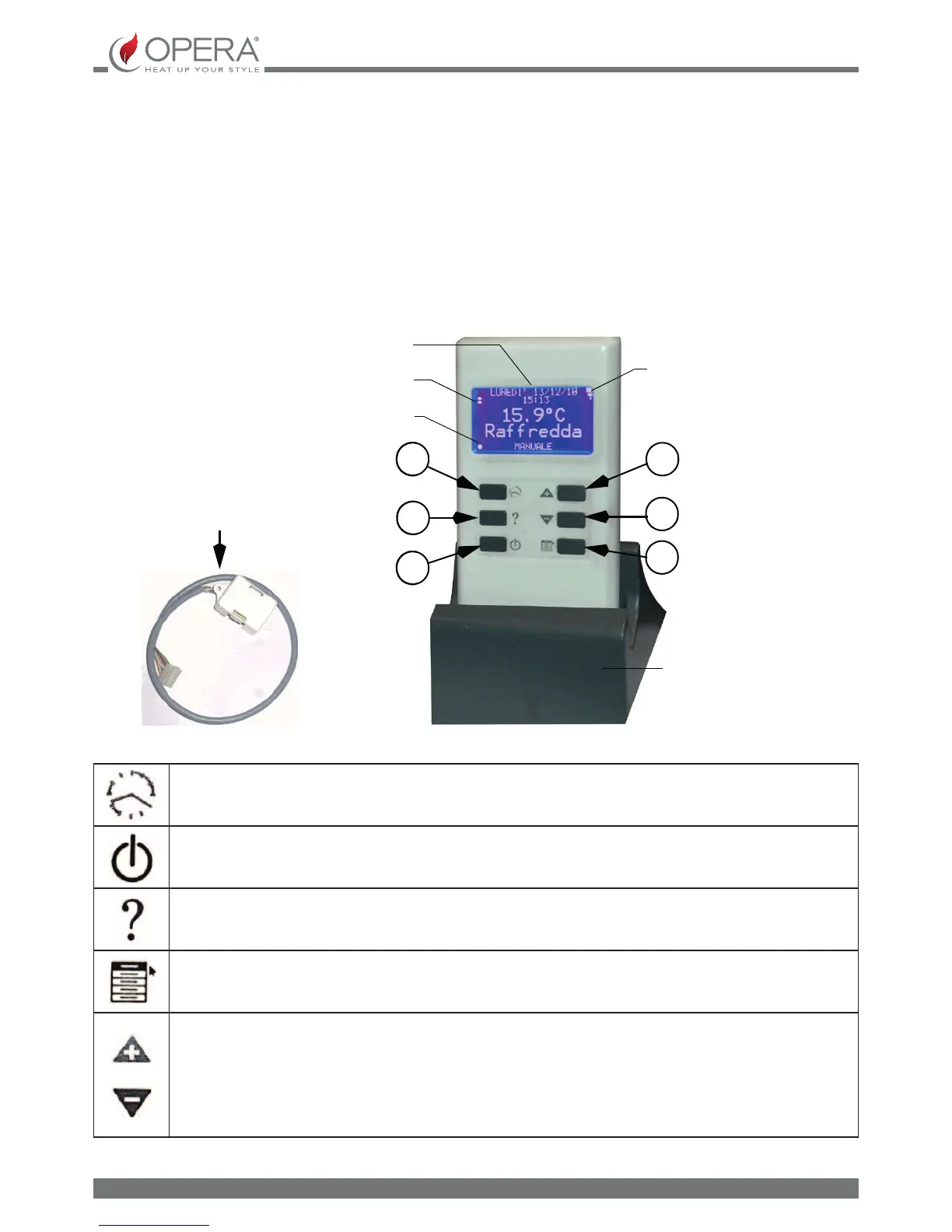
The hand-held remote control is made up from the following components provided in the Q9 inserts (optional in the stoves):
– Hand-held remote control
– TX/RX receiver module
– Re-charge base
Hand-held terminal
The hand-held radio terminal completely replaced the display console
BACKLIT DISPLAY
BATTERY LEVEL ICON
INDICATION DOT
LEVEL ICON SIGNAL
RECHARGE BASE
TX/RX MODULE
Fig. 4.2 Hand-held terminal
P1: CHRONO/MANUAL TO ENTER THE CHRONOTHERMOSTAT menu
P2: ON/OFF TO SWITCH THE APPLIANCE ON AND OFF
P3: GUIDE FOR GUIDELINES REGARDING THE MENU SETTINGS
P4: MENU TO ENTER THE USER MENU
P5 AND P6: + AND TO ADJUST THE DISPLAY LIGHTING CONTRAST AND TO SCROLL THROUGH THE
ITEMS OF THE VARIOUS MENUS AND SUBMENUS


 To Next Page