SETUP MENU OPTIONS
71
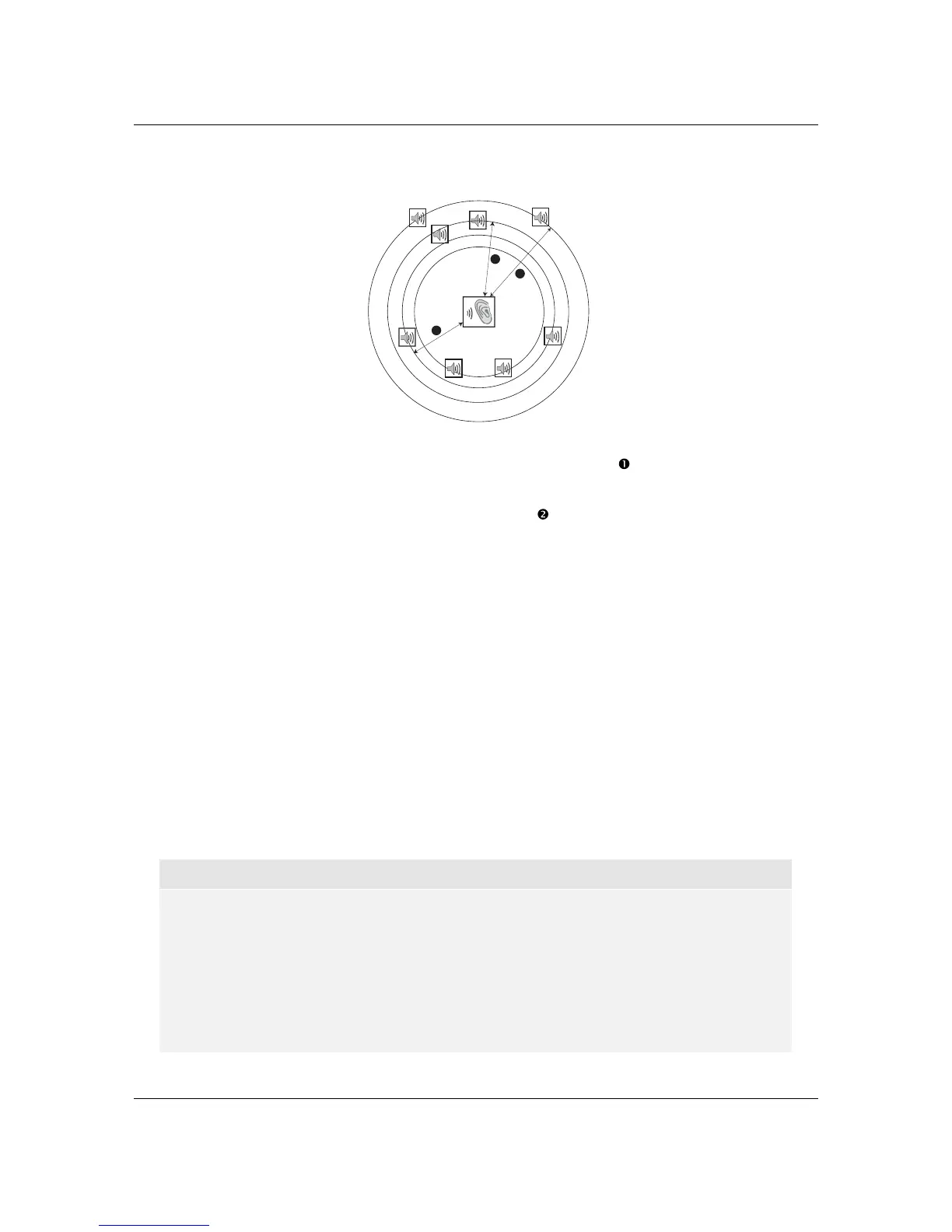
A typical 7.1-channel speaker layout and their speaker distance measurements are displayed as
below:
FL
FR
C
SW
SL
SR
SBL SBR
Speaker Icons:
FL - Front Left
FR - Front Right
C - Centre
SW - Subwoofer
SL - Surround Left
SR - Surround Right
SBL - Surround Back Left
SBR - Surround Back Right
1
2
3
Distances:
1 - Listener to Front
2 - Listener to Centre
3 - Listener to Surround Left
In the above diagram, measure the distance (in feet) from the primary listening position to the Front
Left or Front Right Speaker. Enter the distance of the Front Speakers (
in the above picture) into
the Speaker Configuration menu.
Next, measure the distance (in feet) from centre speaker (
) to the listening position. Move the
cursor to highlight the Centre speaker in the Channel Delay setup page, and enter the distance (as
close as possible) in feet. Repeat for each speaker in the system (Centre, Surround Left, Surround
Right, Surround Back Left, Surround Back Right and Subwoofer) as available. The player will insert
appropriate delay to make sure sound waves from different speakers arrive at the listener at the
same time.
It is possible to independently set distances for each speaker. Speaker distances can be set to the
actual spatial distance
of the speakers.
If the channel delay settings cannot match your speaker configuration, please set all distances to the
same and use your receiver/amplifier to set the channel delay.
3. Trim: The speaker trim level parameters sets the volume of each individual channel. Channel trim
is generally not required since most A/V receivers have the capability to adjust channel trim and
compensate for speaker sensitivity differences. However, if your receiver does not have such
functions (many receivers do not support ch
annel trim for their multi-channel analogue inputs), you
may adjust channel trim through the player. For most accurate results, it is recommended that you
use test tones from a calibration disc, such as Digital Video Essentials HD Basics , and a SPL
(Sound Pressure Level) meter. The trim level can be set to +/- 10dB in 0.5dB increments.
NOTE
x Increasing the Trim Level above 0dB may result in distortion if the original audio level is
already high. When this occurs the waveform becomes clipped and audible distortion can
be heard. In this situation, it is necessary to reduce the Trim Level until the distortion is
removed. When using the Trim Level for speakers, it is recommended that you set the
least sensitive speaker’s Trim Level to 0dB, and set other speakers’ Trim Level to
negative values.
x The Test Tone can be used in conjunction with the player’s trim control. Each speaker
can be set to independent trim levels and there is no linked pair limitation.



 To Next Page