EX540/EX542/EX612/EX615/EX762/EX540I/EX542I/ES523ST/EW533ST
Condential 2-10
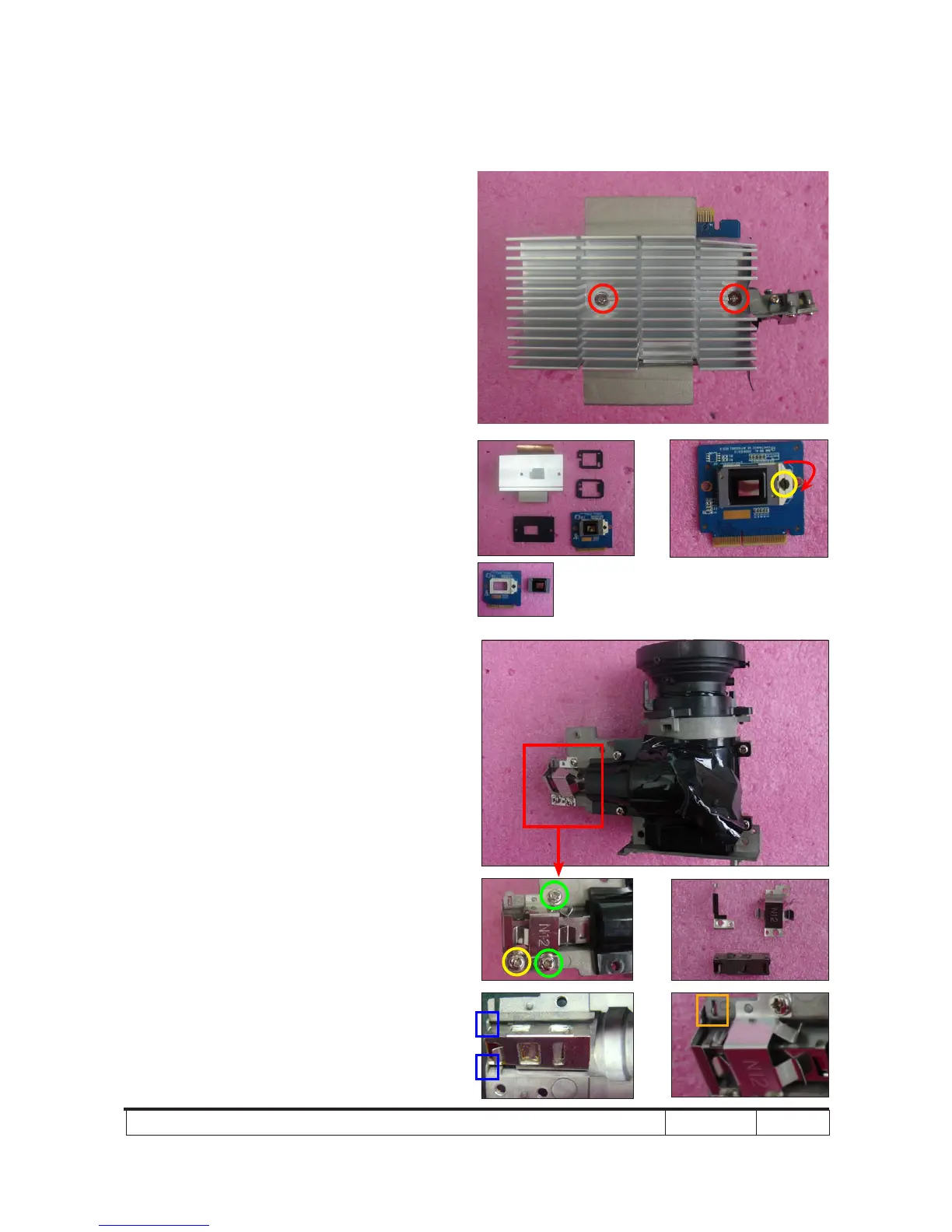
2-12 Disassemble DMD Chip
and DMD Board
1. Unscrew 2 screws (as red circle) to
disassemble the Heat Sink and DMD
Module.
2. Rotate the screw (as yellow circle)
clockwise to disassemble the DMD
Board and DMD Chip.
Note: - Avoid touching the DMD Chip when you
disassemble it.
- Found that the DMD Chip has scrapes
or dirt use of a magnifying glass, you
may use an electrostatic ion gun to
clean it.
- Pay attention to the xed position when
assembling the DMD Chip.
2-13 Disassemble Rod
Module
1. Unscrew 2 screws (as green circle) to
take off the Rod Spring.
2. Unscrew 1 screw (as yellow circle) to
take off the Rod Cover.
3. Remove the Rod.
Note: - Avoid touching the Rod when you
disassemble or assemble it.
- Please notice the Rod Module’s direction
when you assemble it (as picture A shown).
- Ensure left edge of Rod Module contact
with the Engine base’s blocks.
- Rod Spring must hook in the position as
picture B shown.
Rod cover
Rod spring
Rod
A
B



 To Next Page