EX540/EX542/EX612/EX615/EX762/EX540I/EX542I/ES523ST/EW533ST
Condential
5-4
5-1-3 Setup Procedure
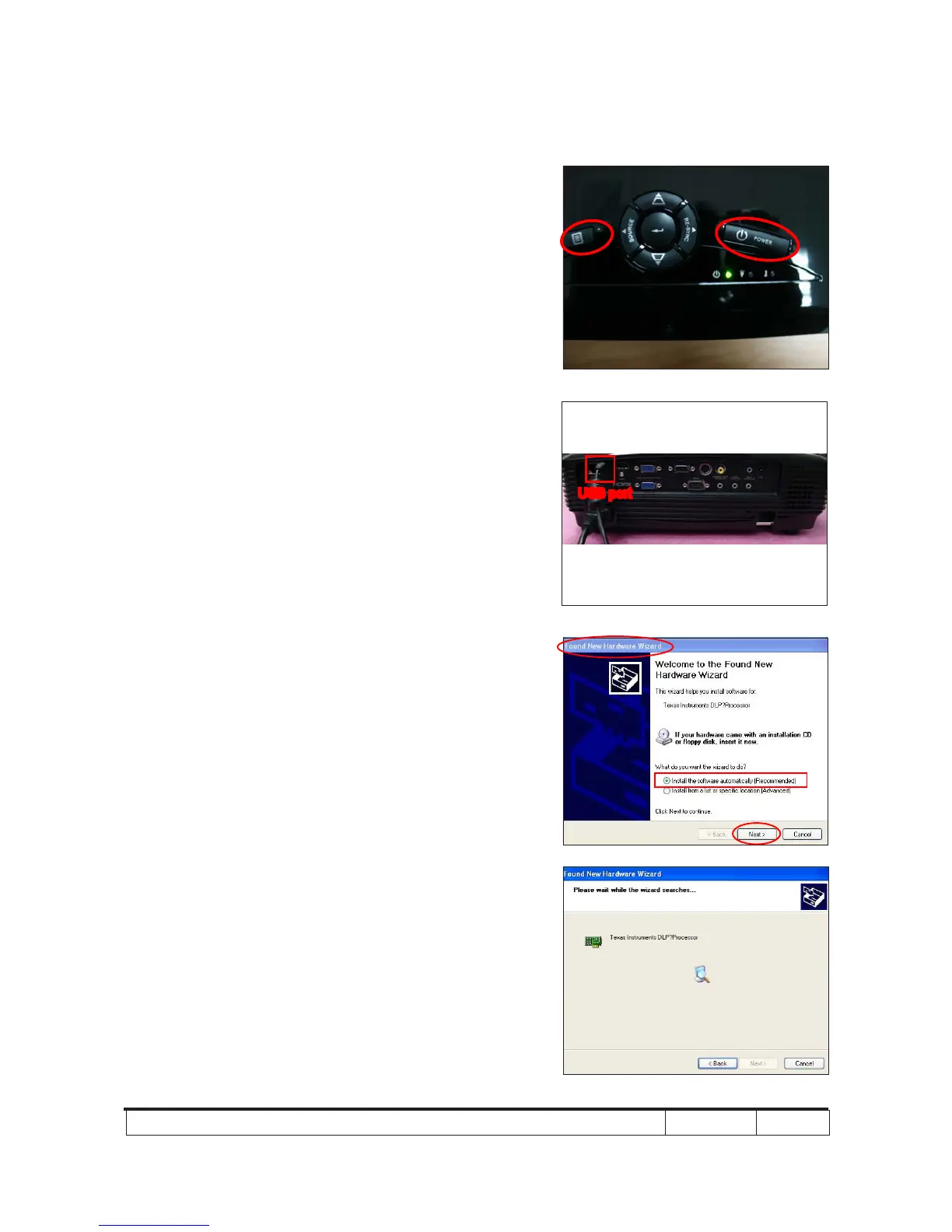
1. Set up
- Hold on "MENU" and "POWER" buttons
and plug in the power cord.
- The ON/STANDBY LED will be ashing
green.
- Release "MENU" and "POWER" buttons.
- Connect projector with USB cable.
Note: - The system fan and the lamp will not
operate.
5-1-4 USB Driver Upgrade
Procedure
1. Execute Program
(1) Connect projector with PC by USB
cable.
(2) "Found New Hardware Wiszard" picture
will appear on the screen.
(3) Select "Install the software automatically
(Recommended)".
(4) Click "Next".
(5) Searching picture, please wait for
several seconds.
(3)
(4)
(2)
USB port



 To Next Page