Home
Optoma
Projector
EX765
Page 13
Optoma EX765 - Page 13
115 pages
Manual
Save Page as PDF
To Next Page
To Next Page
To Previous Page
To Previous Page
Loading...
EX765/EW766/EX765W/EW766W
Condential
2-4
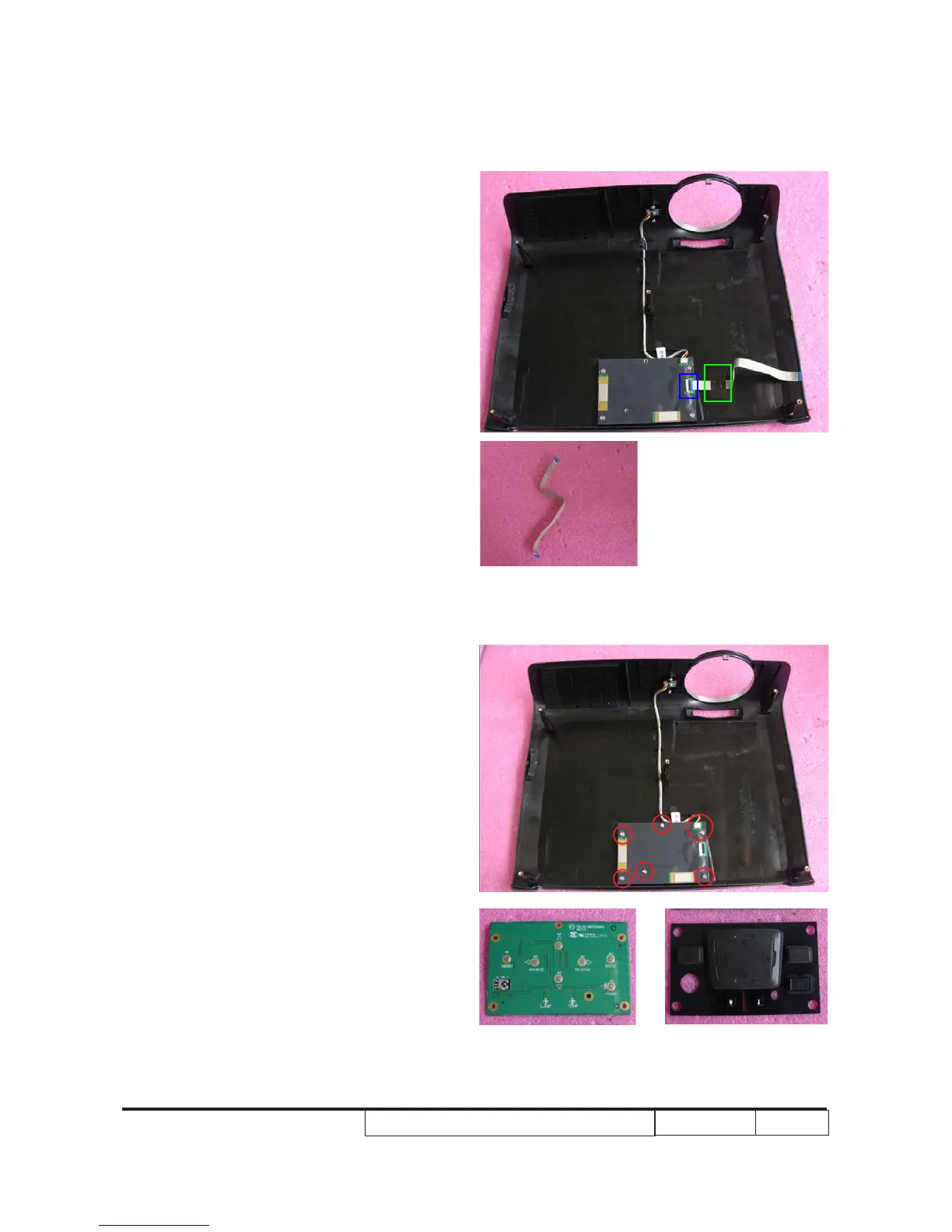
5. Unscrew 6 screws and unplug 1
connector (as red circle) to remove
keypad board and keypad button.
4. T
ear off 1 gummed tape (as green square)
and unplug 1 connector (as blue
square) to remove FPC cable.
12
14
Table of Contents
Main Page
Default Chapter
1
Service Manual
1
Table of Contents
4
Chapter 1 Introduction
7
Highlight
7
Compatibility Modes
9
Chapter 2 Disassembly Process
10
Equipment Needed & Product Overview
10
Disassemble Lamp Cover & Lamp Module
11
Disassemble Top Cover Module
12
Disassemble Back Cover Module
15
Disassemble Main Board Module
16
Disassemble LAN Board Module(Only for EX765/EW766)
19
Disassemble Wireless Module(Only for EX765W/EW766W)
22
Disassemble Lamp Driver Module
24
Disassemble Fan Module
27
Disassemble Engine Module
28
Disassemble Blower Module
34
Disassemble LVPS Module
34
Disassemble Bottom Cover Module
36
Rod Adjustment
38
Re-Write Lamp Usage Hours
39
Chapter 3 Troubleshooting
40
LED Lighting Message
40
Main Procedure
41
Chapter 4 Function Test & Alignment Procedure
45
Test Equipment Needed
45
Service Mode
45
OSD Reset
45
Test Condition
46
Defect Specification Table
47
Test Inspection Procedure
48
PC Mode
49
Video Performance
53
Optical Performance Measure
55
Network Function Test
58
Wireless Function Test (Only for EX765W & EW766W)
61
Chapter 5 Firmware Upgrade
65
Section 1: Firmware Upgrade Procedure
65
Equipment Needed
65
DLP Composer Lite Setup Procedure
66
USB Driver Upgrade Procedure
68
Firmware Upgrade Procedure
69
Section 2: 8051 Firmware Upgrade Procedure
72
Equipment Needed
72
NLINK Setup Procedure
73
Install Manley USB Driver
75
8051 Firmware Upgrade Procedure
77
Section 3: Network Firmware Upgrade Procedure
79
Read Projector IP
80
Network Setting
81
Network FW Upgrade Procedure
82
Section 4: Wireless Firmware Upgrade Procedure (Only for EX765W/EW766W)
84
Equipment Needed
84
Wireless FW Upgrade Procedure
85
Edid Upgrade
88
Edid Introduction
88
Other manuals for Optoma EX765
Brochure & Specs
4 pages
Related product manuals
Optoma EX762
98 pages
Optoma EX765W
99 pages
Optoma EX785
133 pages
Optoma EX779
115 pages
Optoma EX784
4 pages
Optoma EX550
48 pages
Optoma EX330
50 pages
Optoma EX612
56 pages
Optoma EX530
63 pages
Optoma EX631
48 pages
Optoma EX531p
4 pages
Optoma EX330e
4 pages



 To Next Page