5. Connection
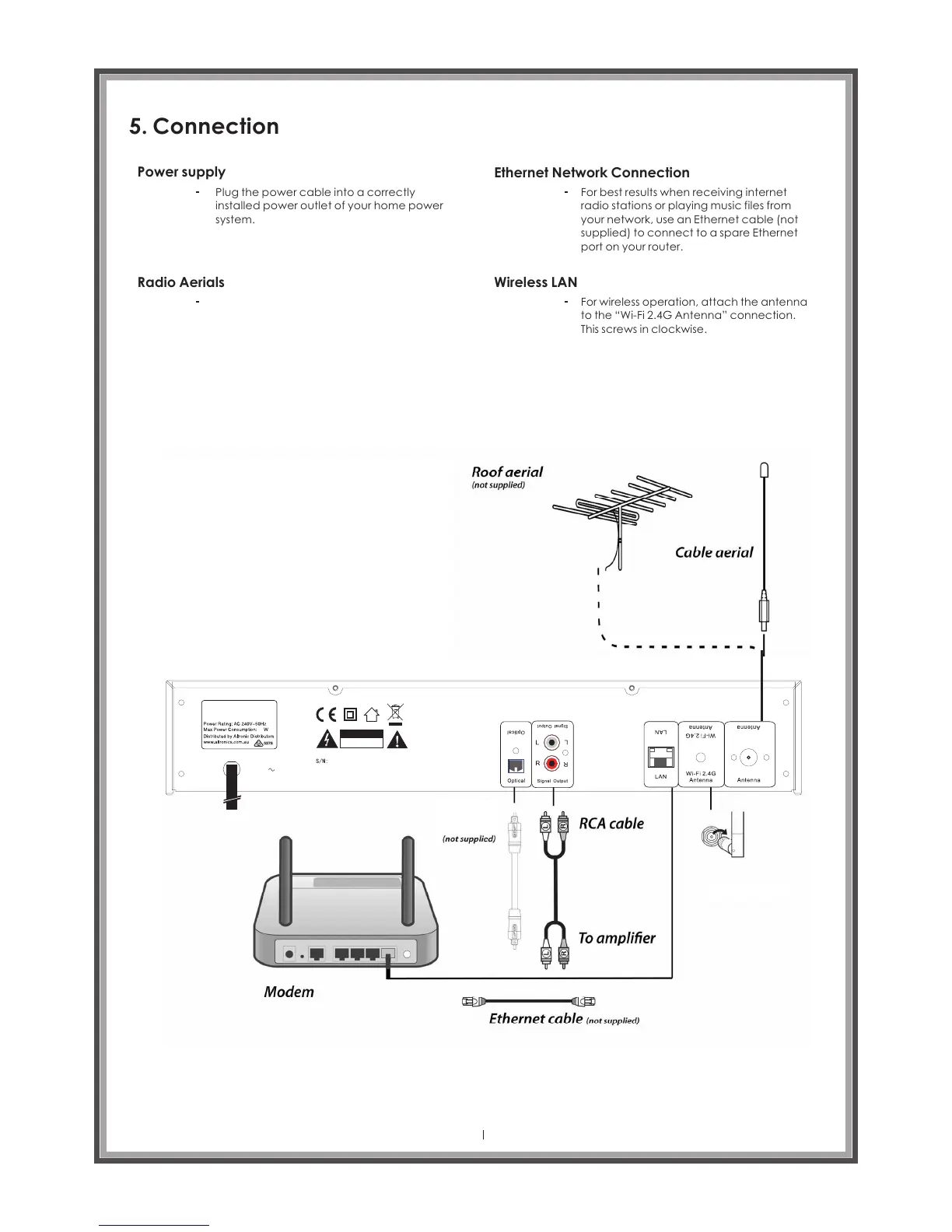
Power supply
Plug the power cable into a correctly
installed power outlet of your home power
system.
Radio Aerials
Ethernet Network Connection
For best results when receiving internet
radio stations or playing music files from
your network, use an Ethernet cable (not
supplied) to connect to a spare Ethernet
port on your router.
Wireless LAN
For wireless operation, attach the antenna
to the “Wi-Fi 2.4G Antenna” connection.
This screws in clockwise.
Page 12
AC240V
A 269 6
Digital (DAB+)
Internet FM Tuner
12
RISK OF ELECTRIC
SHOCK DO NOT OPEN
C A U T IO N
DAB/FM
DAB/FM
Optical
cable
Wi-fi aerial
In order to receive DAB or FM radio
broadcasts it is necessary to connect
the supplied wire aerial to the screw
socket marked DAB/FM Antenna.
Alternatively, if you have an external aerial,
you can connect a suitable cable from the
socket marked DAB/FM Antenna to a wall
socket that connects to the roof aerial.



 To Next Page